7 Remote Control Adjustments
1
Important Remote Control Adjustments
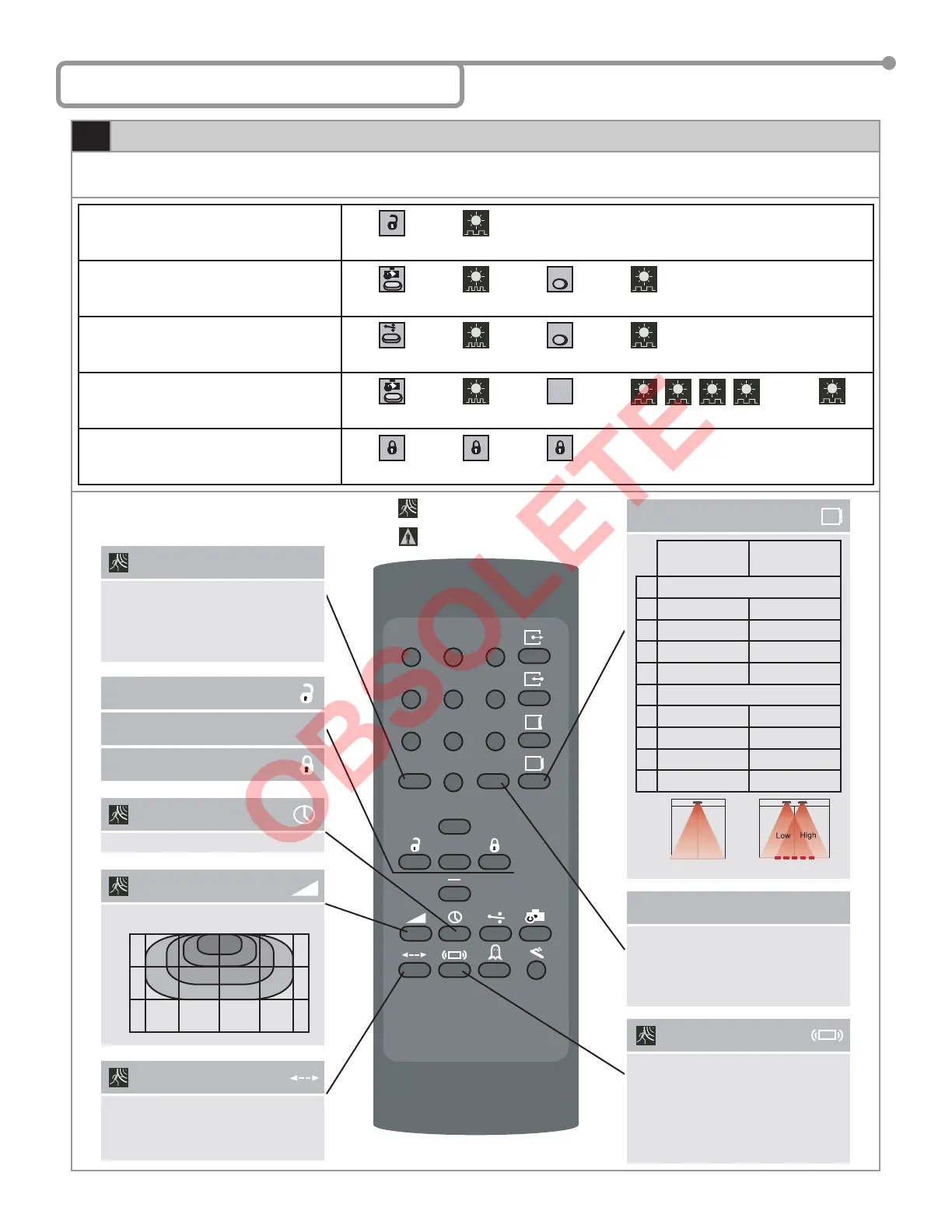
Every programming session begins by unlocking the sensor. Thereafter a program setting may be altered by pressing the desired function key
followed by the desired value for that function. When all programming is complete press the lock key twice to retain settings. Use the following
as a guide:
Unlock the sensor to enter into adjustment
session (if no access code has been entered)
To change the value of a parameter
(ex. Maximum duration of presence
detection)
… to change any other parameters
(ex. Output Confi guration)
To check the value of a parameter
(ex. maximum duration of presence
detection)
Lock the adjustment session and go back to
normal function
Press Unlock Key
RED LED
Flashes Slowly
Select Parameter
to Change
RED LED
Flashes Quickly
Enter New Value
RED LED
Flashes Slowly
Select Parameter
to Change
RED LED
Flashes Quickly
Enter New Value
RED LED
Flashes Slowly
Select Parameter
to Check
RED LED
Flashes Quickly
Press Question
Mark
The Number of Green Flashes Indicate
the Value of This Parameter
RED LED
Flashes Slowly
Press Lock Key Twice
OR + Lock Code
0-9
0-9
1
4
7
F1 F2
5
8
0
+
?
3
6
9
2
Relay Hold Time
0 (0.5s) → 9 (9s)
Sensitivity
0 (min) → 9 (max) default = 7
0
3
6
9
0 3.2’ 6.4’3.2’6.4’
0
3.2’
6.4’
9.6’
Microwave Detection
Mode
1: Bidirectional Mode
2: Unidirectional Mode
3: Unidirectional Mode with MTF
4: Unidirectional - Reverse Mode
Safety Output
Redirection
0: No Redirection
1: Transfer Presence Detection To
Activation Output (All Relay Output)
2: Activation Output Only Upon Motion
and Presence Detection
F1
Door Control
1: Normal (LED in Normal Mode)
2: Door Permanently Open
(Red LED On)
2: Door Permanently Closed
(Red LED Off)
F2
Unlock
Check Value
?
Lock
Microwave
Immunity
1: Reduced
2: Normal
3: Increased
4: through 9: Higher number equals
higher immunity level.
See Important Notes Page 6
Radar Motion Detection
IR Presence Detection
75.5122.05 20070427 Page 5 of 13
Installation
Confi guration
Mounting
Height
Pulse
Frequency
Single Unit
1 Low Low
2 High Low
3 Low High
4 High High
Overlapping Units
5 Low Low
6 High Low
7 Low High
8 High High
See Important Notes Page 6



 To Next Page