Calibration and Adjustment Instructions for MC5 Multifunction Calibrator For Main Firmware Version 1.90
Page 13/16
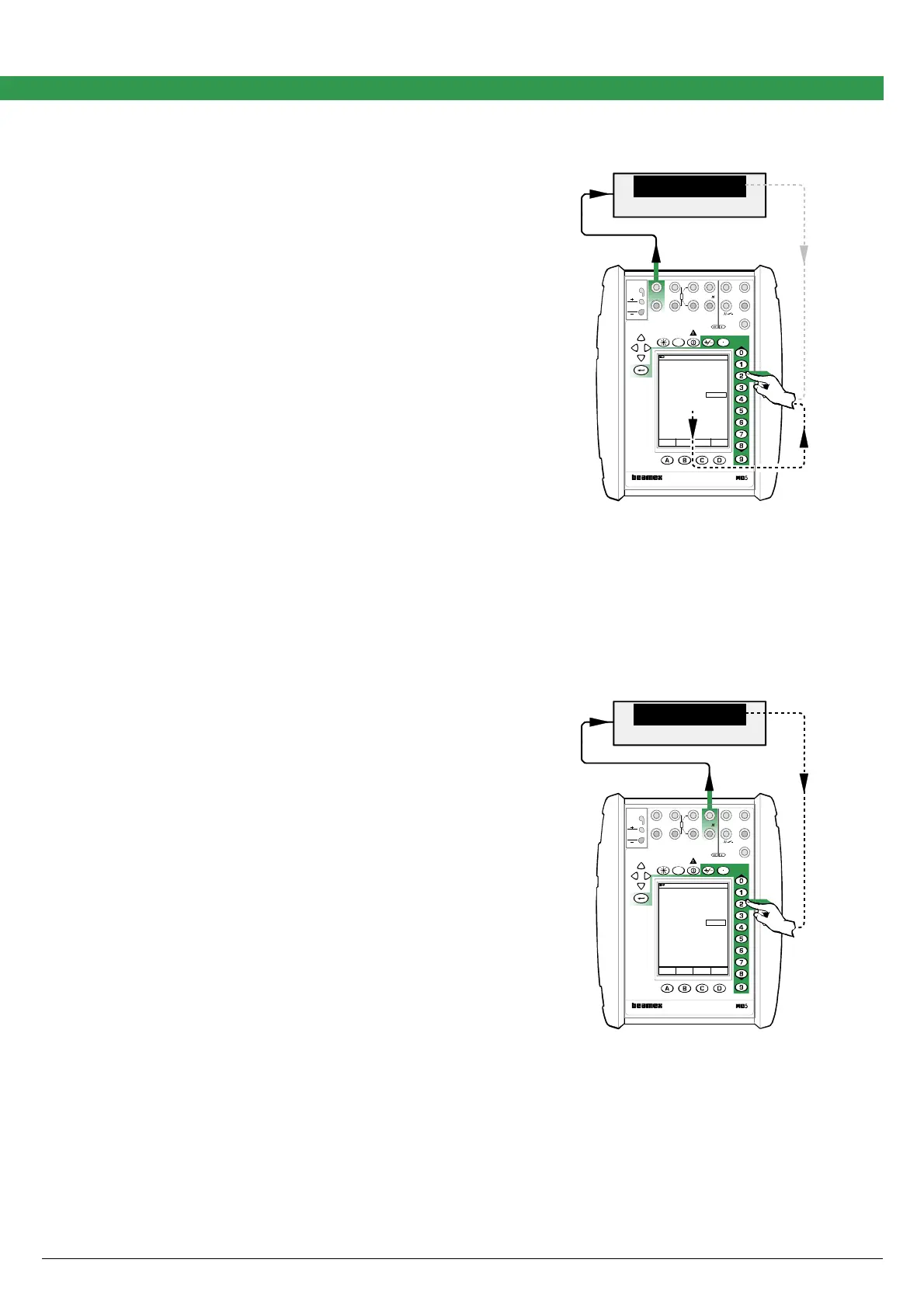
Adjusting the Low Voltage Generation in ET Module (±500 mV)
Quantity: Voltage
Function/Port: ET: Low V. Sensor Sim.
The lowermost measurement value in the low voltage
generation window is the calibrator’s own feedback
measurement of the generated voltage. It is accurate
enough for trimming the generated value. The Digital
Multimeter connected to the loop is optional.
Adjustment point ranges, mV
Low: 0
High: 400 … 500
Move the field indicator to the uppermost field and enter
zero as the low adjustment point. Enter the voltage seen
on the Digital Multimeter’s display to Span Reference
Value field in the calibrator. Then generate a voltage that
is inside the high adjustment point range and enter the
correct value for that point too. Repeat the low and high
adjustments until the voltage generation is accurate
enough.
When ready, select either another Quantity and Func-
tion/Port combination or save the adjustment result as
described in chapter Saving Adjustment Data on page
16.
DMM
mV
449.91195
17.10.2002 9:49
Voltage
ET: Low V. Sensor Sim.
mV450.000
Measurement mV
Span Reference Value 449.912
449.912
Field MENU
Calibration
Mode
DMM
Field MENU
MENU
MULTIFUNCTION CALIBRATOR
T/C, Low V
4-w meas
R, RTD
3 & 4-w meas
V, I,
+24V
I
meas/sink
Low V
HART
®
T/C INT. RJ
T/C OR EXT
WIRES ONLY
2-w xmtr
V, ,
?
MEASURE
OUTPUTSENSOR MEASURE & SIMULATE
ET E
Max input:
60 VDC/30 VAC
Adjusting the Frequency Generation in ET Module (2.7 mHz … 50 kHz)
Quantity: Frequency
Function/Port: ET: Frequency Gen.
Connect an accurate Digital Multimeter to the calibra-
tor’s terminals highlighted in the adjacent picture.
Adjustment point range, Hz
1000 … 50000
Move the field indicator to the uppermost field and enter
a value inside the adjustment point range. Enter the re-
sistance seen on the Digital Multimeter’s display to Span
Reference Value field in the calibrator.
When ready, select either another Quantity and Func-
tion/Port combination or save the adjustment result as
described in chapter Saving Adjustment Data on page
16.
DMM
Hz
45 000.000
17.10.2002 10:32
Frequency
ET: Frequency Gen.
pos. square
Hz45000. 0
Amplitude [Vpp] 5.00
Span Reference Value 45000.000
Field MENU
Calibration
Mode
MULTIFUNCTION CALIBRATOR
T/C, Low V
4-w meas
R, RTD
3 & 4-w meas
V, I,
+24V
I
meas/sink
Low V
HART
®
T/C INT. RJ
T/C OR EXT
WIRES ONLY
2-w xmtr
V, ,
?
MEASURE
OUTPUTSENSOR MEASURE & SIMULATE
ET E
Max input:
60 VDC/30 VAC
Note.
The default Amplitude is 5 V
pp
. Change it to a more suitable level, if needed.



 To Next Page