Beijer Electronics Frequency Inverter BFI-H3 KI00363D 2021-07
www.beijerelectronics.com 16 (32)
5.6 Fieldbus control settings
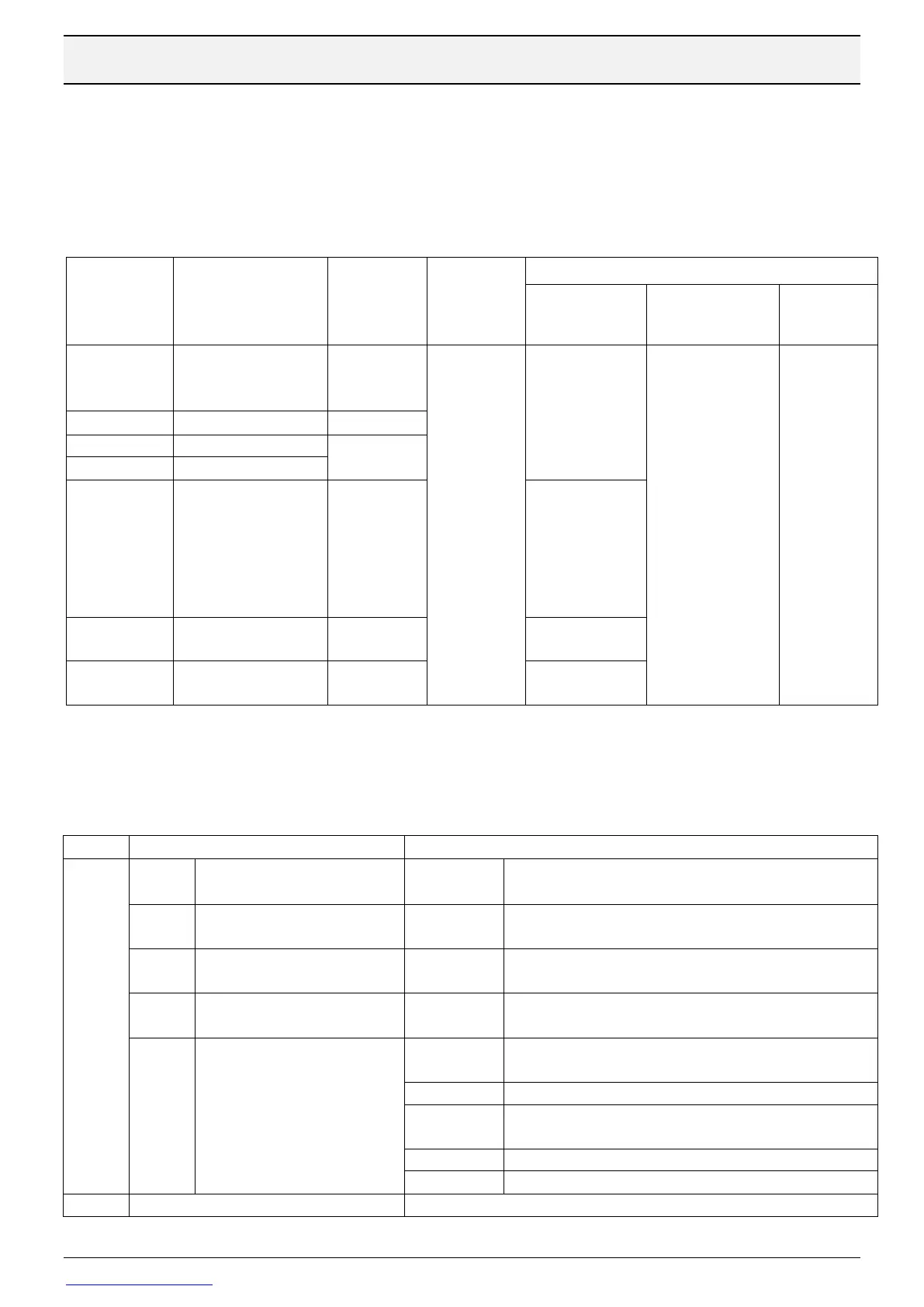
The drive can be controlled by fieldbus or Ethernet. Following settings must be done:
P1-12=4, Start/stop/frequency setpoint command by bus
P1-14=201, make access to parameters in group 5 mentioned below
Terminal 2 must be connected to 24 V and safety inputs(STO+/STO-) correctly connected.
Fieldbus
ramp
action P5-
07
GSDML-V2.25-HMS-
ABCC-PRT2P-
201110111.xml
0: Ramp
time by
parameter
1: Ramp
time sent by
serial,
fieldbus or
Ethernet
Drive behaviour if
a communication
command is not
received within
time specified in
this parameter.
Type of reaction
decided in P5-06.
0: Trip
1: Ramp to
stop and
trip
2: Ramp to
stop and
no trip
3: Preset
speed 8
(P2-08)
Set manually
by PC-program
Ver1, Remote device
station, Exclusive
station 2
P5-03:
9,6= 156 kbs
19,2= 625 kbs
38,4= 2,5 Mbs
57,6= 5 Mbs
115= 10 Mbs
Contact Beijer support
for latest version
5.7 Fieldbus communication protocol
Cyclic data for all bus types consist of four 16-bit word input and output. Word 1 and 2 has
the following meaning:
0: Stop
1: Startsignal on
0: Deceleration time in P1-04
1: Deceleration time in P2-25
0: Drive Healthy
1: Drive tripped
0: No function
1: Alarm reset
0: Auto Mode
1: Hand mode
0: No function
1: Coasting stop
0: Safe Torque inputs activated
1: Safe Torque inputs deactivated
0: Maintenance not required
1: Maintenance required
1: In Standby or Sleep mode
1: BFI Ready to run. Software enable, power on, AUTO
mode, STO ok and no active alarm.
1: Low or High Load detected
Actual output frequency [0,1 Hz]



 To Next Page