Beijer Electronics Frequency Inverter BFI-H3 KI00363D 2021-07
www.beijerelectronics.com 22 (32)
5.14 BFI-Smartstick
Communication between BFI Drive and PC-software BFI-Tools or app BFI-Tools Mobile is
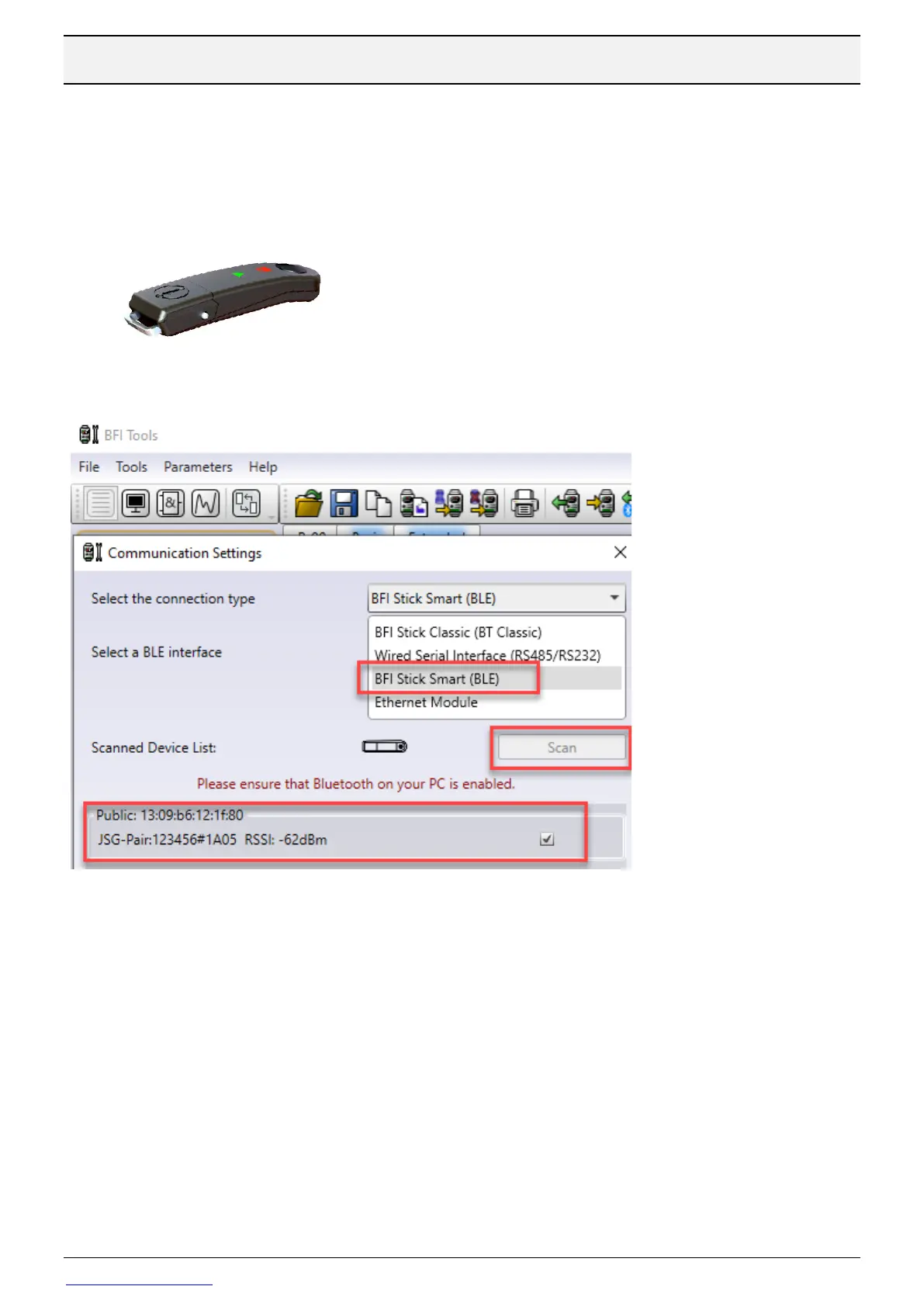
done by Bluetooth through BFI-Smartstick. Bluetooth is not built into BFI but in BFI-
Smartstick, see picture below. BFI-Smartstick is connected to BFI through it’s RJ45
connector. BFI-Smartstick also has a memory for parameter settings that can be read or
written by it’s buttons.
Choose BFI Stick Smart (BLE) in Communication Settings.
Push Scan and when BFI-Smartstick is found, push Connect.
P-14 must be set to 201 to access all parameters in the drive.
Cable CAB115 can also be used, USB connection to PC and RJ45 to BFI. CAB115 is a 3-
meter cable with one USB connector for PC and a RJ-45 connector intended for BFI
Choose ”Wired Serial Interface(RS485/RS232)” in picture above.



 To Next Page