10 / 56 EN
Remote Control / User Manual
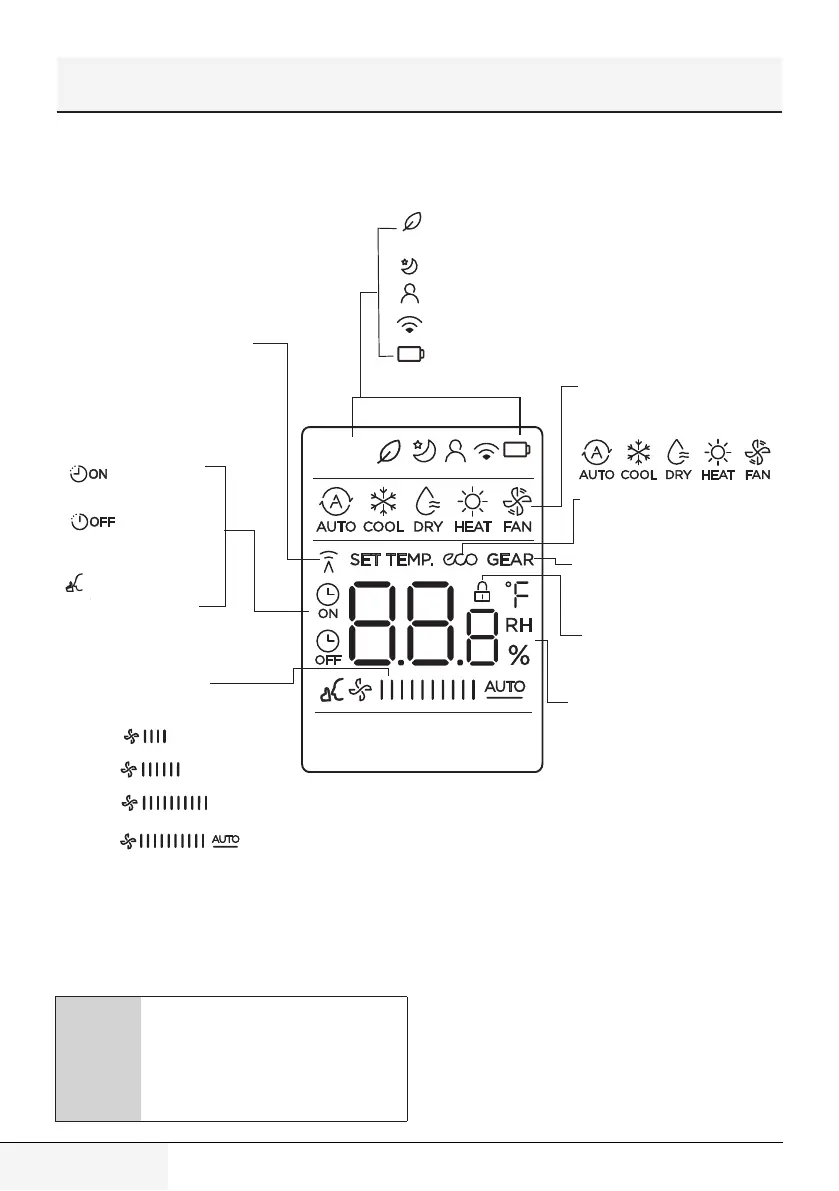
4 Remote screen indicators
Information are displayed when the remote
controller is power up.
Transmission Indicator
MODE display
TIMER ON display
FAN SPEED display
TIMER OFF display
Silence feature
display
ECO display
GEAR display
LOCK display
Temperature/Timer/Fan speed
display
Sleep mode display
feature display
Wireless control feature display
Low battery detection display(If flashes)
Displays when LOCK feature
is activated.
Lights up when r emote
sends signal to indoor
unit
Displays the current mode,
including:
Displays when ECO
feature is activated
Displays when GEAR
feature is activated
Displays the set temperature
by default, or fan speed or
timer setting when using
TIMER ON/OFF functions.
Temperature range:
o
o
o
17-30 C / /62-86 F
T imer setting range:
0-24 hours
This display is blank when
operating in FAN mode.
(20-28 C)
(some units)
LOW
MED
HIGH
AUTO
Displays selected fan speed:
This fan speed can not be
adjusted in AUTO or DRY
mode.
Fresh feature display(some units)
(No displays when Fresh feature is activated)
Zone Follow
(Not available)
This fan speed can not be
adjusted in AUTO or DRY
mode.
Transmission Indicator
Lights up when remote
sends signal to indoor unit
TIMER ON display
TIMER OFF display
Silence feature
display
FAN SPEED display
Displays selected fan speed:
LOW
MED
AUTO
Fresh feature display (some units)
(No displays when Fresh feature is activated)
Sleep mode display
ZoneFollow feature display
Wireless control feature display
Low battery detection display (lf flashes)
MODE display
Displays the current mode,
including:
Temperature/Timer/Fan speed
display
Displays the set temperature by
default, or fan speed or timer
setting when using TIMER ON/OFF
functions.
• Temperature range:
17-30°C/62-86°F/(20-28°C)
(some units)
• Timer setting range: 0-24 hours
This display is blank when
operating in FAN mode.
ECO display
Not available for this unit.
GEAR display (Not available)
Displays when GEAR feature is
activated
LOCK display
Displays when LOCK feature is
activated.
HIGH
C
All indicators shown in the figure are
for the purpose of clear presentation.
But during the actual operation, only
the relative function signs are shown
on the display window.


 To Next Page