71 / 172 IT
Condizionatore d’aria di tipo split / Manuale utente
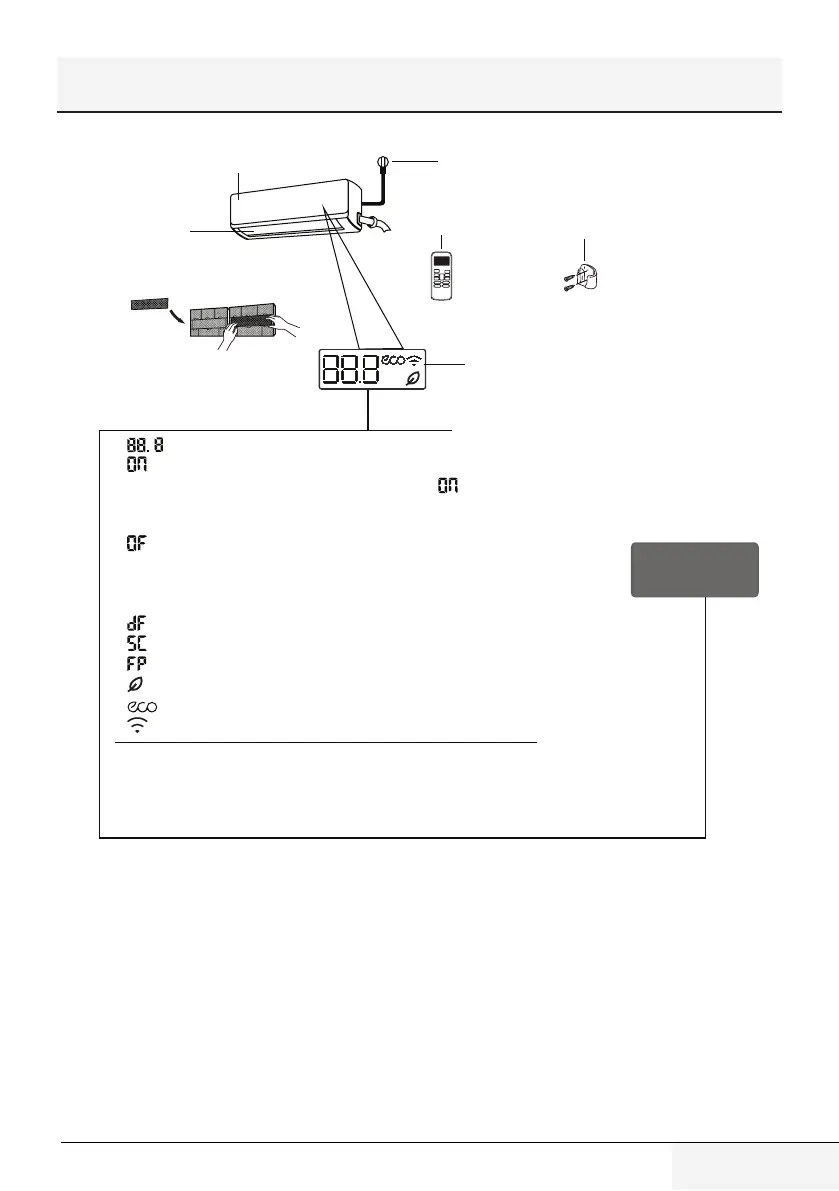
Display Code
Meanings
(E)
“ ”
Power Cable (Some Units
)
Remote Control
Remote Control
Holder (Some Units)
Functional Filter
(On Back of Main Filter - Some Units)
Louver
Front Panel
Display window
Display window
The unit has a build-in light sensor to
detect the ambient brightness. When the
light is turned off, the display will be off
after 7 seconds, saving energy and offering
you a comfortable sleep.
“ ” for 3 seconds when:
• TIMER ON is set
(if the unit is OFF, remains on when TIMER ON is set )
• FRESH, SWING, TURBO, or SILENCE features is turned on
“ ” for 3 seconds when:
• TIMER OFF is set
• FRESH, SWING, TURBO, or SILENCE features is turned off
“ ” when defrosting(for cooling & heating units)
“ ” when unit is self-cleaning(some units)
“ ” when fresh feature is turned on(some units)
“ ” when ECO feature is activated(some units)
“ ” when wireless control feature is activated(some units)
In Fan mode, the unit will display the room temperature.
In other modes, the unit will display your temperature setting.
“ ” Displays temperature, operation feature and Error codes:
Press the LED button on the remote control will turn off the display screen, press the LED
button again during 15 seconds will display the room temperature, if press it again after
15 seconds, it will turn on the display screen.
“ ” when 8°C(46°F) or 12°C(54°F) heating mode is turned
on(some units)
Significato dei
codici del display
Pannello anteriore
Cavo di alimentazione (solo alcune unità)
Deflettore
Filtro operativo
(sul retro del filtro principale, su alcuni modelli)
Telecomando
Portatelecomando
(solo alcune unità)
Display
Display
L’unità è dotata di un sensore in grado
di rilevare la luminosità dell’ambiente.
Quando viene spenta la luce, il display si
spegne dopo 7 secondi, consentendo di
risparmiare energia e di dormire in modo
più confortevole.
“
Display Code
Meanings
(E)
“ ”
Power Cable (Some Units
)
Remote Control
Remote Control
Holder (Some Units)
Functional Filter
(On Back of Main Filter - Some Units)
Louver
Front Panel
Display window
Display window
The unit has a build-in light sensor to
detect the ambient brightness. When the
light is turned off, the display will be off
after 7 seconds, saving energy and offering
you a comfortable sleep.
“ ” for 3 seconds when:
• TIMER ON is set
(if the unit is OFF, remains on when TIMER ON is set )
• FRESH, SWING, TURBO, or SILENCE features is turned on
“ ” for 3 seconds when:
• TIMER OFF is set
• FRESH, SWING, TURBO, or SILENCE features is turned off
“ ” when defrosting(for cooling & heating units)
“ ” when unit is self-cleaning(some units)
“ ” when fresh feature is turned on(some units)
“ ” when ECO feature is activated(some units)
“ ” when wireless control feature is activated(some units)
In Fan mode, the unit will display the room temperature.
In other modes, the unit will display your temperature setting.
“ ” Displays temperature, operation feature and Error codes:
Press the LED button on the remote control will turn off the display screen, press the LED
button again during 15 seconds will display the room temperature, if press it again after
15 seconds, it will turn on the display screen.
“ ” when 8°C(46°F) or 12°C(54°F) heating mode is turned
on(some units)
” Visualizza la temperatura, la funzione in uso e i codici di errore:
“
Display Code
Meanings
(E)
“ ”
Power Cable (Some Units
)
Remote Control
Remote Control
Holder (Some Units)
Functional Filter
(On Back of Main Filter - Some Units)
Louver
Front Panel
Display window
Display window
The unit has a build-in light sensor to
detect the ambient brightness. When the
light is turned off, the display will be off
after 7 seconds, saving energy and offering
you a comfortable sleep.
“ ” for 3 seconds when:
• TIMER ON is set
(if the unit is OFF, remains on when TIMER ON is set )
• FRESH, SWING, TURBO, or SILENCE features is turned on
“ ” for 3 seconds when:
• TIMER OFF is set
• FRESH, SWING, TURBO, or SILENCE features is turned off
“ ” when defrosting(for cooling & heating units)
“ ” when unit is self-cleaning(some units)
“ ” when fresh feature is turned on(some units)
“ ” when ECO feature is activated(some units)
“ ” when wireless control feature is activated(some units)
In Fan mode, the unit will display the room temperature.
In other modes, the unit will display your temperature setting.
“ ” Displays temperature, operation feature and Error codes:
Press the LED button on the remote control will turn off the display screen, press the LED
button again during 15 seconds will display the room temperature, if press it again after
15 seconds, it will turn on the display screen.
“ ” when 8°C(46°F) or 12°C(54°F) heating mode is turned
on(some units)
” per 3 secondi quando:
• TIMER ON (TIMER ATTIVO) è impostato (se l’unità è spenta, “
Display Code
Meanings
(E)
“ ”
Power Cable (Some Units
)
Remote Control
Remote Control
Holder (Some Units)
Functional Filter
(On Back of Main Filter - Some Units)
Louver
Front Panel
Display window
Display window
The unit has a build-in light sensor to
detect the ambient brightness. When the
light is turned off, the display will be off
after 7 seconds, saving energy and offering
you a comfortable sleep.
“ ” for 3 seconds when:
• TIMER ON is set
(if the unit is OFF, remains on when TIMER ON is set )
• FRESH, SWING, TURBO, or SILENCE features is turned on
“ ” for 3 seconds when:
• TIMER OFF is set
• FRESH, SWING, TURBO, or SILENCE features is turned off
“ ” when defrosting(for cooling & heating units)
“ ” when unit is self-cleaning(some units)
“ ” when fresh feature is turned on(some units)
“ ” when ECO feature is activated(some units)
“ ” when wireless control feature is activated(some units)
In Fan mode, the unit will display the room temperature.
In other modes, the unit will display your temperature setting.
“ ” Displays temperature, operation feature and Error codes:
Press the LED button on the remote control will turn off the display screen, press the LED
button again during 15 seconds will display the room temperature, if press it again after
15 seconds, it will turn on the display screen.
“ ” when 8°C(46°F) or 12°C(54°F) heating mode is turned
on(some units)
” resta sul display quando la
funzione TIMER ON (TIMER ATTIVO) viene impostata)
• Le funzioni FRESH (FRESCO), SWING (OSCILLAZIONE), TURBO o SILENCE (SILENZIOSO) sono attive
“
Display Code
Meanings
(E)
“ ”
Power Cable (Some Units
)
Remote Control
Remote Control
Holder (Some Units)
Functional Filter
(On Back of Main Filter - Some Units)
Louver
Front Panel
Display window
Display window
The unit has a build-in light sensor to
detect the ambient brightness. When the
light is turned off, the display will be off
after 7 seconds, saving energy and offering
you a comfortable sleep.
“ ” for 3 seconds when:
• TIMER ON is set
(if the unit is OFF, remains on when TIMER ON is set )
• FRESH, SWING, TURBO, or SILENCE features is turned on
“ ” for 3 seconds when:
• TIMER OFF is set
• FRESH, SWING, TURBO, or SILENCE features is turned off
“ ” when defrosting(for cooling & heating units)
“ ” when unit is self-cleaning(some units)
“ ” when fresh feature is turned on(some units)
“ ” when ECO feature is activated(some units)
“ ” when wireless control feature is activated(some units)
In Fan mode, the unit will display the room temperature.
In other modes, the unit will display your temperature setting.
“ ” Displays temperature, operation feature and Error codes:
Press the LED button on the remote control will turn off the display screen, press the LED
button again during 15 seconds will display the room temperature, if press it again after
15 seconds, it will turn on the display screen.
“ ” when 8°C(46°F) or 12°C(54°F) heating mode is turned
on(some units)
” per 3 secondi quando:
• viene impostato TIMER OFF (TIMER DI SPEGNIMENTO)
• Le funzioni FRESH (FRESCO), SWING (OSCILLAZIONE), TURBO o SILENCE (SILENZIOSO) sono
disattive
“
Display Code
Meanings
(E)
“ ”
Power Cable (Some Units
)
Remote Control
Remote Control
Holder (Some Units)
Functional Filter
(On Back of Main Filter - Some Units)
Louver
Front Panel
Display window
Display window
The unit has a build-in light sensor to
detect the ambient brightness. When the
light is turned off, the display will be off
after 7 seconds, saving energy and offering
you a comfortable sleep.
“ ” for 3 seconds when:
• TIMER ON is set
(if the unit is OFF, remains on when TIMER ON is set )
• FRESH, SWING, TURBO, or SILENCE features is turned on
“ ” for 3 seconds when:
• TIMER OFF is set
• FRESH, SWING, TURBO, or SILENCE features is turned off
“ ” when defrosting(for cooling & heating units)
“ ” when unit is self-cleaning(some units)
“ ” when fresh feature is turned on(some units)
“ ” when ECO feature is activated(some units)
“ ” when wireless control feature is activated(some units)
In Fan mode, the unit will display the room temperature.
In other modes, the unit will display your temperature setting.
“ ” Displays temperature, operation feature and Error codes:
Press the LED button on the remote control will turn off the display screen, press the LED
button again during 15 seconds will display the room temperature, if press it again after
15 seconds, it will turn on the display screen.
“ ” when 8°C(46°F) or 12°C(54°F) heating mode is turned
on(some units)
” quando la funzione di sbrinamento è attiva (unità con pompa di calore)
“
Display Code
Meanings
(E)
“ ”
Power Cable (Some Units
)
Remote Control
Remote Control
Holder (Some Units)
Functional Filter
(On Back of Main Filter - Some Units)
Louver
Front Panel
Display window
Display window
The unit has a build-in light sensor to
detect the ambient brightness. When the
light is turned off, the display will be off
after 7 seconds, saving energy and offering
you a comfortable sleep.
“ ” for 3 seconds when:
• TIMER ON is set
(if the unit is OFF, remains on when TIMER ON is set )
• FRESH, SWING, TURBO, or SILENCE features is turned on
“ ” for 3 seconds when:
• TIMER OFF is set
• FRESH, SWING, TURBO, or SILENCE features is turned off
“ ” when defrosting(for cooling & heating units)
“ ” when unit is self-cleaning(some units)
“ ” when fresh feature is turned on(some units)
“ ” when ECO feature is activated(some units)
“ ” when wireless control feature is activated(some units)
In Fan mode, the unit will display the room temperature.
In other modes, the unit will display your temperature setting.
“ ” Displays temperature, operation feature and Error codes:
Press the LED button on the remote control will turn off the display screen, press the LED
button again during 15 seconds will display the room temperature, if press it again after
15 seconds, it will turn on the display screen.
“ ” when 8°C(46°F) or 12°C(54°F) heating mode is turned
on(some units)
” quando l'unità esegue l'autopulitura(solo alcuni modelli)
“
Display Code
Meanings
(E)
“ ”
Power Cable (Some Units
)
Remote Control
Remote Control
Holder (Some Units)
Functional Filter
(On Back of Main Filter - Some Units)
Louver
Front Panel
Display window
Display window
The unit has a build-in light sensor to
detect the ambient brightness. When the
light is turned off, the display will be off
after 7 seconds, saving energy and offering
you a comfortable sleep.
“ ” for 3 seconds when:
• TIMER ON is set
(if the unit is OFF, remains on when TIMER ON is set )
• FRESH, SWING, TURBO, or SILENCE features is turned on
“ ” for 3 seconds when:
• TIMER OFF is set
• FRESH, SWING, TURBO, or SILENCE features is turned off
“ ” when defrosting(for cooling & heating units)
“ ” when unit is self-cleaning(some units)
“ ” when fresh feature is turned on(some units)
“ ” when ECO feature is activated(some units)
“ ” when wireless control feature is activated(some units)
In Fan mode, the unit will display the room temperature.
In other modes, the unit will display your temperature setting.
“ ” Displays temperature, operation feature and Error codes:
Press the LED button on the remote control will turn off the display screen, press the LED
button again during 15 seconds will display the room temperature, if press it again after
15 seconds, it will turn on the display screen.
“ ” when 8°C(46°F) or 12°C(54°F) heating mode is turned
on(some units)
” quando la modalità di riscaldamento 8 °C (46 °F) o 12 °C (54 °F) è attiva (solo alcuni modelli)
“
Display Code
Meanings
(E)
“ ”
Power Cable (Some Units
)
Remote Control
Remote Control
Holder (Some Units)
Functional Filter
(On Back of Main Filter - Some Units)
Louver
Front Panel
Display window
Display window
The unit has a build-in light sensor to
detect the ambient brightness. When the
light is turned off, the display will be off
after 7 seconds, saving energy and offering
you a comfortable sleep.
“ ” for 3 seconds when:
• TIMER ON is set
(if the unit is OFF, remains on when TIMER ON is set )
• FRESH, SWING, TURBO, or SILENCE features is turned on
“ ” for 3 seconds when:
• TIMER OFF is set
• FRESH, SWING, TURBO, or SILENCE features is turned off
“ ” when defrosting(for cooling & heating units)
“ ” when unit is self-cleaning(some units)
“ ” when fresh feature is turned on(some units)
“ ” when ECO feature is activated(some units)
“ ” when wireless control feature is activated(some units)
In Fan mode, the unit will display the room temperature.
In other modes, the unit will display your temperature setting.
“ ” Displays temperature, operation feature and Error codes:
Press the LED button on the remote control will turn off the display screen, press the LED
button again during 15 seconds will display the room temperature, if press it again after
15 seconds, it will turn on the display screen.
“ ” when 8°C(46°F) or 12°C(54°F) heating mode is turned
on(some units)
” quando la funzione Fresco è attiva (solo alcune unità)
“
Display Code
Meanings
(E)
“ ”
Power Cable (Some Units
)
Remote Control
Remote Control
Holder (Some Units)
Functional Filter
(On Back of Main Filter - Some Units)
Louver
Front Panel
Display window
Display window
The unit has a build-in light sensor to
detect the ambient brightness. When the
light is turned off, the display will be off
after 7 seconds, saving energy and offering
you a comfortable sleep.
“ ” for 3 seconds when:
• TIMER ON is set
(if the unit is OFF, remains on when TIMER ON is set )
• FRESH, SWING, TURBO, or SILENCE features is turned on
“ ” for 3 seconds when:
• TIMER OFF is set
• FRESH, SWING, TURBO, or SILENCE features is turned off
“ ” when defrosting(for cooling & heating units)
“ ” when unit is self-cleaning(some units)
“ ” when fresh feature is turned on(some units)
“ ” when ECO feature is activated(some units)
“ ” when wireless control feature is activated(some units)
In Fan mode, the unit will display the room temperature.
In other modes, the unit will display your temperature setting.
“ ” Displays temperature, operation feature and Error codes:
Press the LED button on the remote control will turn off the display screen, press the LED
button again during 15 seconds will display the room temperature, if press it again after
15 seconds, it will turn on the display screen.
“ ” when 8°C(46°F) or 12°C(54°F) heating mode is turned
on(some units)
” quando la funzione ECO è attiva (solo alcune unità)
"
Display Code
Meanings
(E)
“ ”
Power Cable (Some Units
)
Remote Control
Remote Control
Holder (Some Units)
Functional Filter
(On Back of Main Filter - Some Units)
Louver
Front Panel
Display window
Display window
The unit has a build-in light sensor to
detect the ambient brightness. When the
light is turned off, the display will be off
after 7 seconds, saving energy and offering
you a comfortable sleep.
“ ” for 3 seconds when:
• TIMER ON is set
(if the unit is OFF, remains on when TIMER ON is set )
• FRESH, SWING, TURBO, or SILENCE features is turned on
“ ” for 3 seconds when:
• TIMER OFF is set
• FRESH, SWING, TURBO, or SILENCE features is turned off
“ ” when defrosting(for cooling & heating units)
“ ” when unit is self-cleaning(some units)
“ ” when fresh feature is turned on(some units)
“ ” when ECO feature is activated(some units)
“ ” when wireless control feature is activated(some units)
In Fan mode, the unit will display the room temperature.
In other modes, the unit will display your temperature setting.
“ ” Displays temperature, operation feature and Error codes:
Press the LED button on the remote control will turn off the display screen, press the LED
button again during 15 seconds will display the room temperature, if press it again after
15 seconds, it will turn on the display screen.
“ ” when 8°C(46°F) or 12°C(54°F) heating mode is turned
on(some units)
" quando la funzione Controllo wireless è attiva (solo alcune unità)
In modalità Ventilatore, l'unità visualizzerà la temperatura dell'ambiente.
Nelle altre modalità, l'unità visualizzerà la temperatura impostata.
Premere il tasto LED sul telecomando per spegnere il display, premerlo nuovamente
per 15 secondi per visualizzare la temperatura dell'ambiente, premerlo una terza
volta per 15 secondi per accendere nuovamente il display.
3.2 Temperatura di
funzionamento
L’uso del condizionatore d’aria al di fuori di
questi intervalli potrebbe attivare alcune funzioni
di sicurezza che causeranno la disattivazione
dell’unità.
3 Specifiche e caratteristiche dell’unità


 To Next Page
 Loading...