14 / 56 EN
Remote Control / User Manual
6 Setting the timer
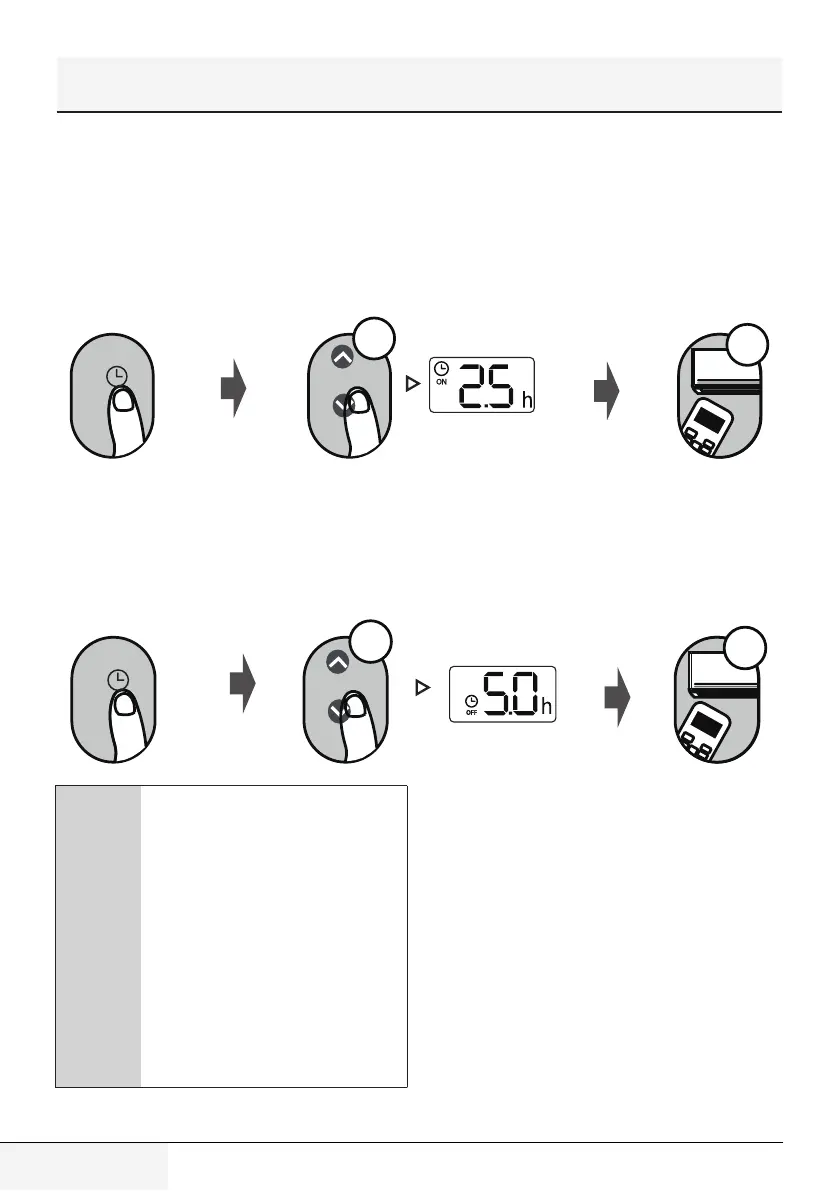
TIMER ON/OFF - Set the amount of time after
which the unit will automatically turn on/off.
6.1 Timer on setting
Press TIMER button to initiate the
ON time sequence.
Press Temp. up or down button for multiple
times to set the desired time to turn on the
unit.
Point remote to unit and wait 1sec,
the TIMER ON will be activated.
TIMER
x5
O N/O F F
M
OD E
F
A N
SH OR T
CU T
TIMER ON
TIMER OF
F
TEM P
S
L
E
EP
1
sec
6.2 Timer off setting
Press TIMER button to initiate the
OFF time sequence.
Press Temp. up or down button for multiple
times to set the desired time to turn off the
unit.
Point remote to unit and wait 1sec,
the TIMER OFF will be activated.
O N/O F F
M
OD E
F
A N
SH OR T
CU T
TIMER ON
TIMER OF
F
TEM P
S
L
E
EP
1
sec
TIMER
x10
C
1. When setting the TIMER ON or
TIMER OFF, the time will increase
by 30 minutes increments with
each press, up to 10 hours. After
10 hours and up to 24, it will
increase in 1 hour increments.
(For example, press 5 times to get
2.5h, and press 10 times to get
5h,) The timer will revert to 0.0
after 24.
2. Cancel either function by setting
its timer to 0.0h.


 To Next Page