System Overview
| 30 |
© Honeywell International Inc. Do not copy without express permission of Honeywell.
KFC 230 AeroCruze Autopilot Pilot's Guide
89000019-001
Rev 2 May 2019
When in Altitude Hold mode, each pressing of the UP/DN soft
buttons (5) on the autopilot panel adjusts the reference altitude
by 20 feet, or at the rate of approximately 500 feet per minute
when held continuously, acquiring a new reference altitude
when the button is released.
When active, ALT HOLD mode is annunciated on the autopilot
touchscreen by a green active indicator box, green text,
and a green border. When ALT HOLD mode is inactive but
available, ALT HOLD is annunciated on the touchscreen by
white text and a white border.
NOTE: When the altimeter baro correction is adjusted, the
autopilot automatically adjusts the internal reference
such that the new altitude will be re-captured.
e. Heading Select (HDG) Mode
In Heading Select mode, the autopilot performs a bank
maneuver, turning the airplane to the selected heading
commanded from the heading bug on the HSI.
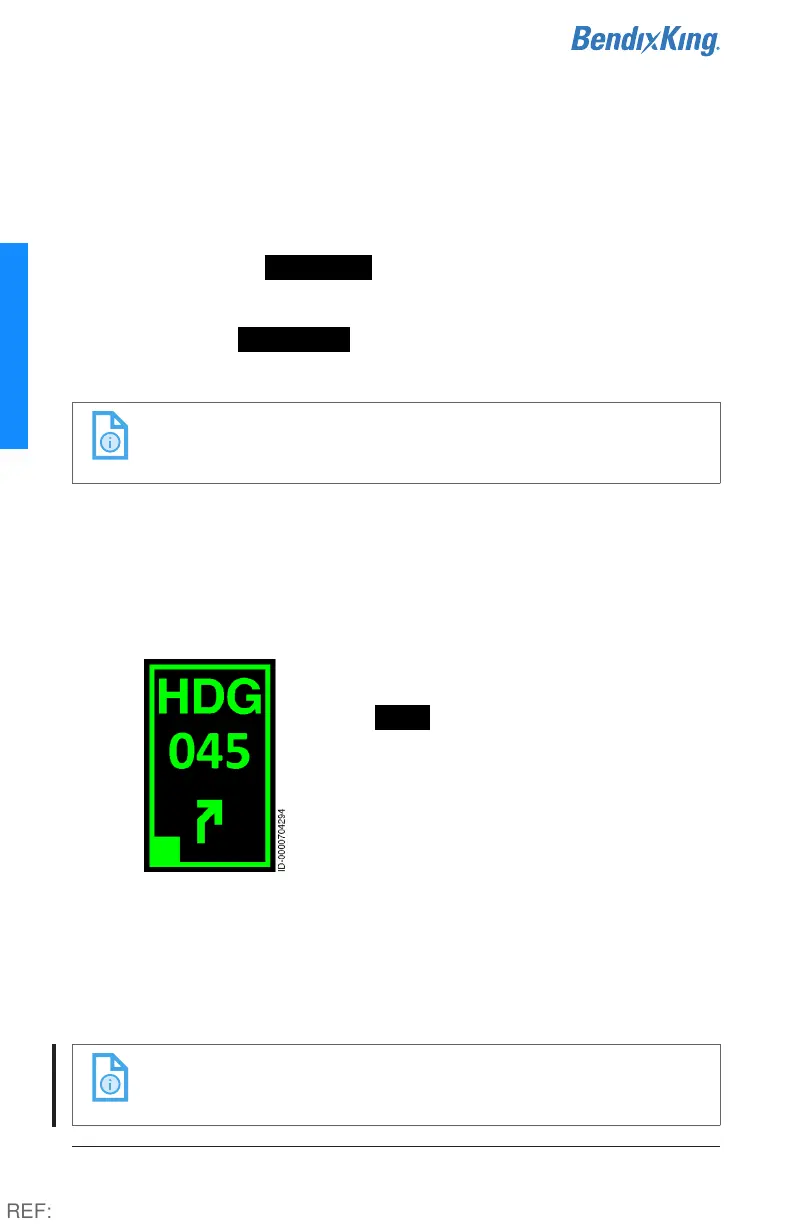
Heading Select mode is engaged by pressing
the HDG button on the touchscreen. When
active, HDG mode is annunciated on the
autopilot touchscreen by a green active
indicator box, green text, green border, and
the HSI-selected heading in degrees (when
equipped with digital HSI). The difference
between actual and selected heading is
depicted by a green arrow symbol at the
bottom of the HDG button, indicating the turn direction
required to fly the selected heading, up to a maximum of 180°.
Selected headings greater than 180° will command a turn in
the opposite direction. In HDG mode, the heading bug may be
adjusted at any time, resulting in the airplane turning to the
new heading.
NOTE: The Heading Direction Arrow depicted is a situational
awareness aid only and does not replace pilot
judgement for correct turn direction.
REF:



 To Next Page