HDS-14LSX / HDS-14LSXE Lifts 33 P/N 5900162 — April 2018 — Rev. F3
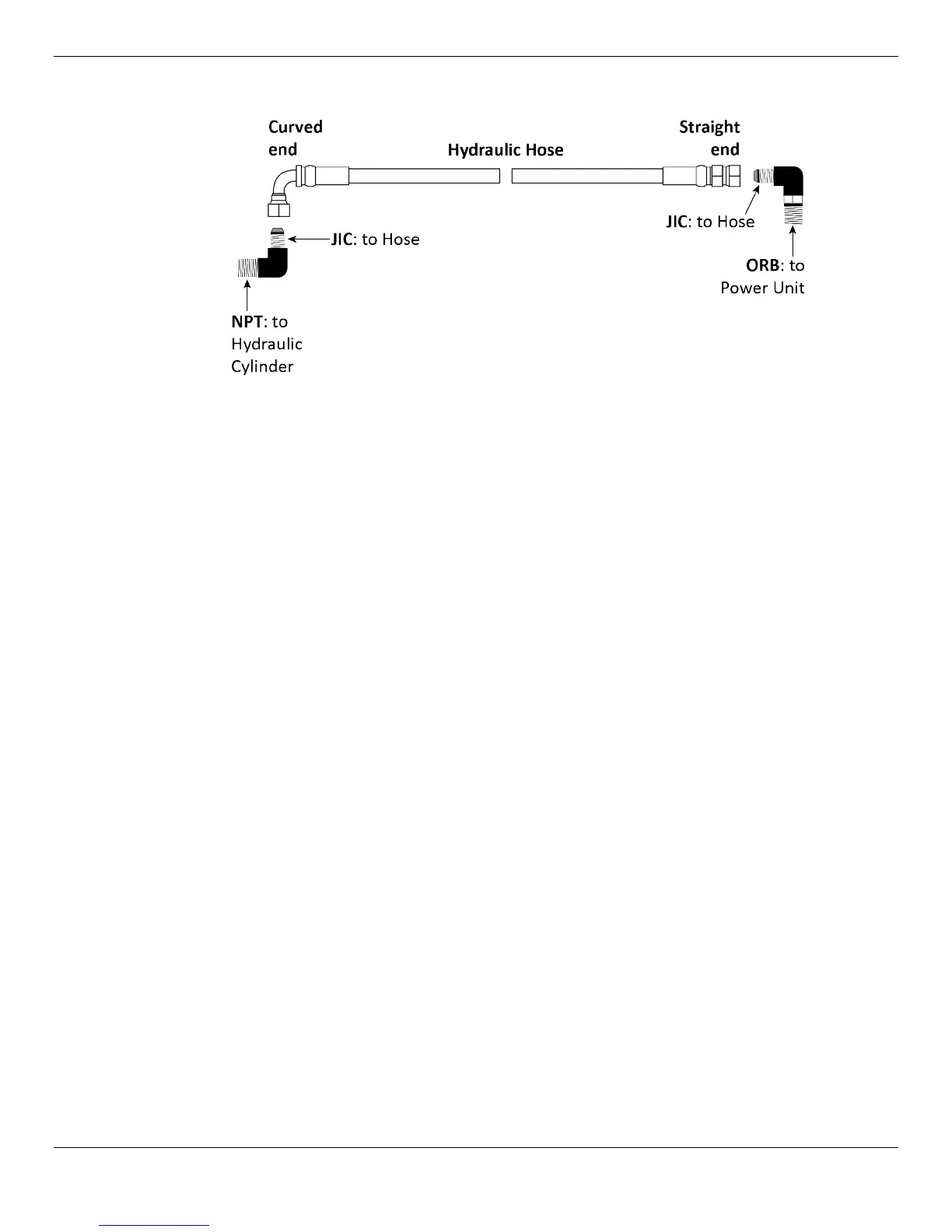
The following drawing shows the Hydraulic Line and its connectors in more detail.
To install the Hydraulic Line:
1. Find the Hydraulic Line and the two hydraulic fittings (one JIC-to-NPT, one JIC-to-ORB).
2. Take the Straight end of the Hydraulic Line and, starting at the Hydraulic Cylinder, route the
Straight end through the Retaining Rings and the Flex Tube.
When you are done, the Straight end should be coming out of the Flex Tube near the Power Unit.
3. On the Hydraulic Cylinder, remove the Shipping Plug from the connector at the Piston Rod end.
4. Attach the NPT connector on the JIC-to-NPT Fitting to the connector on the Hydraulic Cylinder
where you just removed the Shipping Plug.
Tighten until secure.
Leave the JIC connector pointing up; this will help keep the Hydraulic Line up and away from
where the Cables will be installed.
5. Attach the Curved end of the Hydraulic Line to the JIC connector that is facing up.
Tighten until secure.
6. Leave the Straight end of the Hydraulic Line coming out of the Flex Tube; do not connect it to the
Power Unit at this point.
Note: The ORB connector of the JIC-to-ORB Fitting will be connected to the Power Unit later in the
installation.


 To Next Page