The OSD (On-Screen Display) menu20
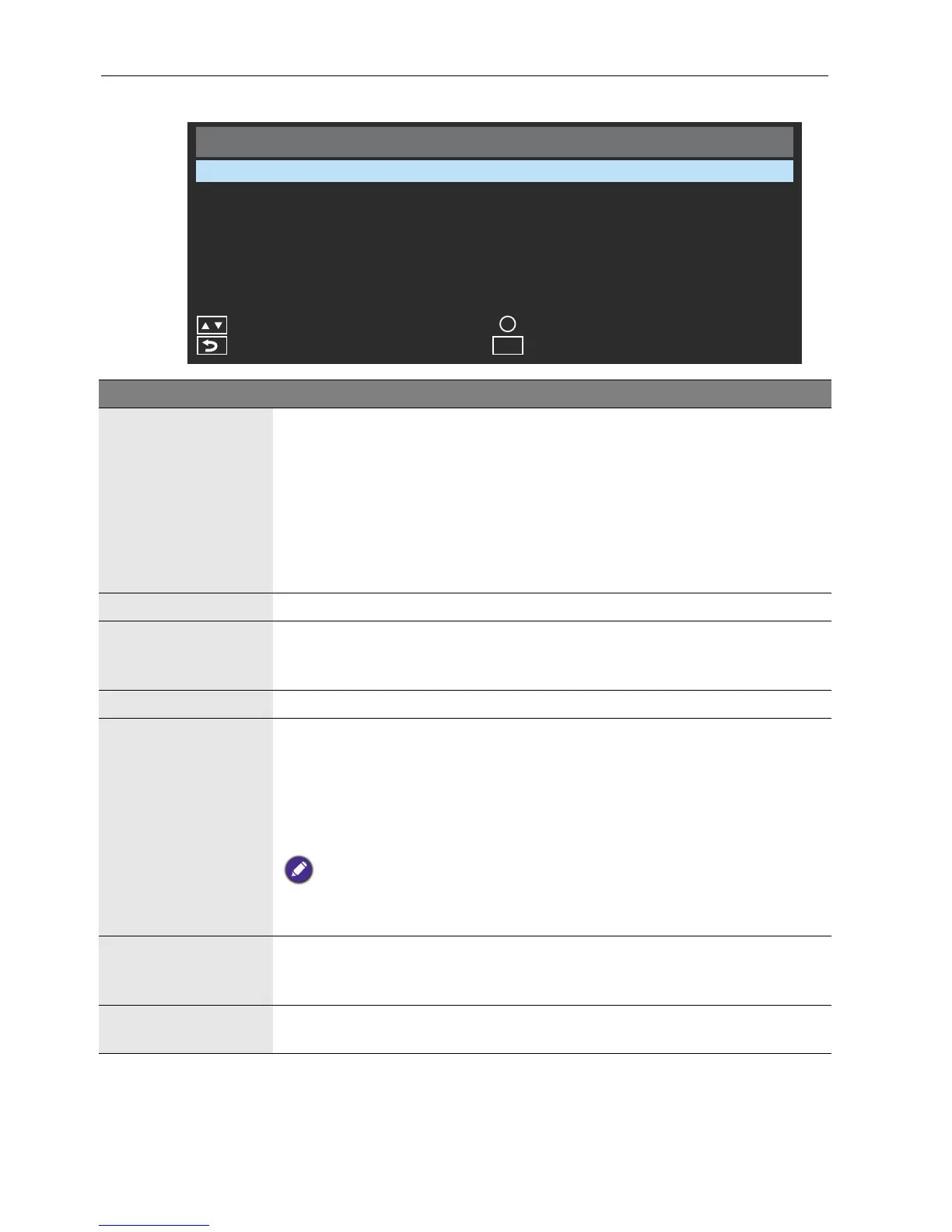
Picture menu
Picture
Picture Mode
Backlight
OK
OK
Exit
Menu
Color Temperature
Gamma
Aspect Ratio
Back
VGA setting
Reset Picture Setting
Dynamic
11500
2.2
Auto
100
Move
Name Description
Picture Mode
• Standard: Suitable for viewing in environments with normal lighting
condition. This most closely represents the broadcast standard quality.
No alteration to color, contract or brightness has been made.
• Dynamic: Suitable for viewing in darker environments. Colors have
been adjusted to more accurately represent natural skin tones.
• Advertiser: Suitable for viewing in darker environments, as brightness
has been increased, and sharpness has been decreased.
• Custom: Your own customized mode.
Backlight Adjusts backlight values. The values for this option range from 0 to 100.
Color
Temperature
Adjusts the color temperature of the black and white part of the image.
You can choose from the following values: 4900, 6500, 9300, 11500,
or Custom.
Gamma Adjusts gamma setting.
Aspect ratio
Adjusts the aspect ratio of the image. The default resolution of the
display is 1920x360. You can choose from Auto, Normal, Wide, or
Dot by Dot. Auto means the display automatically adjusts the images
size to ensure that the entire image is displayed. Dot by Dot means the
image is reproduced so that each pixel of the image is represented by a
corresponding pixel on the display.
Dot by Dot is only selectable as an option if the video source supports
1920x360 resolution. If the video source does not support 1920x360 resolution,
Auto is selectable.
VGA Setting
Adjusts the settings for images from the VGA input source. The values
you can adjust include: H. Position, V. Position, Clock, Phase,
Auto Adjustment, or Auto.
Reset Picture
Setting
Restores above settings to their default values.



 To Next Page