The OSD (On-Screen Display) menu 25
Multimedia system operation
The multimedia system provides a variety of settings when the display is connected to a
USB drive.
To access the multimedia systems:
1. Make sure the USB drive is correctly connected to the display.
2. Turn on the display.
3. Press the INPUT button on the remote control or the INPUT button on the
control panel.
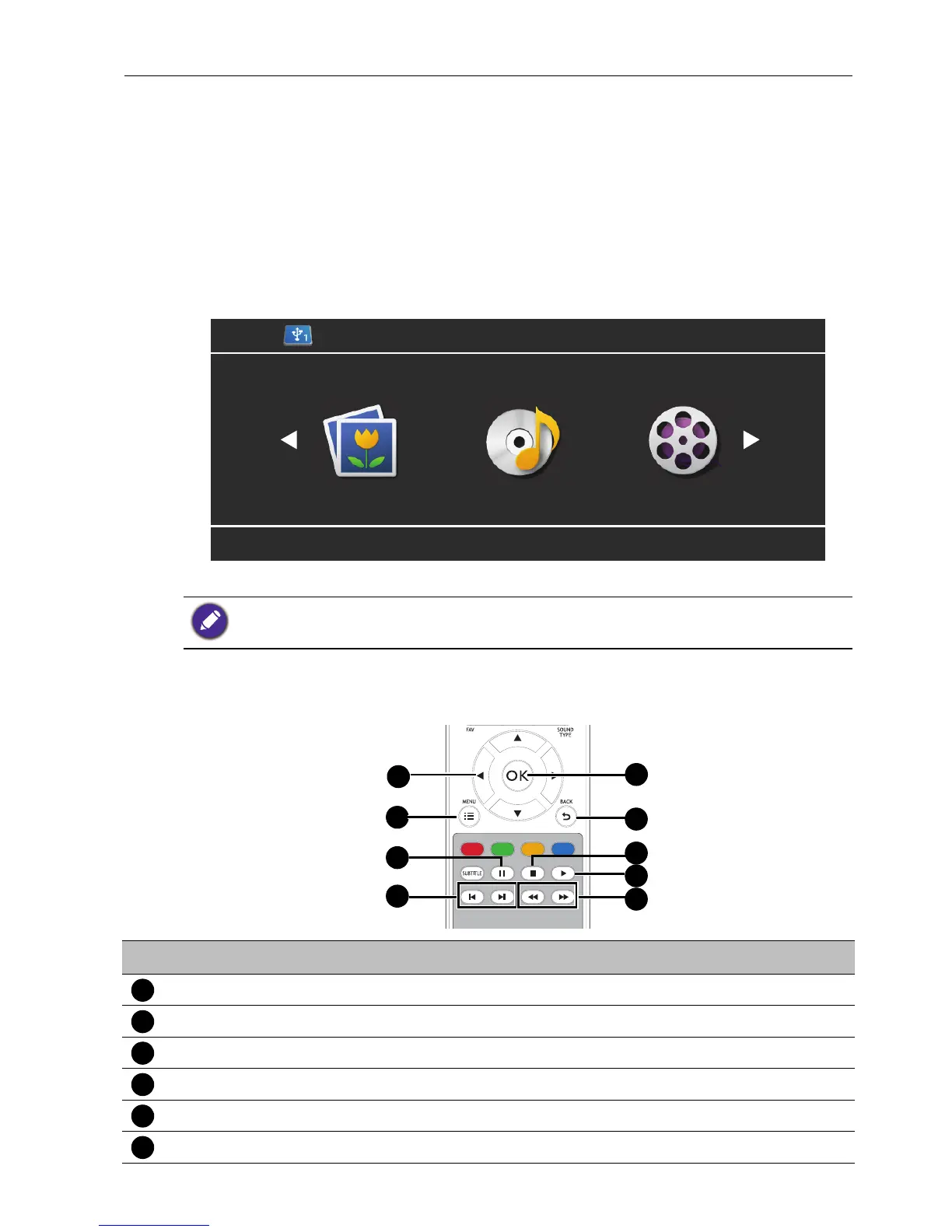
4. Select USB from the input menu. The main page appears.
5. Select your desired option on the main page and operate using the remote control.
Multimedia buttons on the remote control
To operate the multimedia system, use the buttons on the remote control.
If no USB drive is inserted into the display you will not be able to select any option on the main
page.
No. Name Description
/// Directional buttons for selecting a desired item.
MENU Switches to the OSD menu.
Pauses the video/audio clip.
/ Jumps to the previous/next video/audio clip.
OK Selects/deselects a menu item.
BACK Goes back to the previous screen.



 To Next Page