Parts of the display and their functions20
Parts of the display and their functions
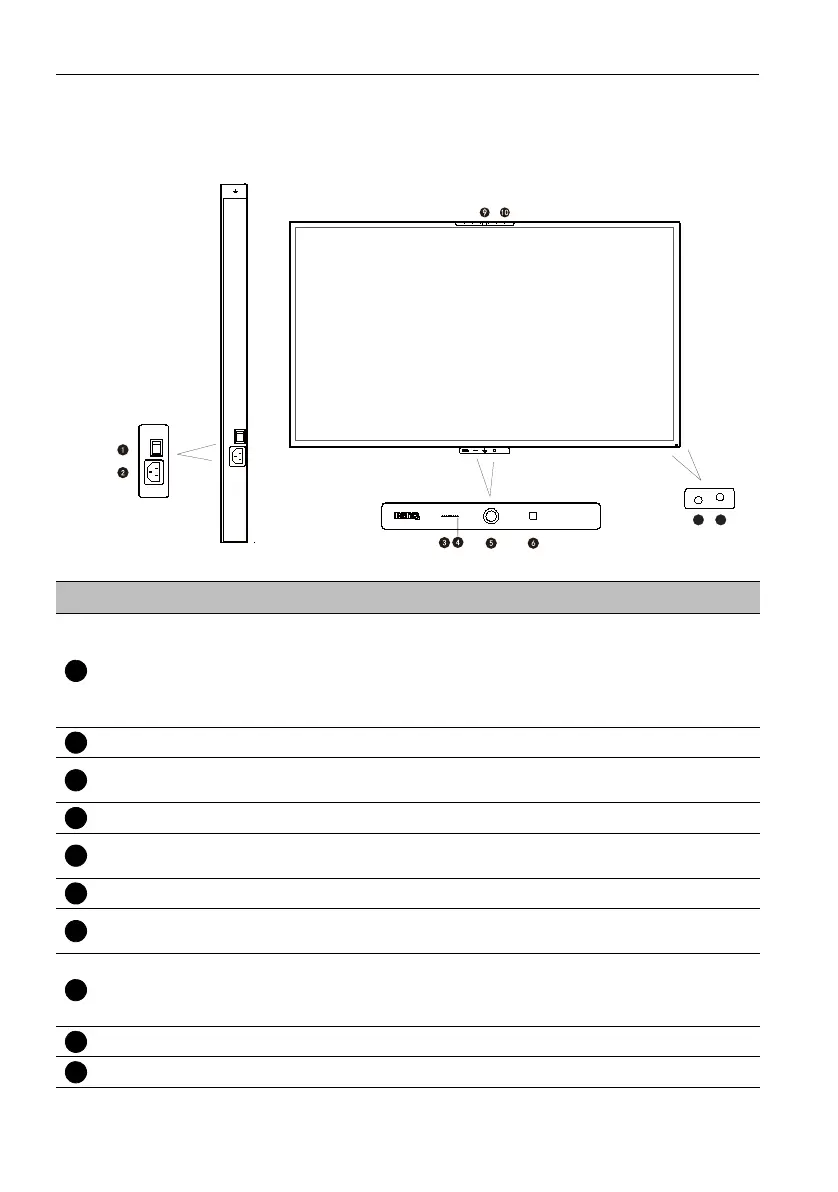
Front panel
No. Name Description
Power Switch
Used to isolate the power supply from the system.
• When the switch is set to ON (I), the system will
automatically enter standby mode.
• When the switch is set to OFF (O), this will completely cut
off the power supply.
Power-in Connects with the supplied power cord.
CO2 Sensor
Measures the increments between ppm levels. The baseline of
the measurement may shift over time.
Light Sensor To detect if a source of light moves toward the sensor’s range.
Motion Sensor
Detects human body and trigger the eye care protection
mechanism.
NFC Function NFC Sensor: NFC reader & writer.
Remote Control
Signal Receiver
Receives remote control IR signals. Do not obstruct the
receiver.
Power Indicator
Shows power state.
• Power on: Blue light
• Power off: Red light
Built-in Camera Camera for video conferences.
Built-in Array Mic Microphone for video conferencing or recording.


 To Next Page