BenQ DC 5530 User’s Manual
English
Using the DC E53+
6
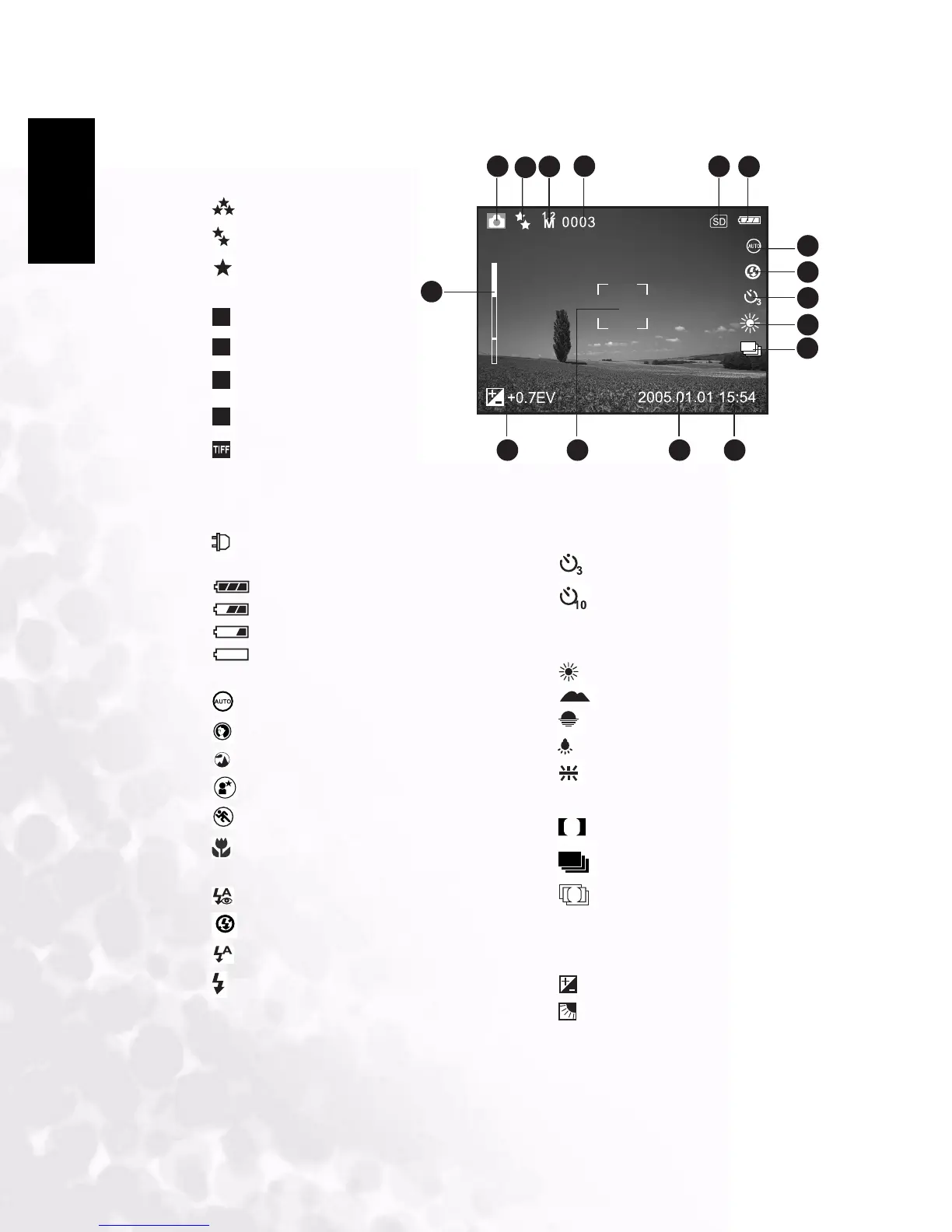
3.1.1 Capture Mode LCD Monitor Information
1. Camera mode
2. Image quality
[]SUPER FINE
[]FINE
[]NORMAL
3. Image size (resolution)
[ ] 2560 x 1920
[ ] 2048 x 1536
[ ] 1280 x 960
[ ] 640 x 480
[ ] TIFF IMAGE
4. Available number of shots
5. SD memory card indicator
(if present)
6. [ ] Adapter indicator/
Battery power indicator
[]Full battery power
[ ] Medium battery power
[ ]Low battery power
[ ]Virtually no battery power
7. Scene mode
[]AUTO
[]PORTRAIT
[]LANDSCAPE
[]NIGHT SCENE
[]SPORTS
[]MACRO
8. Flash mode
[]RED EYE
[]NO FLASH
[]AUTO FLASH
[ ] FORCED FLASH
9. Self-timer icon (if used)
[ ] 3-second delay
[ ] 10-second delay
10. White balance
[AUTO]AUTO
[]DAYLIGHT
[]CLOUDY
[]SUNSET
[]TUNGSTEN
[]FLUORESCENT
11. Capture mode icon
[]SINGLE
[ ]CONTINUOUS
[]AEB
12. Time
13. Date
14. Focus area
15. [ ] Exposure compensation
[ ] Backlight correction
16. Zoom status
T
W
1 2 3 6
7
4
5
8
9
10
16
14
11
15 13 12
5M
3M
M
1.2
M
0.3
S
A



 To Next Page