MAIN USER
Enter a MAIN USER PIN, press then press .
+
Access to programming will be signalled by slow flashing on LED 7 and a long
high-tone beep.
Programming structure and modes
Structure Programming comprises two distinct phases----shown by the ON /OFF
status of LED L6.
PHASE 1----ENTER PARAMETER ADDRESS----LED L6 OFF
Ø Phase 1----enter the Address of the parameter to be programmed (maxi-
mum 3 digits) then press .
Access to PHASE 2 will be signalled by a long high-tone beep.
Access Denied will be signalled by a long low-tone beep. Retry after error
beep.
+
Press to exit the programming phase.
PHASE 2----ENTER PARAMETER VALUE----LED L6 ON
Ø Phase 2----enter the parameter value then press .
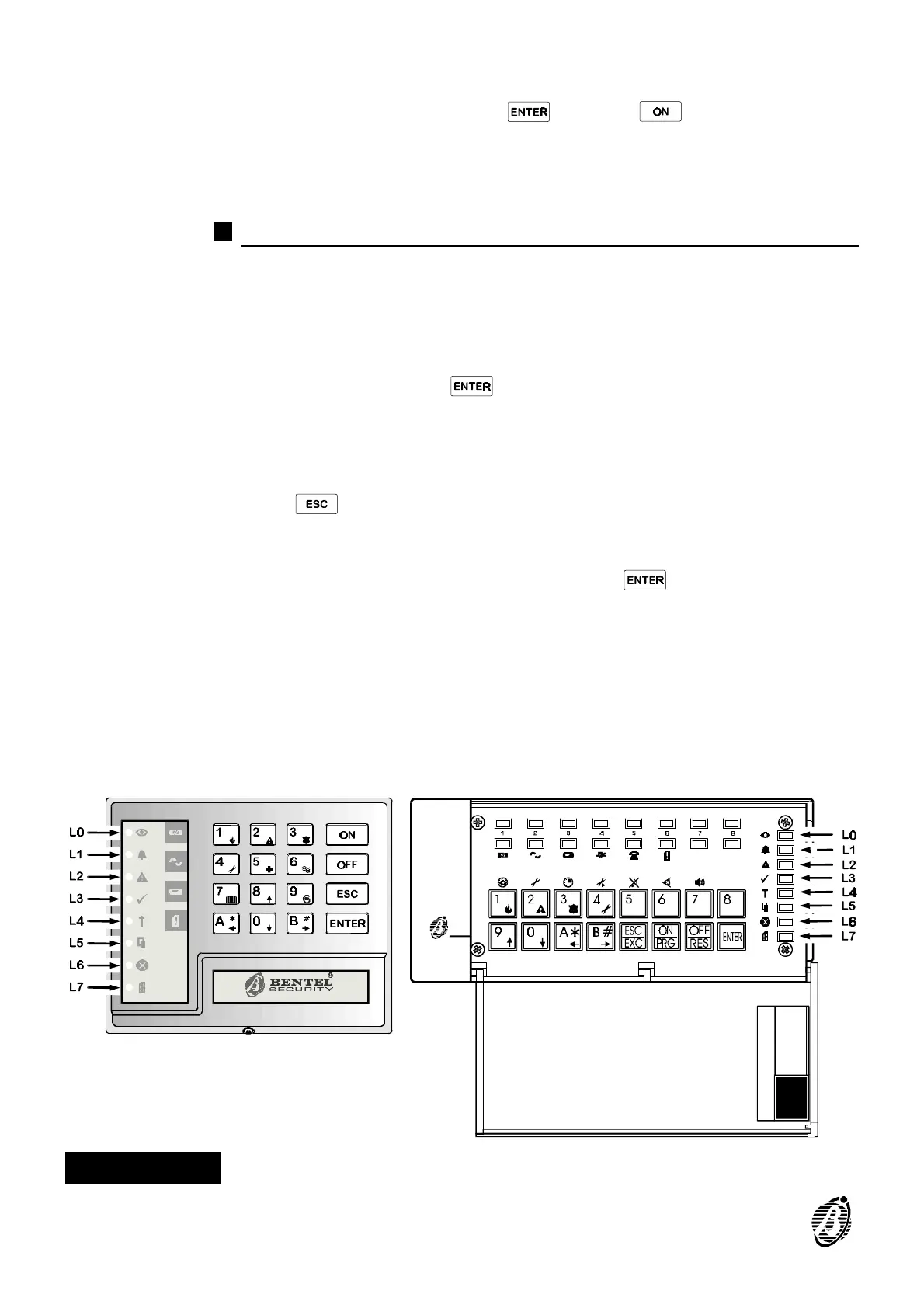
The Panel status: partitions, options, attributes, etc., can be viewed by
means of the LEDs under the number keys. An audible acceptance or er-
ror signal will be emitted when the keys are pressed.
Telephone numbers, PINs and times cannot be viewed on the keypad, and
the LEDs under the number keys will be OFF.
Figure 1 LEDs and keys
6 Security System Control panel









 To Next Page