Model H79
6
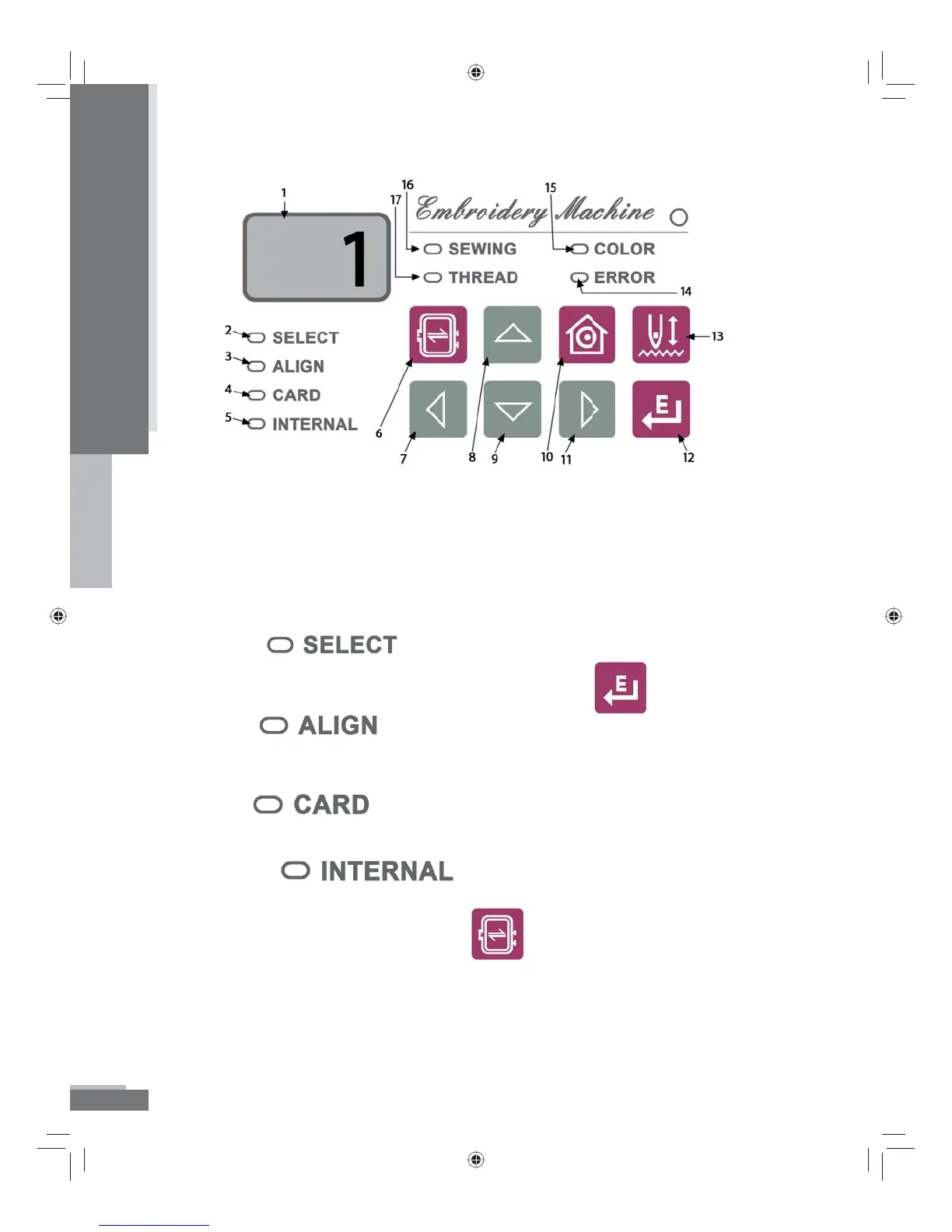
Display and Selection Keys
1. LED Screen – Displays functions
a. Design Number (## for design from Internal Memory or C##
for design on Memory Card)
b. Color Number (i.e. c01, c02)
c. Error message codes—see Error codes, p. 39 - 40.
2. Select is lit when you are in the process of selecting
a design. To make your selection press the
button.
3. Align lights after you have selected a design.
Design can now be embroidered or needle position moved in the
hoop.
4. Card lights to indicate you are accessing designs
from a Memory Card.
5. Internal lights to indicate you are accessing
designs from the Internal Memory of the machine.
6. Only available in align mode, traces the four corners of the
perimeter of the design in the hoop.
7. The arrow keys perform di erent functions depending on which
mode has been accessed.
Introduction
H79_Manual.indd 6H79_Manual.indd 6 10/6/2008 4:29:02 PM10/6/2008 4:29:02 PM



 To Next Page