Bertec Corporation Instrumented Treadmill Manual 19
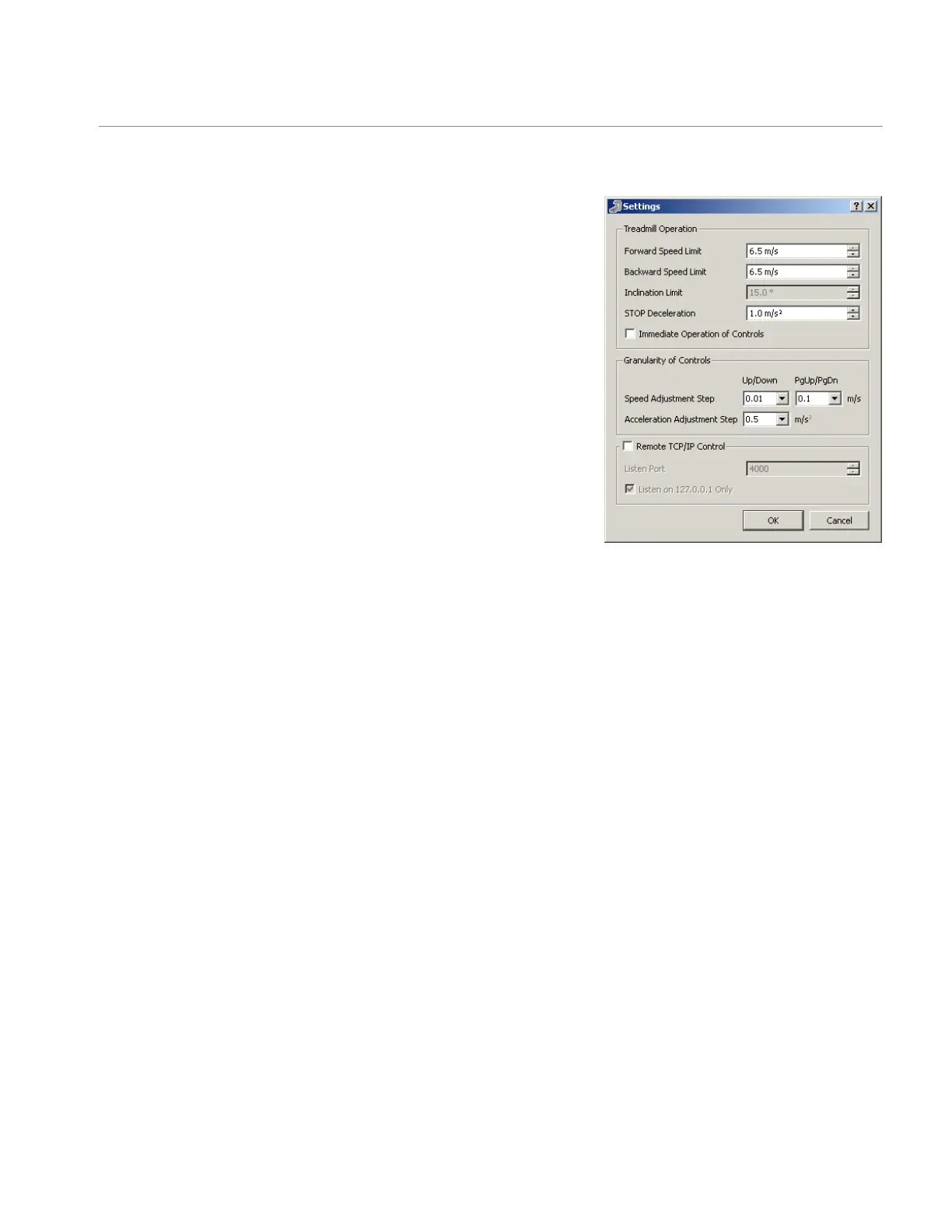
Granularity of Controls
The Granularity of Controls section allows the user to adjust the increments
by which the velocity and acceleration on the Control Panel move. The Speed
Adjustment has two adjustments: ne (left pull-down) and coarse (right pull-
down) in m/s. The Acceleration Adjustment only has one adjustment in m/s
2
.
These adjustments are useful in that the treadmill control software has an
alternative control feature. While on the Control Panel, hitting the Tab key
on the keyboard highlights the velocity and acceleration elds and moves
through those elds. The user can then use the Up and Down arrow keys
and the Page-Up and Page-Down keys on the keyboard to adjust speeds
and acceleration without using the mouse or manually entering numbers. The
Page-Up and Page-Down keys allow for coarse control, set in increments of
tenths of m/s for velocity. The Up and Down arrow keys allow for ne control,
set in hundredths of m/s for velocity. The amount of change that each key hit
corresponds to is controlled by the Granularity of Controls.
Remote Control
The nal feature of the Settings window is under the Remote Control section.
This section is used for remote control of the treadmill via a network. For
further details, please contact Bertec directly.
Treadmill Start Up
Settings window: This allows setting the treadmill’s
functional limits as well as the increment change for
velocity and acceleration used in the Control Panel


 To Next Page