18 Bertec Corporation Instrumented Treadmill Manual
Incline Control
The incline feature is an available option; treadmills do not come standard with this feature. For those treadmills without the
incline feature, this section will not be displayed in the Control Panel.
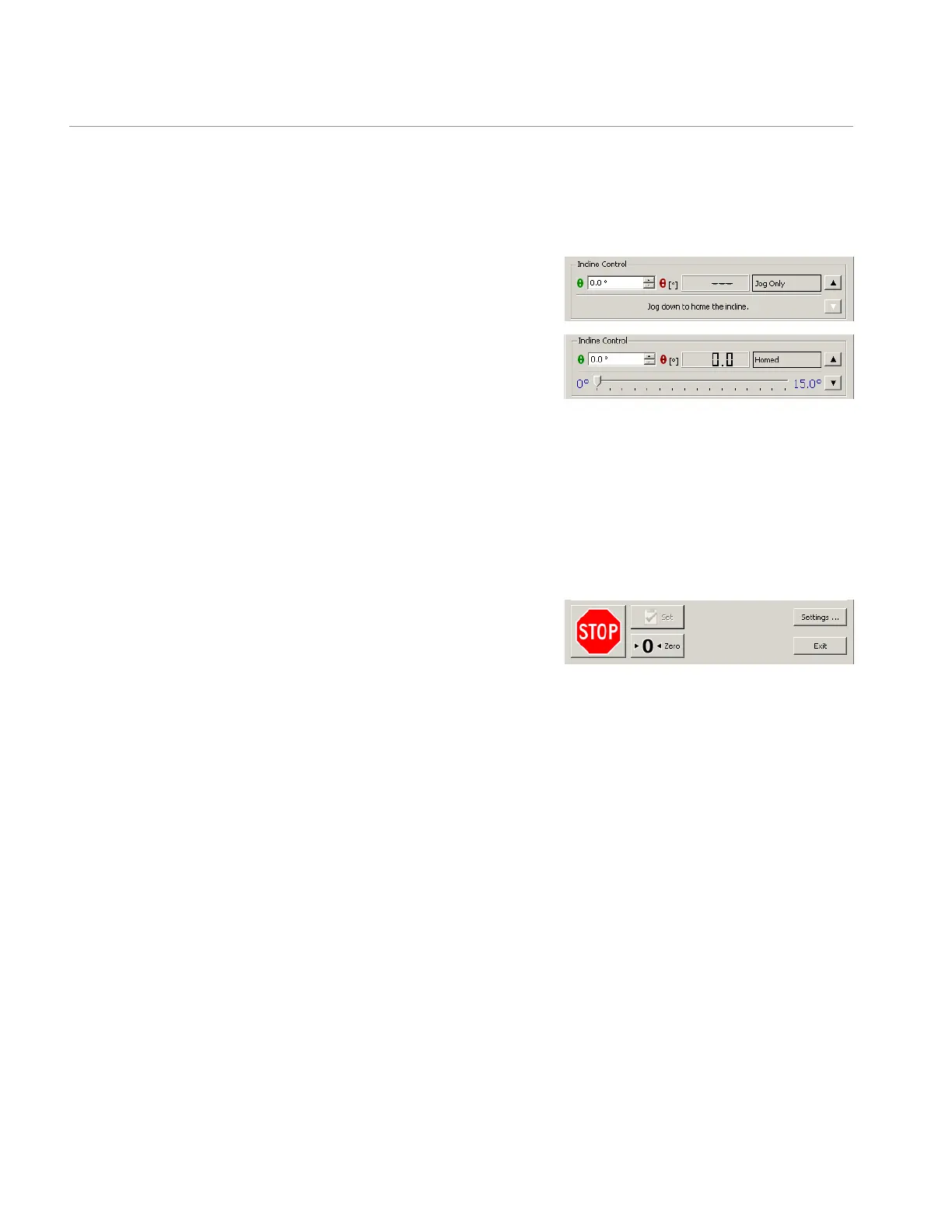
When the control software is rst started, the incline feature is not fully
activated. This is indicated by the text "Jog Only" displayed in the incline
eld of the Incline Control portion of the Control Panel.
In order to fully activate the incline feature, the user must manually calibrate,
or home, the zero position of the incline. Before homing the treadmill, make
sure the incline stabilizer brakes are loose. Brakes should always be loose
when moving the incline; likewise, brakes should be tight when taking
data. To home the incline, click and hold down the down arrow in the Incline
Control section until the treadmill is completely down (the treadmill will make
an audible thump noise when it is down). Once it is completely down, the treadmill will automatically take this as its zero position.
The θ degree indicator (labeled in red) and the horizontal degree slider bar now become active, and the Incline eld will display
"Homed". The incline feature is now completely active, and the θ degree selector (labeled in green) or slider bar may be used
to change the slope of the treadmill. The degree indicator displays feedback from the treadmill indicating the actual degree of
incline. If you wish to limit the maximum incline angle, refer to the Settings section.
Stopping
In addition to the manual emergency stop button, the control software
provides two stop buttons. These are the buttons to be used during normal
operating conditions. The ►O◄ Zero button slows the treadmill to a stop
using the current acceleration specied by the user in the acceleration eld
of the Belt Control section of the Control Panel. The Stop button slows the
treadmill to a stop using the deceleration preset in the Stop Deceleration eld of the Settings window. These two stop buttons
always take immediate effect regardless of the status of the Immediate Operation of Controls box in the Settings window.
Settings
The Settings window is composed of three sections: Treadmill Operation, Granularity of Controls, and Remote Control. This
window is available by clicking on the Settings button on the bottom right of the Control Panel.
Treadmill Operation
The Treadmill Operation section allows the user to set maximum forward and backward velocities. For example, the Backward
Speed Limit may be set to 0 m/s if you do not want the treadmill to run backward. The Inclination Limit is factory preset at 15˚
and can be lowered as necessary. The Stop Deceleration eld allows the user to set the deceleration rate of the treadmill when
the Stop button is clicked on the Control Panel. By checking the box labeled Immediate Operation of Controls, the treadmill is
enabled to immediately respond to any changes in velocity, acceleration, or inclination made while using the Control Panel. If the
box is not checked, then changes to velocity, acceleration, and inclination may be made on the Control Panel, but they will not
go into effect until the Set button at the bottom of the Control Panel is clicked. The Set button only becomes active if this box is
checked. This allows the user to program multiple changes in the treadmill conditions and have all of them go into effect at once.
Treadmill Start Up
Incline Control and Drive Status section (Only available with
a completely activated treadmill with the incline feature)
Stopping section


 To Next Page