Bertec Corporation Instrumented Treadmill Manual 21
The lower light is on when the unit is powered. A blinking LED indicates that the unit is not connected to a treadmill force plate.
If the LED is blinking, check all the cable connections to the treadmill.
The AM6504 has two additional dipswitches on the top surface to set the gain for the output signal. Each switch has an on/off
setting. The gains corresponding to each setting are listed below.
FIGURE 9: Gain switch settings for the AM6504
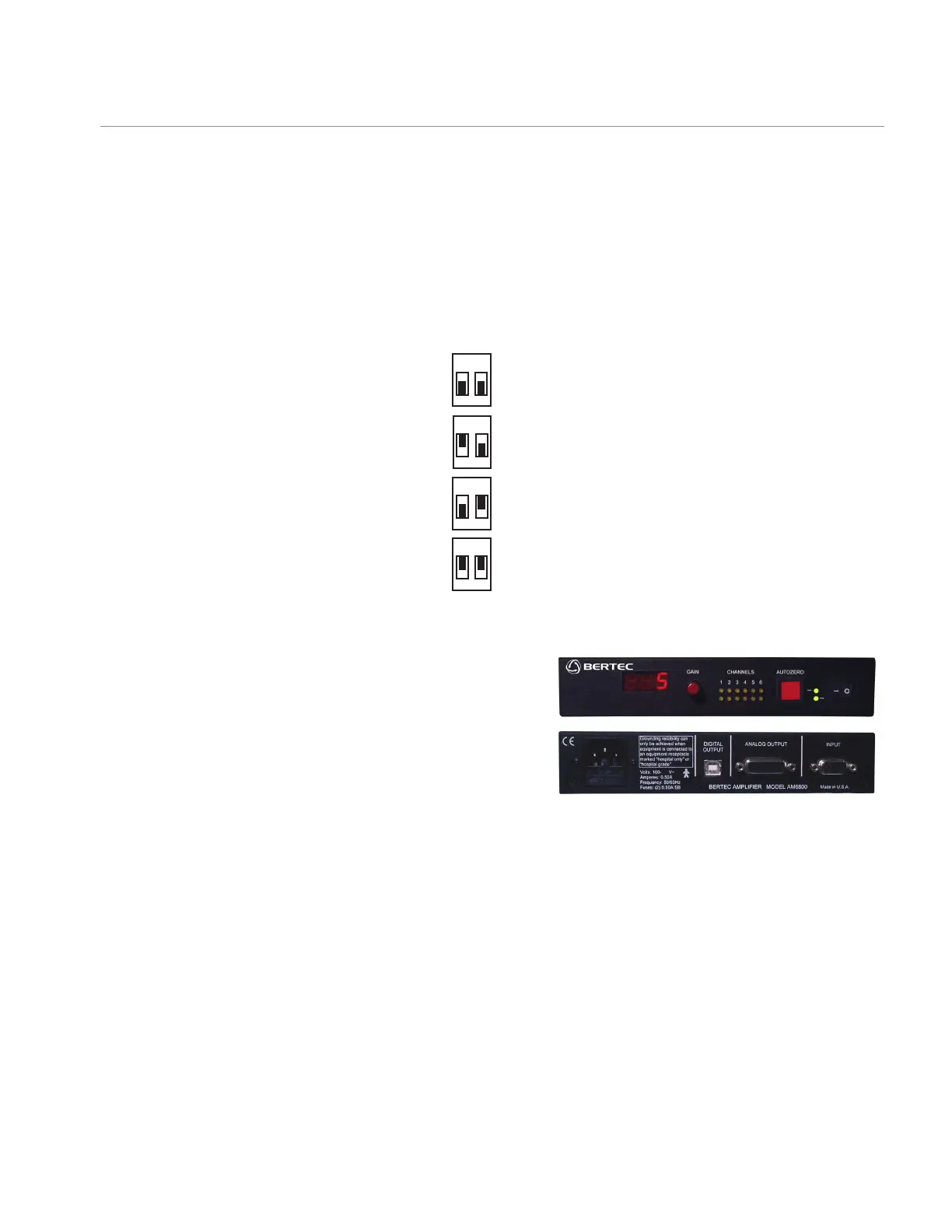
AM6800 Dual Output, Adjustable Gain Amplier
The AM6800 amplier, shown below, incorporates both analog and
digital outputs into one unit. The gain of the analog output is user
selectable, and has 7 different settings (1, 2, 5, 10, 20, 50, 100).
A single gain selection switch is provided for all 6 output channels.
A three-digit LED display on the front panel shows the current gain
setting. The channel signal indicators show the polarity of the analog
output for the six force plate channels. The auto zero button is utilized
to remove tare load offset from each channel output. The mains
power input is a universal input with the range 100-240 V, 50-60 Hz.
The digital output is a USB signal.
If the unit is not connected to a treadmill force plate, the digital display will read "PLA". After the force plate is properly connected
to the unit, when the amplier is turned on, the display will briey (about 0.5 sec.) show the message "CAL", which indicates
that the amplier has successfully recognized the force plate. Finally, the gain setting will display on the digital readout. The pin
assignments for the analog output channels are shown in the General Specication section.
On the front panel of the AM6800 amplier, the two lights between the auto zero button and power switch, the bottom one comes
on when the unit is switched on, and the top light is lit after the auto zero button is pressed. The input and output to the unit is
through 9-pin and 15-pin female D-Sub connectors respectively.
Data Acquisition and Load Calculations
AM6800 amplier
1 2
1 2
1 2
1 2
ON
OFF
ON
OFF
ON
OFF
ON
OFF
GAIN = 1
GAIN = 2
GAIN = 5
GAIN = 10


 To Next Page