ENGLISHGold/Plus/Easy refrigerated cabinets
71
Ed. 12/2020
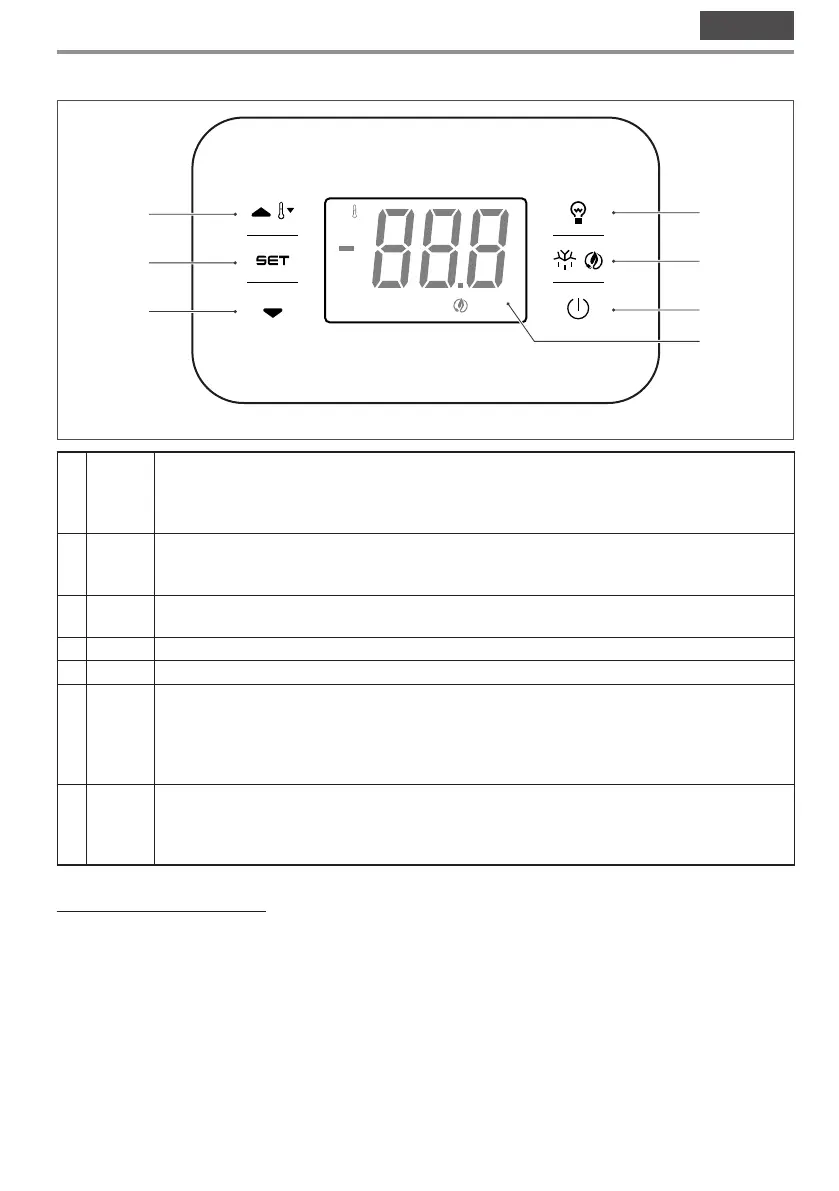
3.4 User interface - EVJ200
B H
C
1
2
3
4
5
6
7
Fig. 23
1 T
Device operation parameters navigation function key (up). During the settings phase, pressing the
key increases the set value by one unit.
If pressed for 2 consecutive seconds, the key will start the overcooling or overheating cycle.
2 S
Unblocking the keyboard and access key to the operating set point of the device. During setting/
modification operations, pressing the key confirms/saves the value input.
3 V
Device operation parameters navigation function key (down). During the settings phase, pressing
the key decreases the set value by one unit.
4 U Pressing the key switches the light in the cell on or off.
5 Z Pressing the key for 2 consecutive seconds starts the defrost cycle.
6 O
Digital power button for the user interface device (controller).
The controller can feature three operating modes:
ON:
the device is powered and on; the utilities can be turned on.
Stand-by:
the device is powered but the software is off; the utilities are off.
OFF:
the device is not powered; the utilities are turned off.
7
Temperature/warning display: when the device is turned on and during the normal operating
cycle, the internal temperature of the appliance is shown in real time. Any active (or flashing) LEDs
provide further information on the operating status of the device (see technical data sheet of the
controller for instructions and meaning of the LEDs).
Switching the appliance on/off
– Make sure that the keyboard is not locked and that no procedure is in progress;
– press the key O for 2 s: the display will switch off/on.
If the device is on, during normal operation the temperature of the cell will be displayed.
If the device is off, the display will be turned off; the red LED O will be switched on.



 To Next Page