INSTALLATION COMFORT AIR CURTAIN
28
2.9.1 Modifying the interface
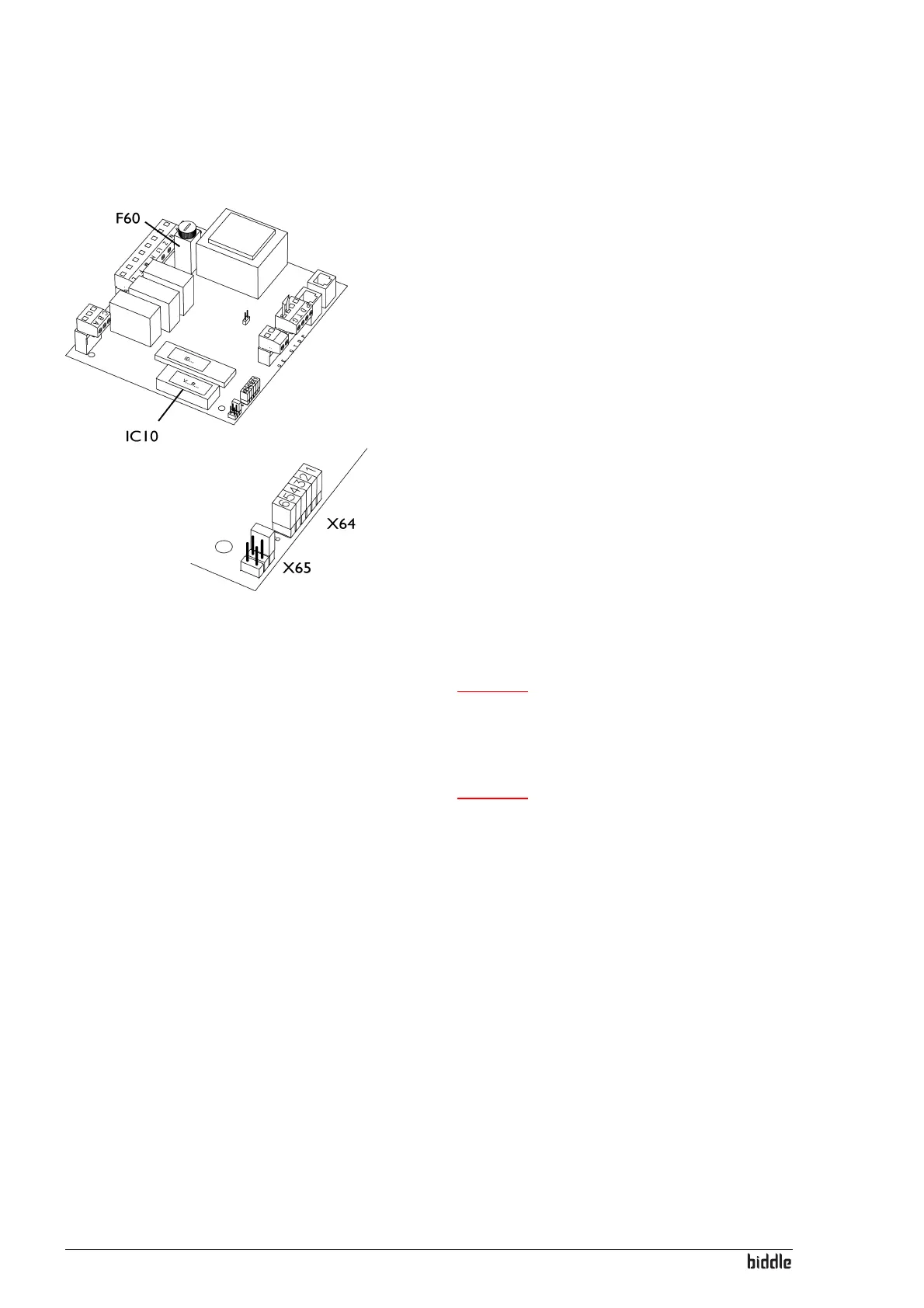
In order to adapt the unit for operation without touch pad
controller, the interface has to be modified. This is done by
removing jumpers 1 and 2 from block X64 on the interface.
1. Switch OFF the power supply.
2. Open the unit (see also the unit operating manual).
3. Move jumpers 1 and 2 to the reserve positions (X65)
4. Close the unit.
2.9.2 Connection of control components
Caution:
c Control components must be connected to block
X72 of the connector plate on the outside of the
unit.
Caution:
c Control components must switch with potential free
contacts. Biddle recommends the use of components
with gold-plated contacts and a low resistance.
Preferably lower than 20 mΩ in order to be able to
switch 1 mA at 5 VDC.
The control components can activate four functions:
• Switching the unit off (OFF)
• Switching the unit to low speed (1)
• Switching the unit to medium speed (2)
• Switching the unit to high speed (3)
A function is activated when a control component makes a
cont
act between the connected terminals as shown in the fig-
ure. Follow the instructions below to employ one or more
functions:



 To Next Page