CITY MANUAL FAULTS
Versie: 5.0 (04-06-2012) 43
See also:
2.6.4 Settings on the Daikin control panel 19
2.8.7 Initialising the touch pad controller 27
4.1 Switching the unit ON and OFF 37
4.1.1 Switching the system ON and OFF 37
6.4 Remedying faults
If you suspect a fault:
1. Check whether the problem can be easily resolved.
2. Try to resolve the problem using the table below. Techni-
cal expertise is needed for this.
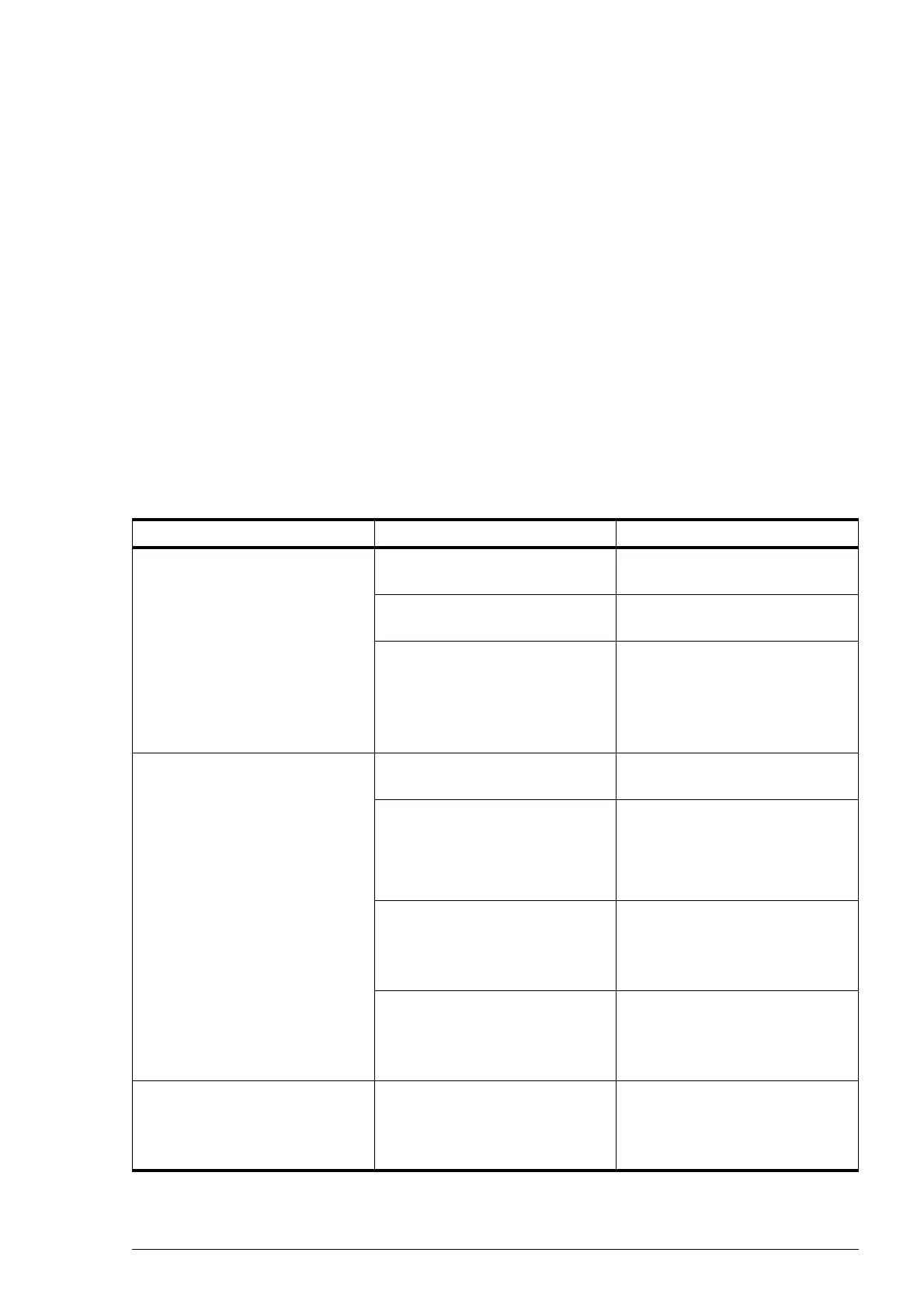
PROBLEM PROBABLE CAUSE WHAT TO DO
The control panel works normally
but the unit does not respond.
No jumper between terminals T
and G.
Install a jumper between terminal T
and terminal G on block X72.
The unit is controlled by a signal
from an external control.
Check the inputs and the jumpers
The fans are receiving no power. 1. Check the transformer fuse.
2. Check the wiring between the
transformer and the fans.
3. Replace the transformer.
The unit is not functioning, the
touch pad controller does not react
when pressed.
The unit is receiving no power. Check the power connections and
wiring.
The connection between the con-
trol panel and the printed circuit
board is not correct.
1. Check the control cable.
2. Check the wiring between con-
nector plate and printed circuit
board.
The printed circuit board is not
working.
1. Check fuse F2.
2. Check the power supply cable.
3. Replace the printed circuit board.
The control panel is defective. Check the control panel by con-
necting it to another unit with
another cable. Replace the control
panel if it does not work.
One fan is not working. The fan is receiving no power or is
defective.
1. Check the wiring of the fan.
2. Check the transformer fuse.
3. Replace the fan.



 To Next Page