9
10 |
11 |
12 |
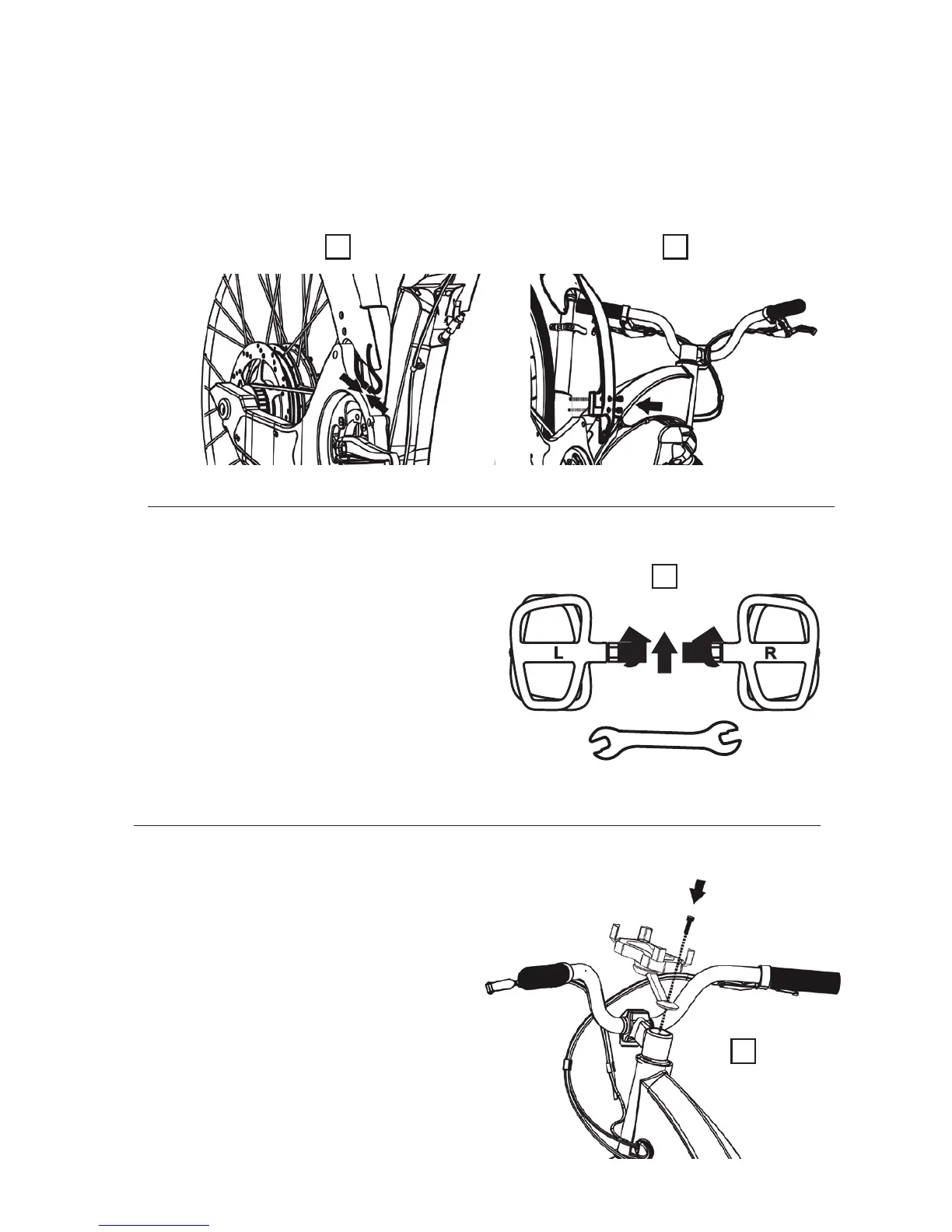
Attach the rear light. Now that the handlebars are attached you can go ahead and attach the
rear light. Connect the cable of the rear light (ensure the colors match) which you can nd
on the right side of the bike, to the cable dangling below the seatpost and next to the front
sprocket (see image L).
Use the 2 M6 screws and the 3-ended allen wrench (which you can nd in the small box with
the rest of the tools) to attach the rear light component to the frame. Fasten this component
securely (see image M ).
L
M
Attaching the pedals
Attach the pedals to the bike. Take a look at
the screws of both pedals –one is inscribed
with an “L” (indicating that this pedal goes
on the left side of the bike) and the other
has an “R” (indicating that this pedal goes
on the right side of the bike). Screw the left
pedal in counterclockwise and the right
pedal in clockwise (see image N).
N
Attaching the cellphone holder
Attach the cellphone holder.
Follow the instructions on the cell phone
holder box (see image O).
O



 To Next Page