BigRep STUDIO 8 Extruder Operations
83
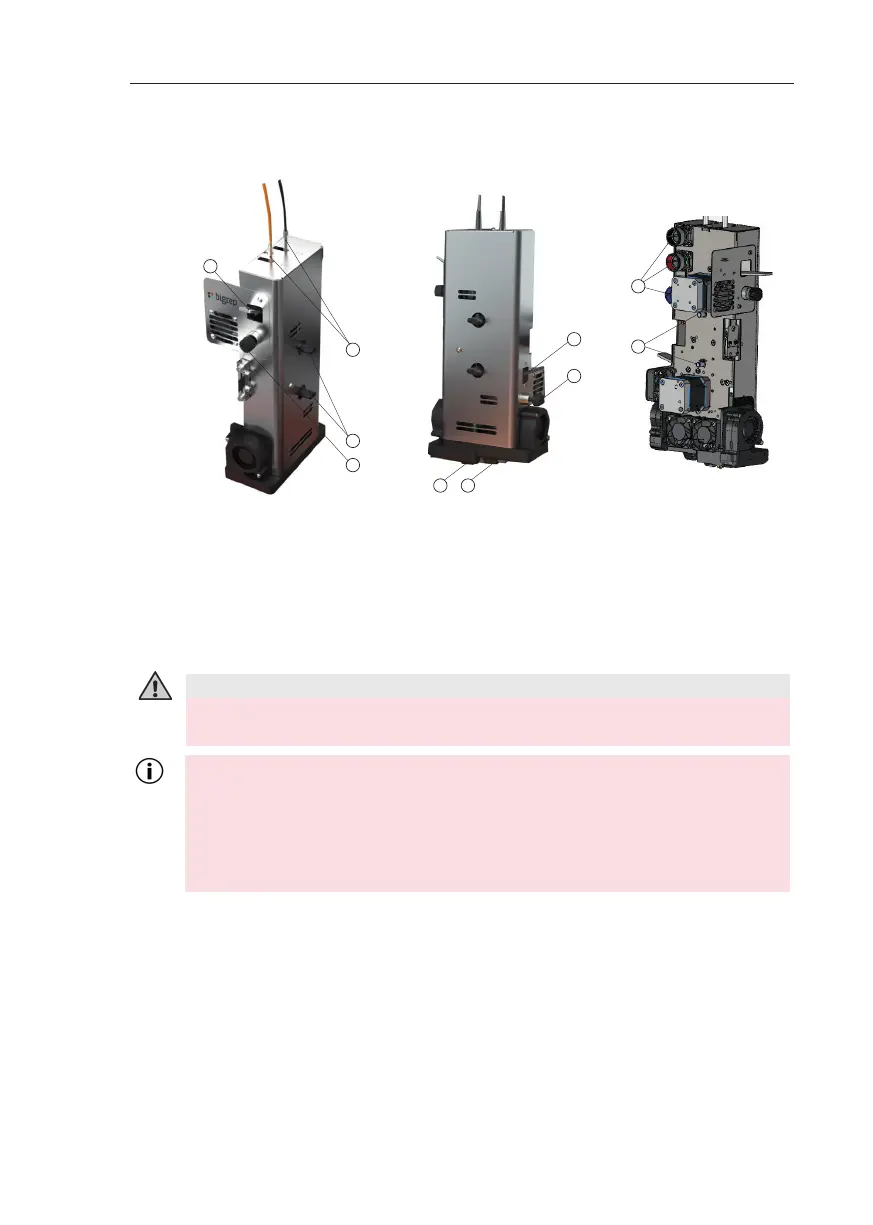
Fig. 8-4: Overview extruder
Extruder Overview
Replacing the Extruder
Safety Instructions
Preparation
Move the extruder to a position that allows for easy removal, if necessary use the
interface.
Remove any filament remains from the extruder.
& Chap. 8.1 Changing Filament
Let the extruder cool down.
a Lever filament drive T1
b Filament guide (2 pcs)
c Extruder attachment screw
Idler wheel T1
e Nozzle T1
f Nozzle T0
g Idler wheel T0
Lever filament drive T0
i Pins (2 pcs)
k Electrical connectors (3 pcs)
a
b
c
d
e
f
g
h
i
k
Never loosen the electrical connectors (k) while the machine is powered.
Also never turn on power if the electrical connectors are not connected to
the extruder.
The electrical connectors (k) must be connected to the extruder whenever
the main switch (S) is set to ON!
A er printing the nozzle is hot. Danger of burns! Always let the nozzle cool
down before removing the extruder!
CAUTION – Danger of Burns



 To Next Page