DHCP Server Mode:
• Disable: Choose Disable if IP addresses are assigned manually to stations on your network.
• DHCP Server: Choose DHCP Server to have the BiPAC 85xx series devices assign IP ad-
dresses automatically to stations on your network.
• DHCP Relay Agent: Choose DHCP Relay Agent if you want to place DHCP servers and
clients on different networks, making DHCP management easier when there is more than one
subnet on the network.
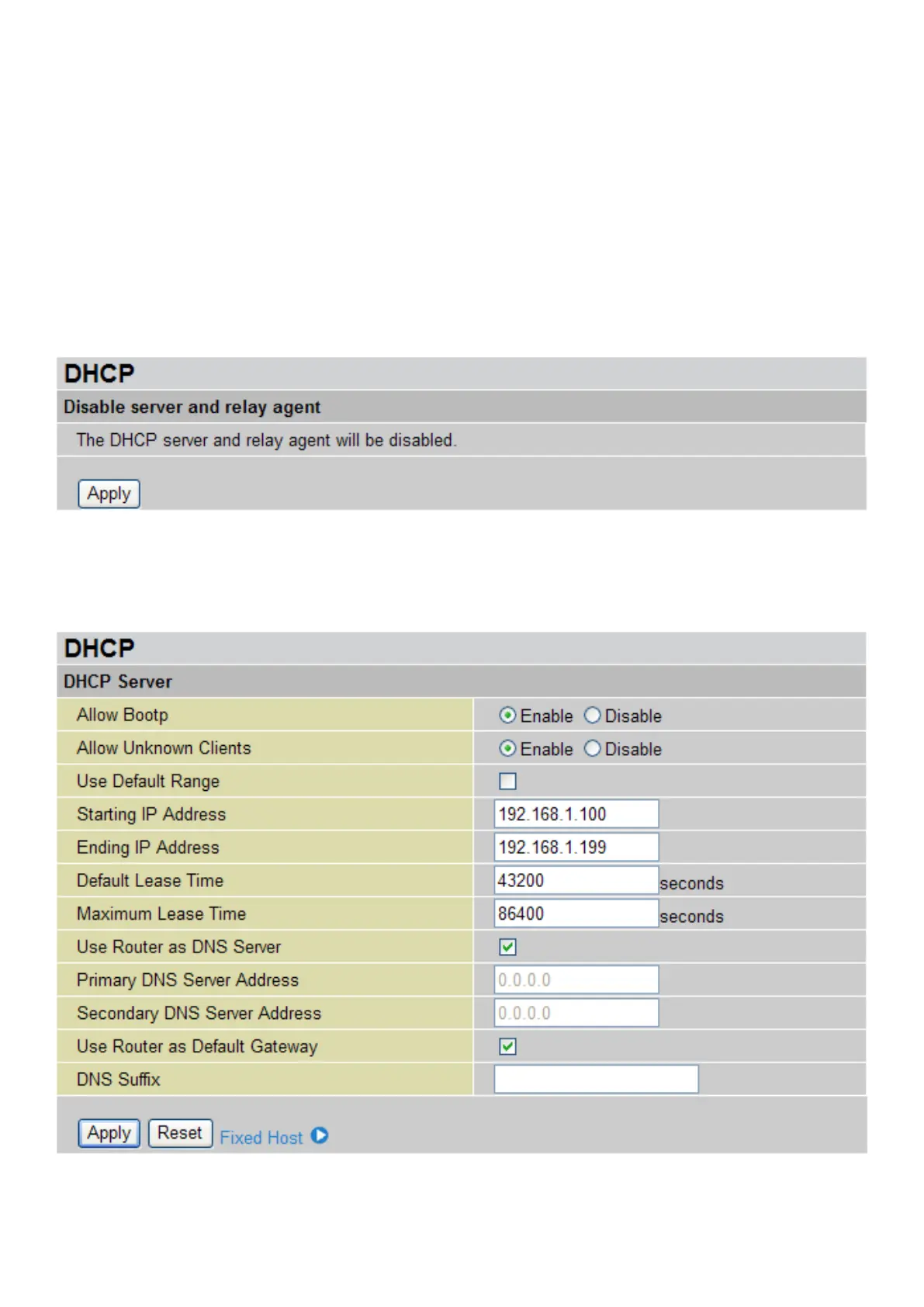
Disabling DHCP Server
Click the Disable radio button and then click Next to display the conrmation screen.
Click Apply to disable the DHCP server and relay agent.
Conguring DHCP Server
To congure the router’s DHCP Server, select DHCP Server from DHCP Server Mode and click
Next.
You can then congure parameters of the DHCP Server. These details are sent to the DHCP client
(i.e. your PC) when it requests an IP address from the DHCP server. If you check “Use Router
as a DNS Server”, the router will perform the domain name lookup, nd the IP address from the
55











 To Next Page