BiPAC 8521
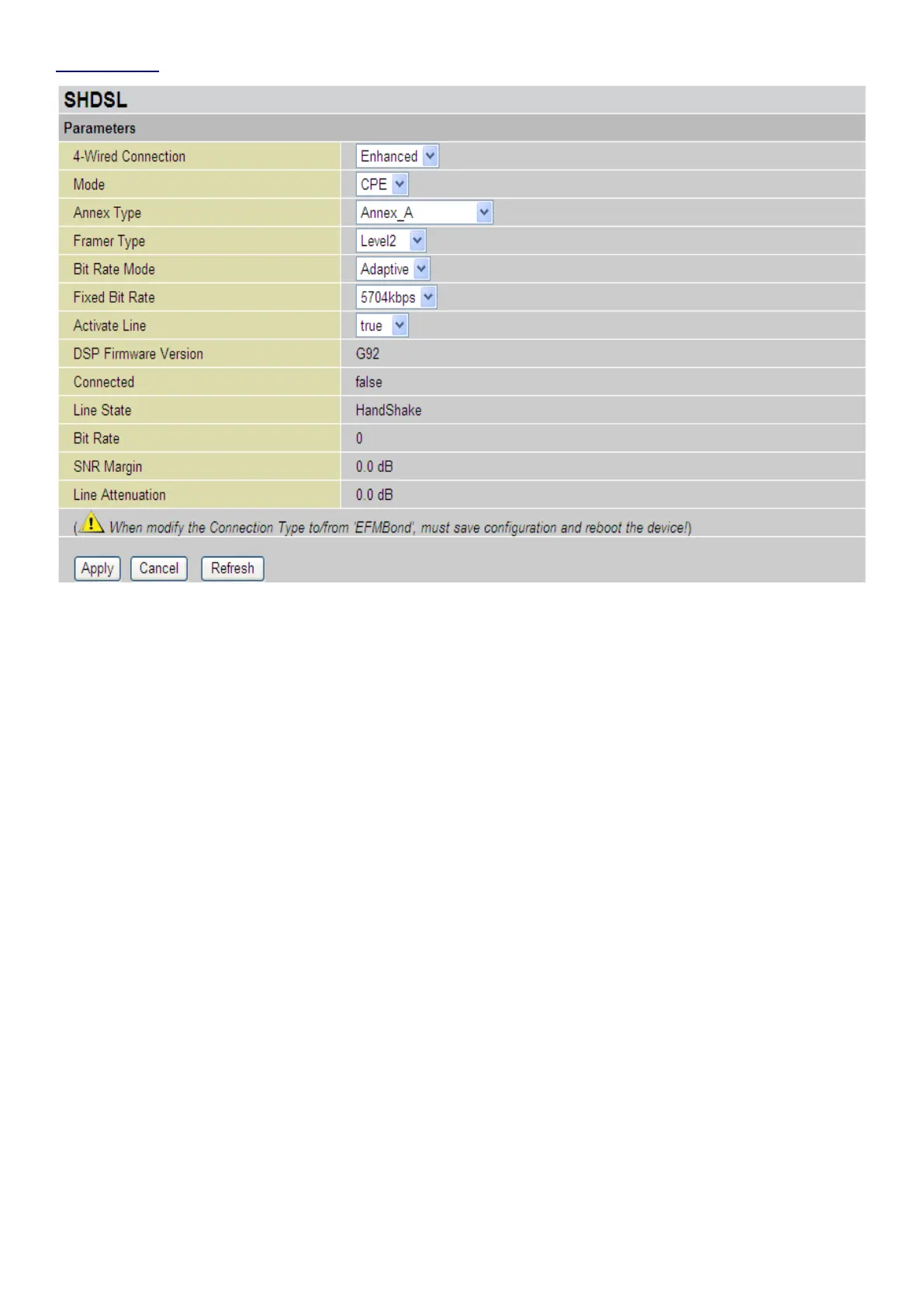
Standard 4-wired connection: BiPAC 8521 supports 4 types of SHDSL.bis connection: False,
Enahnced, Standard&EFMBond. Select the type of SHDSL.bis connection from the 4-wired
connection drop-down menu, and then press Apply to activate the conguration page.
Note: When select 2-wire mode, only Port 1 settings need to be congured and the SHDSL
(RJ-11 cable) must be connected to LINE 1 on the back of the device.
Mode: The SHDSL device can operate as a CPE (Customer Premises Equipment) or CO (Central
Ofce). Select CPE mode when the BiPAC 8500 is connected to your ISP.
Note: Back-to-back feature is a direct connection between two SHDSL devices that one is set
to be CPE and the other CO by using a standard RJ-11 telephone cable.
Annex Type: It is the DSL operating mode standard. Select Annex A or Annex B to support up to
2.3Mpbs SHDSL function.
Note: Make sure that the Annex type is the same for the BiPAC 8521 and the remote router.
Consult with your ISP to set the same annex for the other device.
Framer Type: Packet Framing format. There are 4 types: Level2, Level1A, Level1B and EFM.
Level2 is the same as ATM framing; EFM is EFM framing.
Bit Rate Mode: The mode selections are Adaptive and Fixed. Selecting the Adaptive mode, the best
connection rate will be automatically negotiated with the CO / ISP. Selecting the Fixed mode, the
connection rate will be xed to the specic xed bit rate selected with the CO / ISP.
Fixed Bit Rate: Specify the x transfer rate when Fixed Mode is selected. Specify the maximum
transfer rate when Adaptive Mode is selected. Bit Rate range is 72kbps ~ 5704kbps.
Activate Line: Line active true is set by default. Select false to disable and true to enable SHDSL
SHDSL connection
Note: Once Active Line is selected as false, you have to enable the Active Line to true again
and click the Apply button to reactivate SHDSL connection.
79











 To Next Page