FDL (E2.1) 05/2016 page 23/75
6. Fixed value entry mode
If you do not want to use the week program timer, deactivate it (factory setting, setting in the
user level, chap. 10) before entering any set-points.
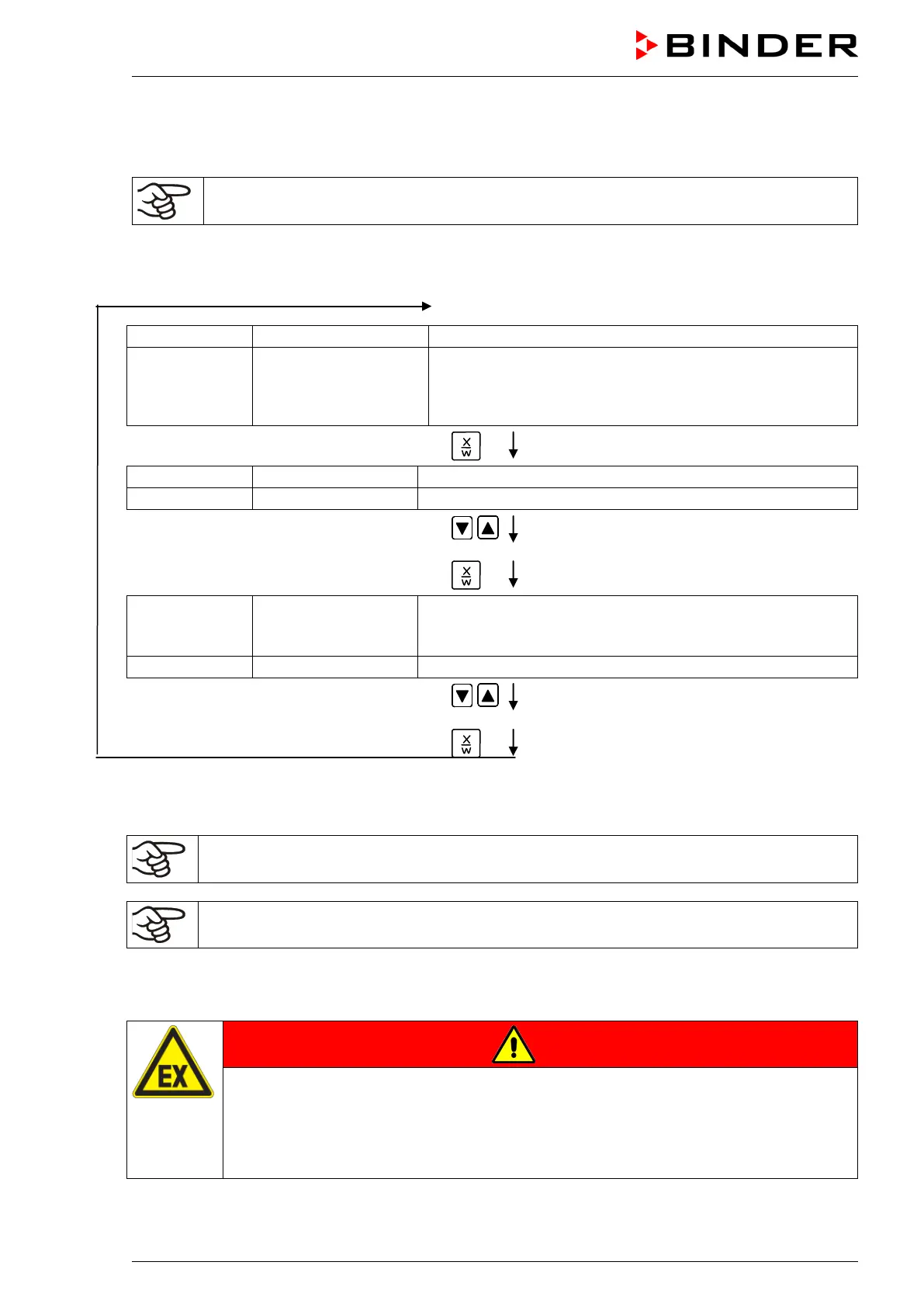
Basic entry principle: Access the individual parameters with button X/W one after the other. Enter the
values with the arrow keys. A value flashing once after 2 seconds indicates that it has been applied by
the controller.
Normal Display
(actual temperature value)
Display 2 shows e.g. 15.01.07 13:52 - -
(actual date and time)
(actual switching state of week program timer
channel 2: Off, visible on
ly if week program timer is activated
in the user level, chap. 10)
Press key
(actual temperature set-point 1)
(variable: temperature in °C)
Enter the temperature set-point in °C using
arrow keys
Value is shown in display 1.
Press key
Display 1 shows e.g. 90.0
(actual temperature set-point 2)
(visible only if week program timer is activated
in the user level, chap. 10)
(variable: temperature in °C)
Enter temperature set-point in °C using the
arrow keys
Value is shown in display 1.
Press key
If no button is pressed within more than 120 sec, or if the EXIT button is pressed, the controller changes
to Normal Display.
When changing the set-point, check the setting of the temperature safety device (chap. 12.1).
The values entered in fixed-value entry mode remain valid after program run-off and are then
equilibrated.
If the week program timer is active, depending on the running week program another set-point (SP2) may
be targeted. Temperatures too high for the introduced solvent quantity can occur. Deactivate the week
program timer if you do not use it (default setting, setting in the User level, chap. 10).
DANGER
Too high temperature.
Danger of explosion.
Danger of death.
Deactivate the week program timer if you do not use it.



 To Next Page