E80/E70 Digital Electrocardiograph User’s Manual
6-2
6.2 Install battery
The battery box is at the bottom of Electrocardiograph. Please refer to the
following steps at the time of installing or replacing battery:
1. Power off the Electrocardiograph, and disconnect the power cord and
other connecting wires;
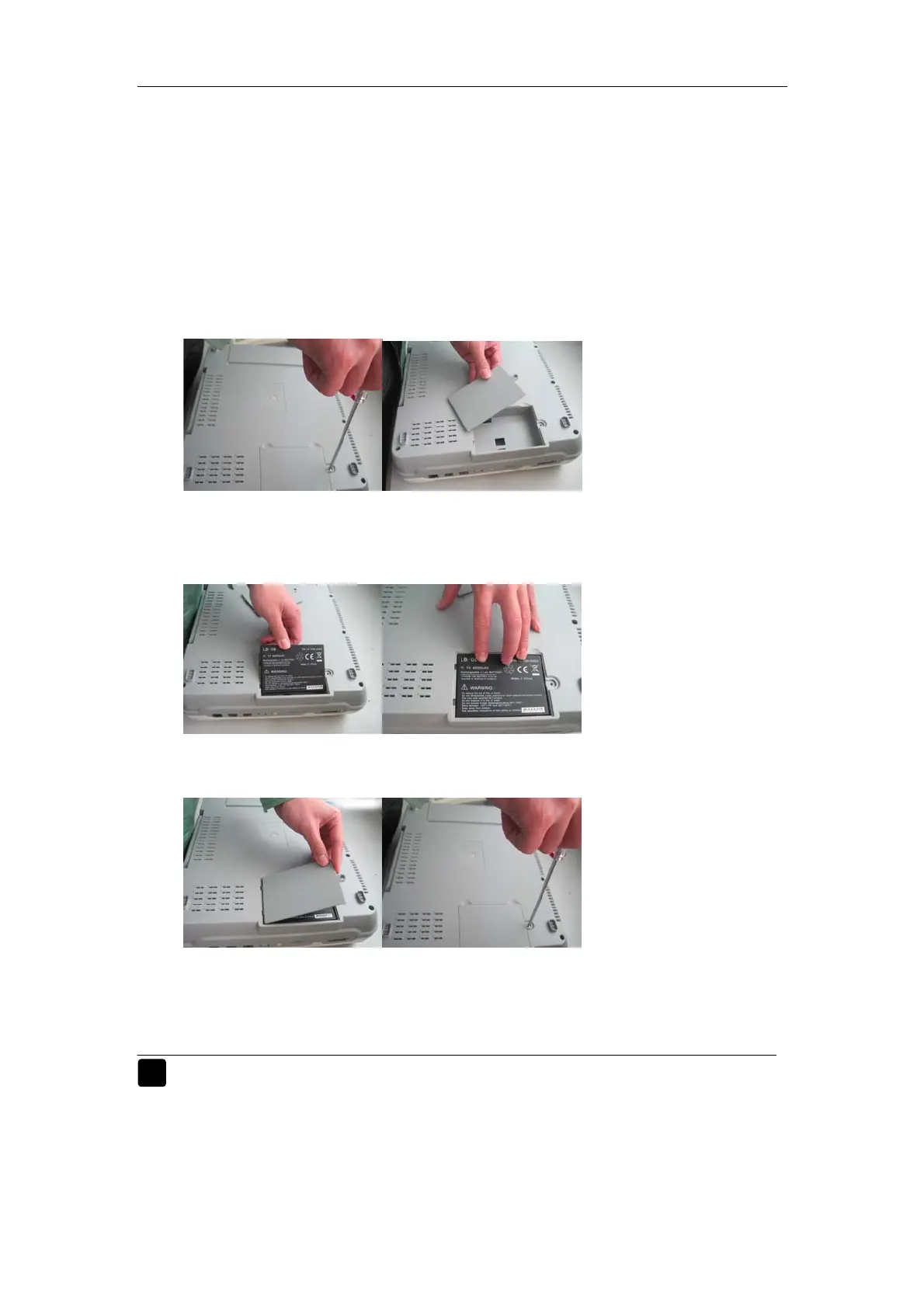
2. Screw off the fixing screws above the battery cover with screwdriver, and
open the battery cover (as shown in Figure 6-1) ;
Fig. 6-1 Install battery
3. Place new battery into the battery box according to the direction of mark,
and press down the battery to ensure close contact of battery;
Fig. 6-2 Install battery
4. Mount the battery cover properly as shown in the figure below;
Fig. 6-3 Install battery
5. Connect the Electrocardiograph to AC power, and check whether the
battery status indicator of the Electrocardiograph is in good status.
Warning:
The positive pole and negative pole of battery shall be connected
correctly; otherwise, it is possible to result in explosion.
Do not directly contact the positive pole and negative pole of battery



 To Next Page