9
9
310
1
7
6
4
5
2
EN-15
ENGLISH
InstruCtIons for use
4. Instructions for Use
There are two types of controllers: BionX ‘G2’ and ‘RIDE+ Pro’.
4.1 BionX ‘G2’ controller
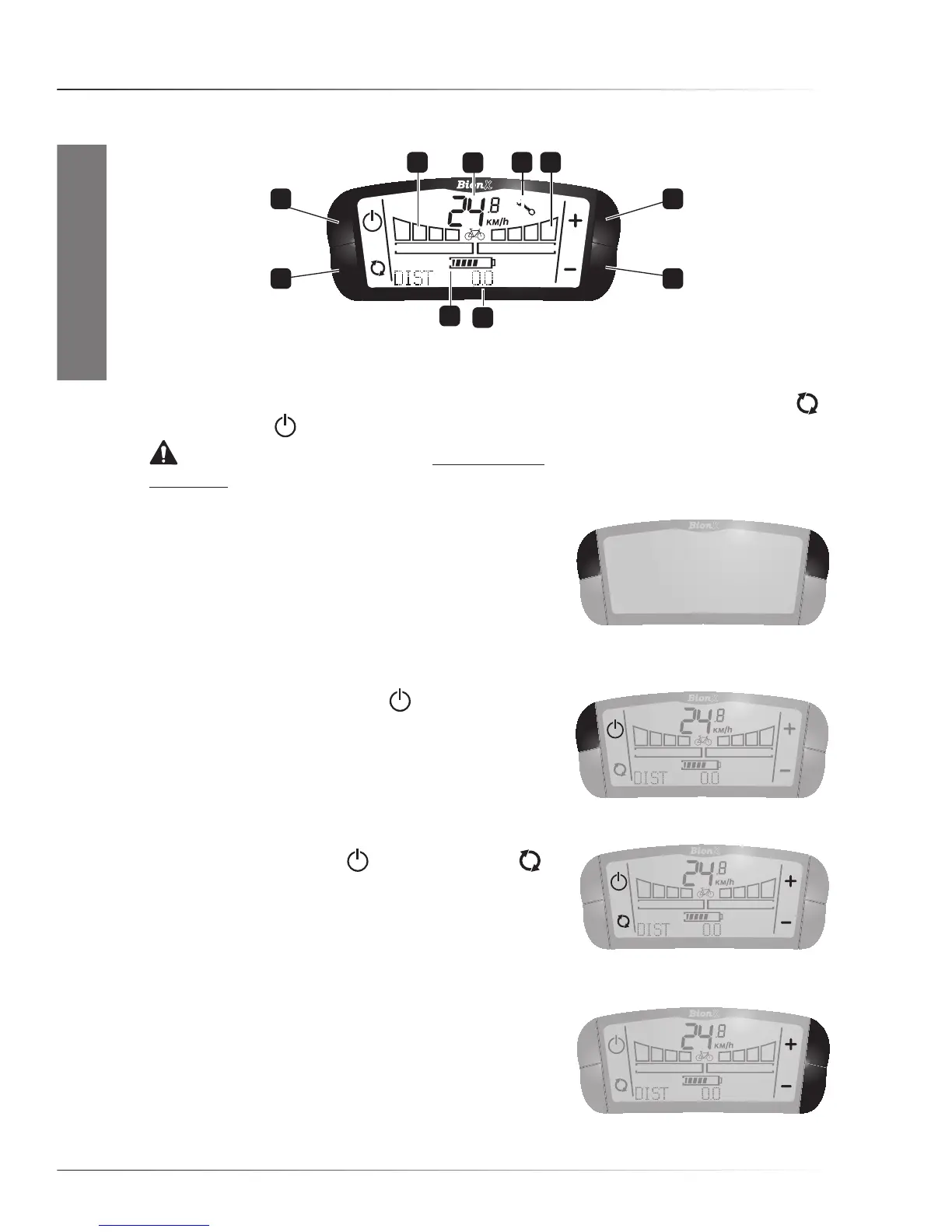
1•Speedindication2•ServiceIndication*3•Currentassistancelevel4•On/‘+’button5•‘-’ Button
6•Distance,Odometer,Chronometer,Averagespeed7•Batterychargelevel8•Mode-switch
button9•On/Off button10•Currentgenerationlevel.
*WARNING. If the Service Indication (a steady or blinking wrench symbol) is visible on the display, refer
immediately to paragraph 7.1 for instructions.
• Switching system On/Off
Press any of the two top buttons briefly to switch the system
On. The battery pack will beep four times, the system will
performashortself-check(shownonthedisplayasa
countdowninthe‘speed’-field),andthesystemwillactivate
(switchto‘On’).Assoonasthesystemis‘On’,thescreen
will display and each function will be shown next to its corresponding button.
To switch the system Off, press the
button. The battery
pack will beep five times. Riding with the system ‘On’ in level
0isthesameasridingwiththesystem‘Off’.Ifthebikeisleft
with the system On, it will automatically switch Off after
about10minutes.
• Changing the position of the buttons
Normally,theOn/Offbutton andthemode-switch
buttonareontheright,andthe‘+’and‘-’buttonsontheleft.
Thefunctionalityofthebuttonscanbeswappedright-to-left.
The code to access this is 2009.Moreinformationabout
programming via the controller can be found later in this manual.
• Assistance
When the motor provides power, the bicycle is in assistance
mode. There are four levels of assistance. The level of
assistance is shown by the bar graph on the right, below the
digits for speed. The narrow graph on the display shows the
amount of energy delivered to the motor.
To increase assistance, press button ‘+’. For assistance level 1, press once. Press again for more



 To Next Page