Network Connection Manual
Ver.2.00
- Port
Check whether the port configured in the printer and the host(PC,
PDA) are the same.
- Authentication/Encryption
Check the authentication/encryption setting status.
Check whether the settings of the printer and the AP(wireless
terminals) are the same.
PING Check
Checking IP collision
- When entering IP address manually without using DHCP, you must
check whether the corresponding IP address is used by other
equipment. The printer may not work normally when there is a
collision in the IP address.
- When the printer is turned off, carry out the Ping Test to the printer IP.
Ping TEST
- Turn off the printer.
- Search “cmd” and then click “Open”.
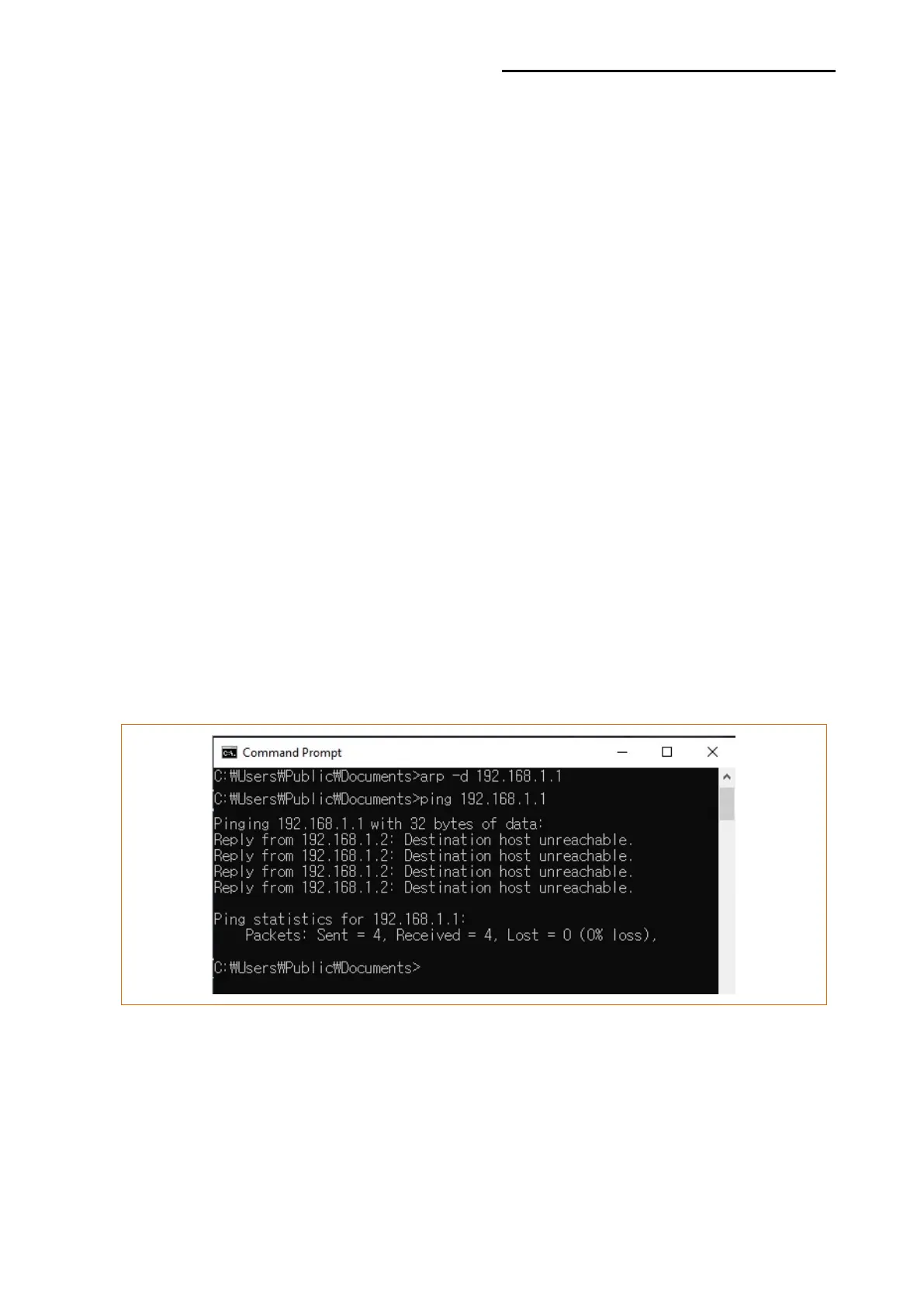
- Enter “ARP –d {printer IP}” and delete ARP table.
- Enter “ping {printer IP}”.
- ARP –d, ping {IP address}
When you see “Destination host unreachable.” as shown below, it means that there is no
collision. The corresponding IP can be used.













 To Next Page