39
FM Modulation
Follow the steps below to setup FM modulation output.
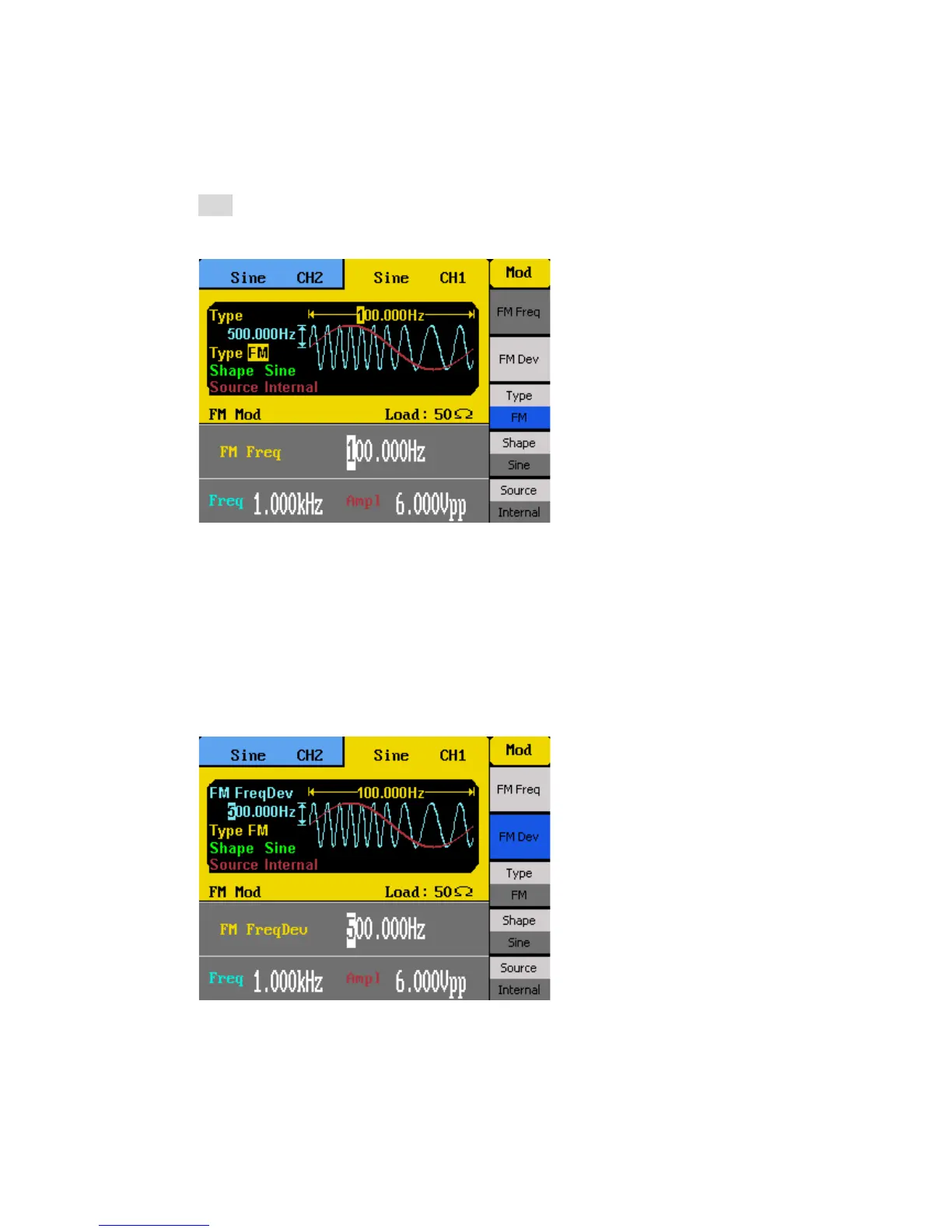
1. Configure your waveform with the desired frequency and amplitude, then press the
Mod button. Under Type, select FM.
2. There are four parameters that can be adjusted: FM Freq, FM Dev, Shape, and
Source.
3. To adjust FM frequency, select FM Freq option from the menu. FM frequency
parameter will be highlighted by the cursor on the first digit. Use the rotary knob or
the numeric keypad to enter the modulating frequency.
FM Freq adjustable range: 2 mHz – 20 kHz
Note: Adjustable range is dependent on the carrier frequency.
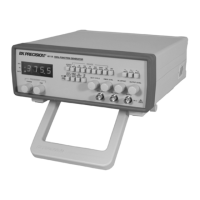
4. Select FM Dev to adjust the maximum FM deviation. Use the rotary knob or the
numeric keypad to enter the frequency.
5. Select Shape to choose the shape of the modulating waveform. Options are: Sine,
Square, Triangle, UpRamp, DnRamp, Noise, Arb.
UpRamp = Upward ramp waveform
DnRamp = Downward ramp waveform



 To Next Page