URSA Mini Shoulder Kit Assembly71
Step 1.
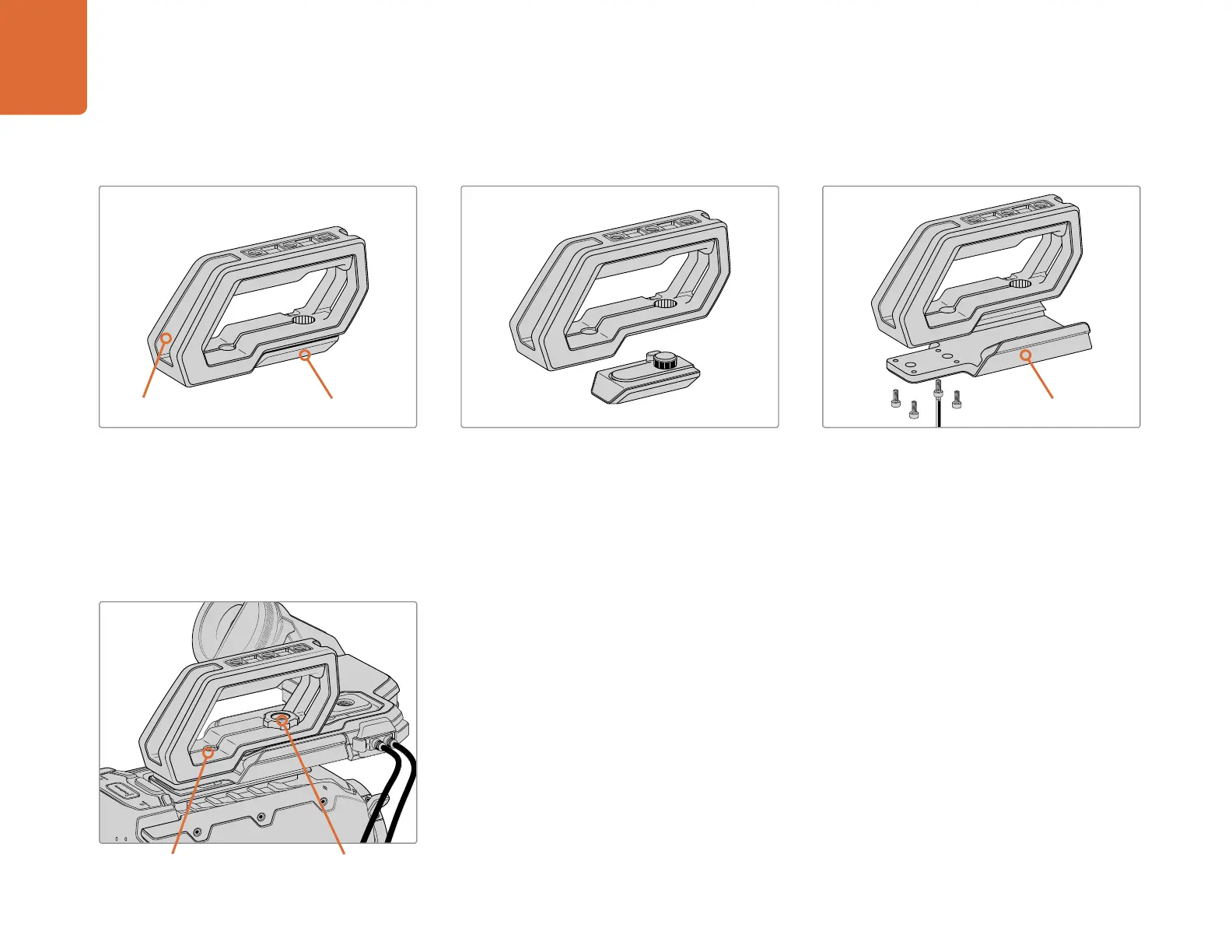
Place your URSA Mini on a flat, stable surface so
you can access the top of your camera.
Step 2.
Remove the URSA Viewfinder cap from the
base of the handle by gently lifting its arm away
from the side of the handle and pulling the cap
from the hole.
Step 3.
Fasten the URSA Viewfinder adapter plate to the
handle using the 4 x M3 screws with a 2.5mm hex
key driver.
To attach the top handle with URSA Viewfinder:
Step 4.
Fasten the handle to any two of URSA Mini’s top 1/4” mounting points using the two supplied 1/4” screws
with a 5mm hex key driver. URSA Mini’s rear two mounting points are recommended for most situations,
but you can choose any pair for better weight balance when using large lenses. Avoid over-tightening
the screws as it may damage the screw threads.
The hole inside the front of the handle is used with the thumb screw when attaching and adjusting the
URSA viewfinder. For information on how to attach the URSA Viewfinder to the top handle, refer to the
‘Blackmagic URSA Viewfinder’ section in your URSA manual.
Top handle URSA Viewfinder cap URSA Viewfinder adapter plate
Thumbscrew for adjusting the
optional URSA Viewfinder position.
2 x 1/4” socket head screws for
mounting handle to camera



 To Next Page