Mini Converter SDI to HDMI 4K
15
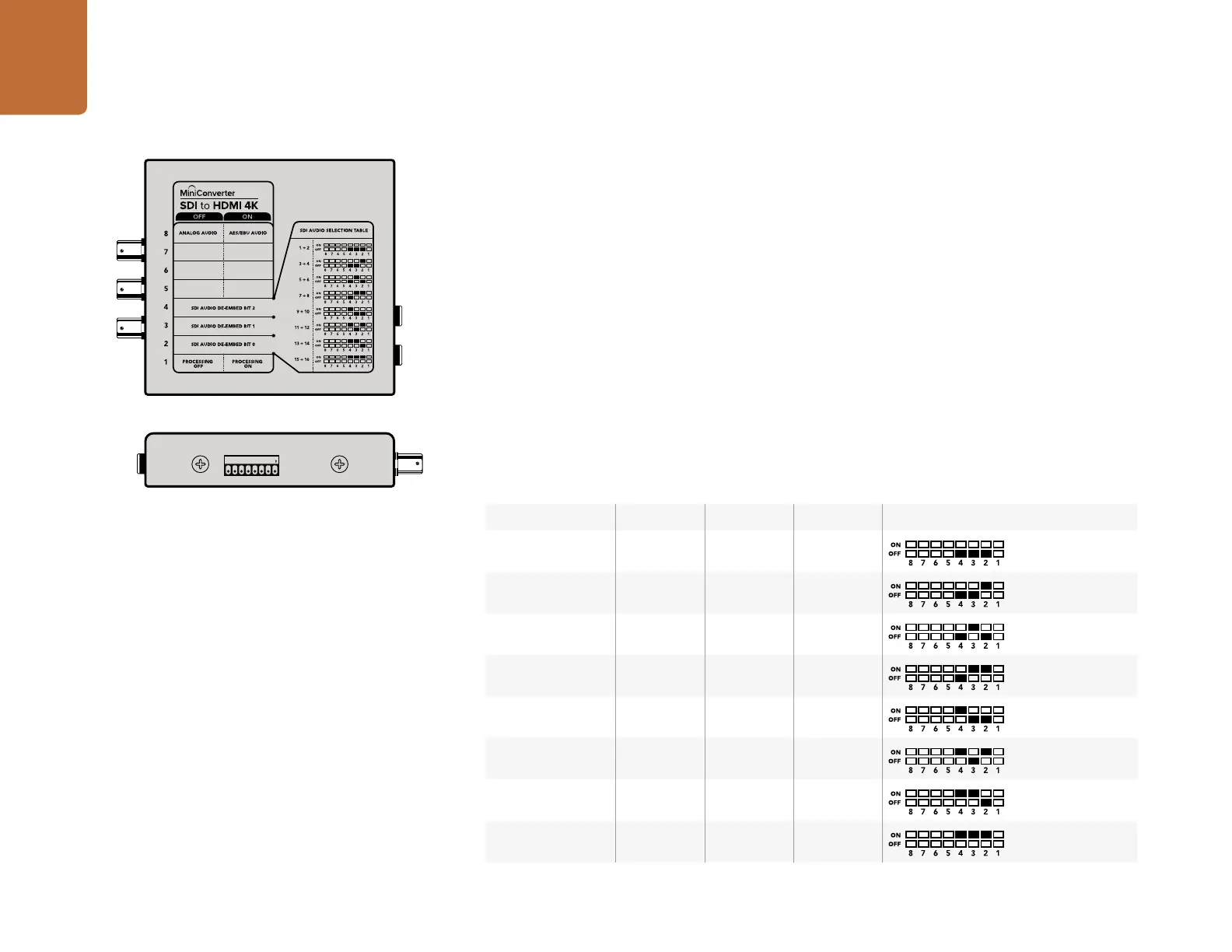
Audio Channels Switch 4 Switch 3 Switch 2 Switch Diagram
1 and 2 OFF OFF OFF
3 and 4 OFF OFF ON
5 and 6 OFF ON OFF
7 and 8 OFF ON ON
9 and 10 ON OFF OFF
11 and 12 ON OFF ON
13 and 14 ON ON OFF
15 and 16 ON ON ON
1
ON
2 3 4 5 6 7 8
Mini Switches
Mini Converter SDI to HDMI’s mini switches provide the following settings:
Switch 8 - Analog Audio, AES/EBU Audio
Set switch 8 to OFF to select balanced analog audio, or to ON for digital AES/EBU audio output.
Switch 4 - SDI Audio De-Embed Bit 2
Switches 4, 3 and 2 are grouped together to provide 8 ON/OFF combinations. Having eight different
combinations allows eight independent pairs of audio channels to be de-embedded from your SDI input
and output to HDMI, analog or AES/EBU audio.
Switch 3 - SDI Audio De-Embed Bit 1
See switch 4 description.
Switch 2 - SDI Audio De-Embed Bit 0
See switch 4 description.
SDI Audio Selection Table
Change your converter's internal settings by adjusting the
mini switches using the tip of a pen.










 To Next Page