Battery Converter SDI to HDMI
64
SDI to HDMI
Battery Converter
HDMI
USB
SDI IN
ON
OFF
1
10
0 9050
POWER
+12V to 31V DC
100
BATT
SDI LOOP
SDI LOCK
2
3
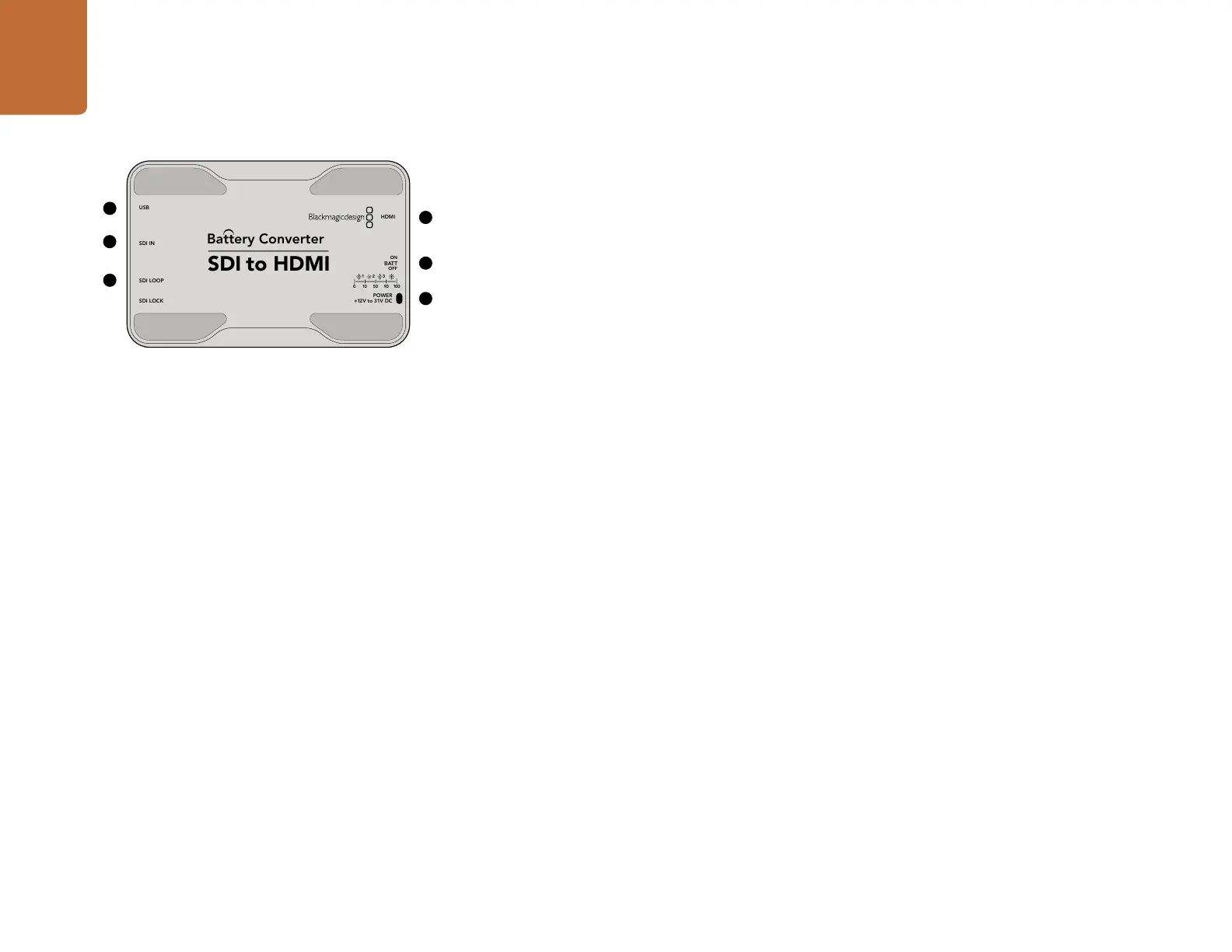
Blackmagic Battery Converter SDI to HDMI
Connect a huge range of HDMI displays and video projectors to SDI based equipment. Your Battery
Converter SDI to HDMI automatically detects between SD/HD/3G-SDI and converts to HDMI with
embedded audio. Battery Converter SDI to HDMI includes a built in rechargeable battery and recessed
connectors protected by an aircraft grade aluminum chassis.
Connectors
1. MINI-B USB PORT
Connects to the Converter Utility software via your Mac OS X or Windows computer. The Mini Converter’s
internal software is also updated using the USB port.
2. SDI In
Primary SDI input BNC connector.
3. SDI LOOP
Loop through output of your SDI input BNC connector.
4. HDMI
HDMI type A video output.
5. ON BATT OFF
Switches battery power On or Off. When set to On, the Battery Converter will keep working even if
external power is lost. When set to Off, only external power is used to ensure built in battery power is
saved. The LED near the switch indicates the battery charge level by a continuous illumination for 100
percent charge, three flashes for 50 to 90 percent charge, two flashes for 10 to 50 percent charge and a
single flash if less than 10 percent charge is remaining.
6. POWER +12V
12 volt power supply input.
1
2
3
4
5
6
Battery Converter SDI to HDMI










 To Next Page