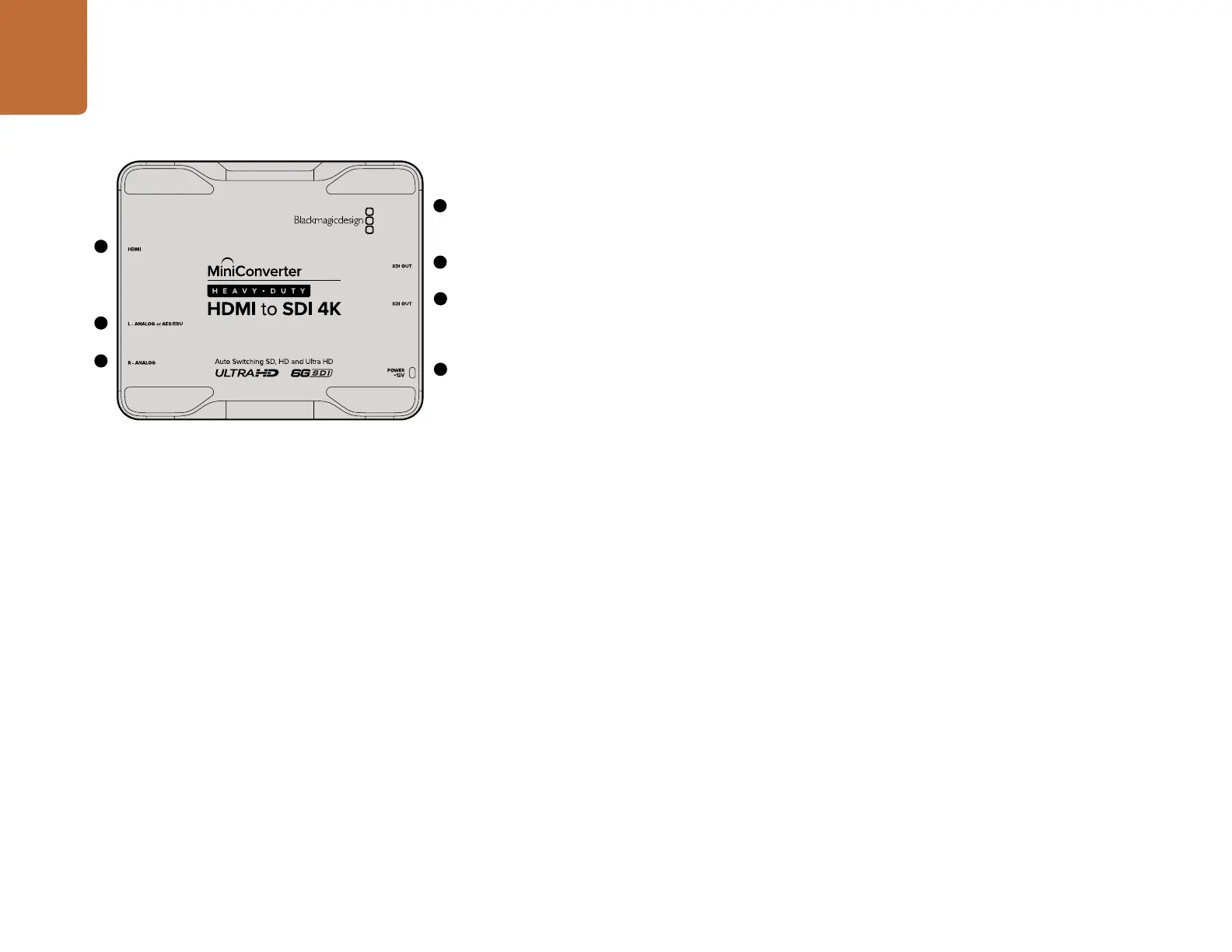
Mini Converter Heavy Duty HDMI to SDI 4K
61
Blackmagic Mini Converter Heavy Duty HDMI to SDI 4K
Convert HDMI outputs from devices such as HDV cameras and game consoles to SDI with the choice
to embed audio from HDMI, AES/EBU or balanced analog audio inputs. This means you can send
video signals from HDMI over SDI using the longest SDI cables. You can even add SDI outputs to
computers with HDMI compatibility. All connectors are recessed and protected by a tough aircraft
grade aluminum chassis.
Connectors
1. HDMI
HDMI type A video input.
2. L - ANALOG or AES/EBU
Balanced left channel analog audio or AES/EBU digital audio input 1/4" TRS connector.
3. R - ANALOG
Balanced right channel analog audio output 1/4" TRS connector.
4. MINI-B USB PORT
Connects to the Converter Utility software via your Mac OS X or Windows computer. The Mini Converter’s
internal software is also updated using the USB port.
5. SDI OUT
SDI video output BNC connector.
6. SDI OUT
Secondary SDI output.
7. POWER +12V
12 volt power supply input.
3
4
5
7
6
1
2
Mini Converter Heavy Duty HDMI to SDI 4K










 To Next Page