Page 14
LB Hex™ Unplugged Manual Rev. A © 2018 Blizzard Lighting, LLC
Using the IR Remote Control
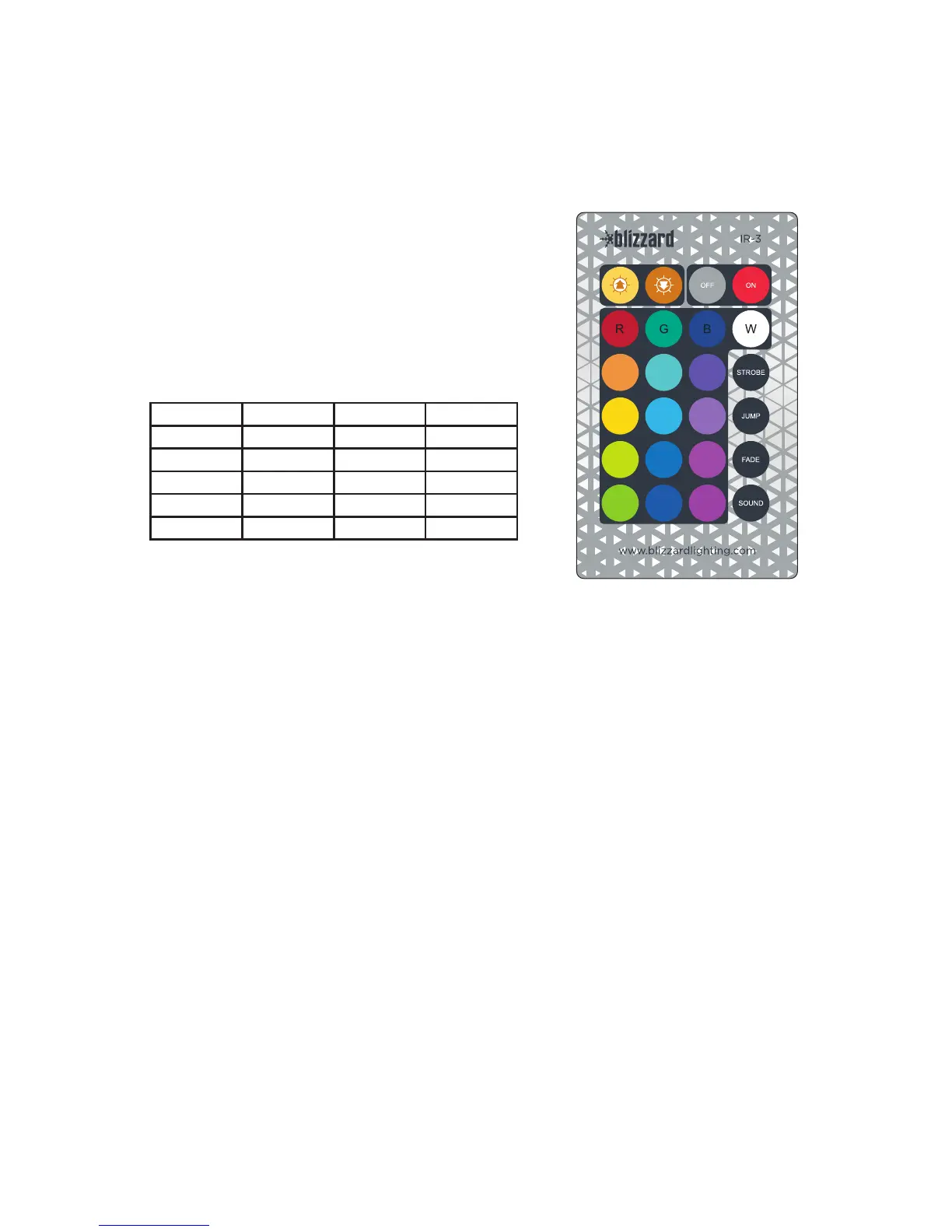
The IR-3 remote control will allow you to transition through dozens of color and brightness
combinations, access automated color jump and fade programs, add variable speed white
strobeeects,andaccesssoundactivemodewithmic
sensitivity adjustments.
First,inthexture(s)controlpanelmenu,navigateto
IR--, and set it to “on” (IRon).
*Before operating the remote, be sure to remove the
plastic tab in the battery compartment. Then, point
theremotecontroldirectlytowardsthexture(the
sensor is on the front face), and note the best perfor-
mance distance is within 5-meters (16.4 ft).
Button Conguration:
Up Down O On
Red Green Blue White
Amber LT. Green LT. Blue Strobe
Orange Mint UV Jump
Almond Aqua Purple Fade
Yellow Cyan Magenta Sound
<UP>
Used to increase the value of the current setting.
<DOWN>
Used to decrease the value of the current setting.
<OFF>
1.)TurnstheLEDso.
2.)Wheno,the<UP/DOWN> buttons will change the DMX channel (d001-d512).
<ON>
1.) Turns the LEDs on.
2.) When on, the <UP/DOWN> buttons will:
a.) Static colors = increase/decrease brightness
b.) Strobe = increase/decrease speed
c.) Jump = increase/decrease speed
d.) Fade = increase/decrease speed
e.) Sound = increase/decrease microphone sensitivity level
<STROBE>
Pressforwhitestrobeeects.Usethe<UP/DOWN> buttons to adjust the speed.
<JUMP>
Pressforautocolorjumpeects.Usethe<UP/DOWN> buttons to adjust the speed.
<FADE>
Pressforautocolorfadeeects.Usethe<UP/DOWN> buttons to adjust the speed.
<SOUND>
Press for sound active mode. Use the <UP/DOWN> buttons to adjust the mic sensitivity.


 To Next Page