12
button indicator will illuminate.
● Power O AC300: Long press the power button. The power button indicator
light will turn o.
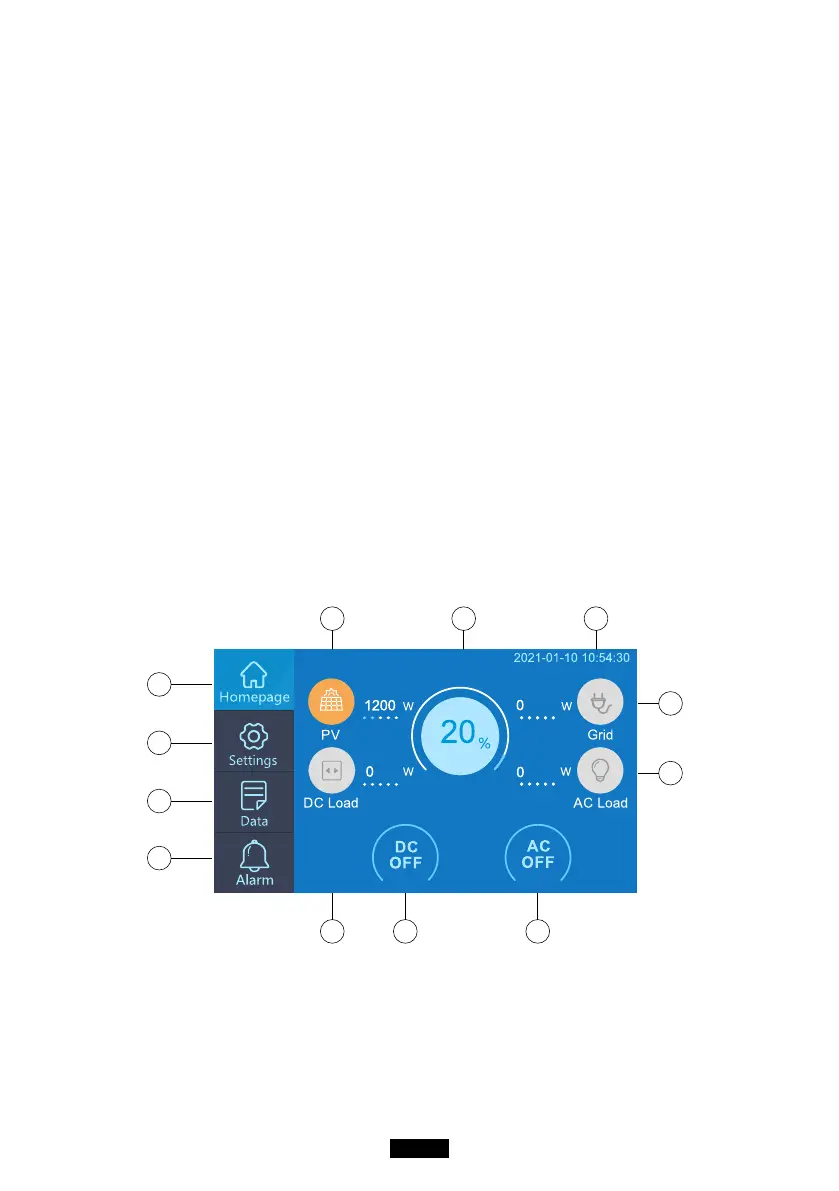
● DC power switch and AC power switch are accessible via the Touchscreen
LCD. Press the “DC ON/OFF” button and/or “AC ON/OFF” button on the screen
to turn ON/OFF the DC/AC output.
● AC300+B300 will turn on automatically from Power O status when either
grid charging and/or PV charging is applied to the unit.
● User can also power ON/OFF of the system by turning ON/OFF B300.
● AC300+B300 will turn o in 4 hours under:
a: No Input and Output b: AC and DC switch at OFF state
07. USER INTERFACE
7.1. Main Interface
Tip:
The LCD resistive touchscreen, recommended to press lightly with the edge of
your ngernail until it "beeps" when it registers a press. (NOTE: Touchscreen
sounds can be disabled in the Settings menu).
e
f
g
k
l
ih j
a
b
c
d



 To Next Page