30
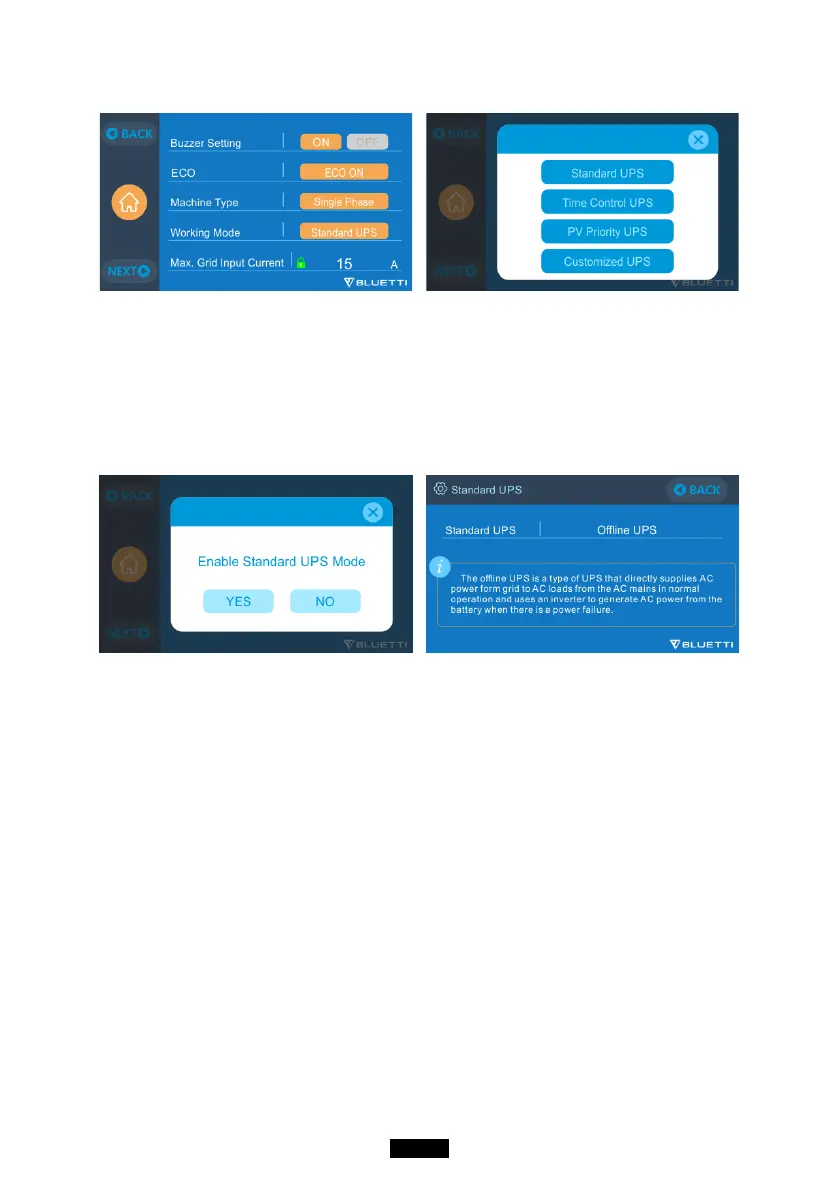
●The default working mode is “Standard UPS Mode”.
10.2. Enable UPS Running Mode
10.2.1 Standard UPS Mode
● The AC300+B300 will power your load directly from the grid and maintain a
100% charge. When grid power fails, the AC300 switches to internal batteries.
10.2.2. Time Control UPS Mode
● Set the times of the AC300+B300 to be charged via grid power and the
times to run loads from its battery.
Charge Time: Set the time of when the AC300+B300 is to be recharged by
grid to avoid the higher electricity rates.
Discharge Time: Set the time to switch to batteries to power loads connected
to the Sub Panel (Optional Purchase).
● Parameter Setting:
Battery SOC Low: When the remaining capacity of AC300+B300 is under the
preset High/Low battery capacity, AC300+B300 will stop powering connected
loads.
Battery SOC High: The maximum capacity AC300+B300 can be charged via
grid. Remaining capacity will be charged via solar panels, car, lead-acid battery
or second adapter only.



 To Next Page