35
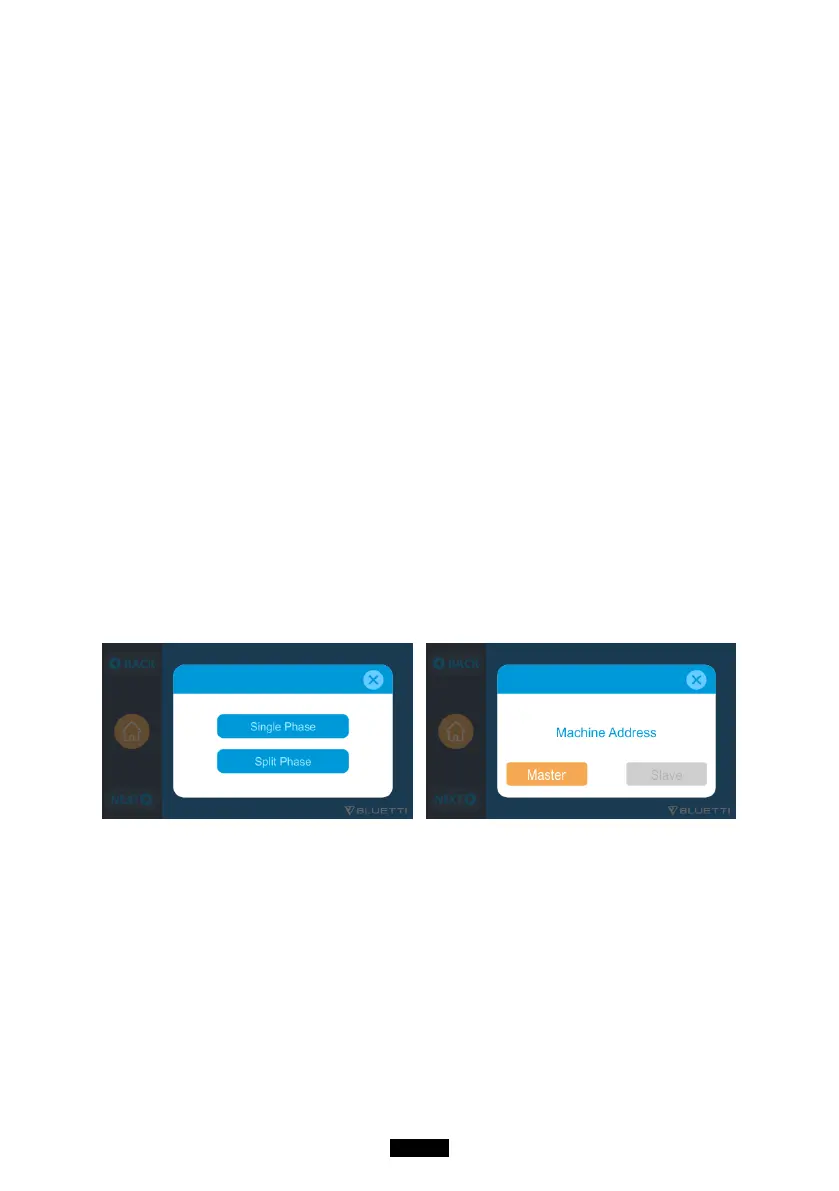
● The “Machine Type” setting on screen is used to enable or disable Split
Phase output. Split-Phase output is achieved by bonding two AC300 into one
power system to double the available output power, voltage, and capacity.
●“Split Phase” is only used for connecting both *2 AC300 together (exclusive
for the 100-120V version of the AC300). A Fusion Box(P30A) is required (sold
separately).
● Launch Split Phase Function:
Note:
If one of the AC300 is out of power, the Split Phase Bonding function will
deactivate automatically.
Step 1: Plug the output cables from each of the two AC300 to the Split Fusion
Box Pro.
Step 2: Plug the communication cables from each of the two AC300 to the Split
Fusion Box Pro.
Step 3: Set the Machine Type to "Split Phase" on AC300 either.
Step 4: Select "Master" or "Slave" on the operating AC300. Select "Master" will
set the operating AC300 as the one to control both two AC300. Then select
"Slave" for another AC300.
Step 5: Clear the alarm history if the connection failed and reconnect the
cables.



 To Next Page