BMG LABTECH Omega Operating Manual
2014-05-16 0415B0001G 23/29
Use of the Advanced TRF Optic Head:
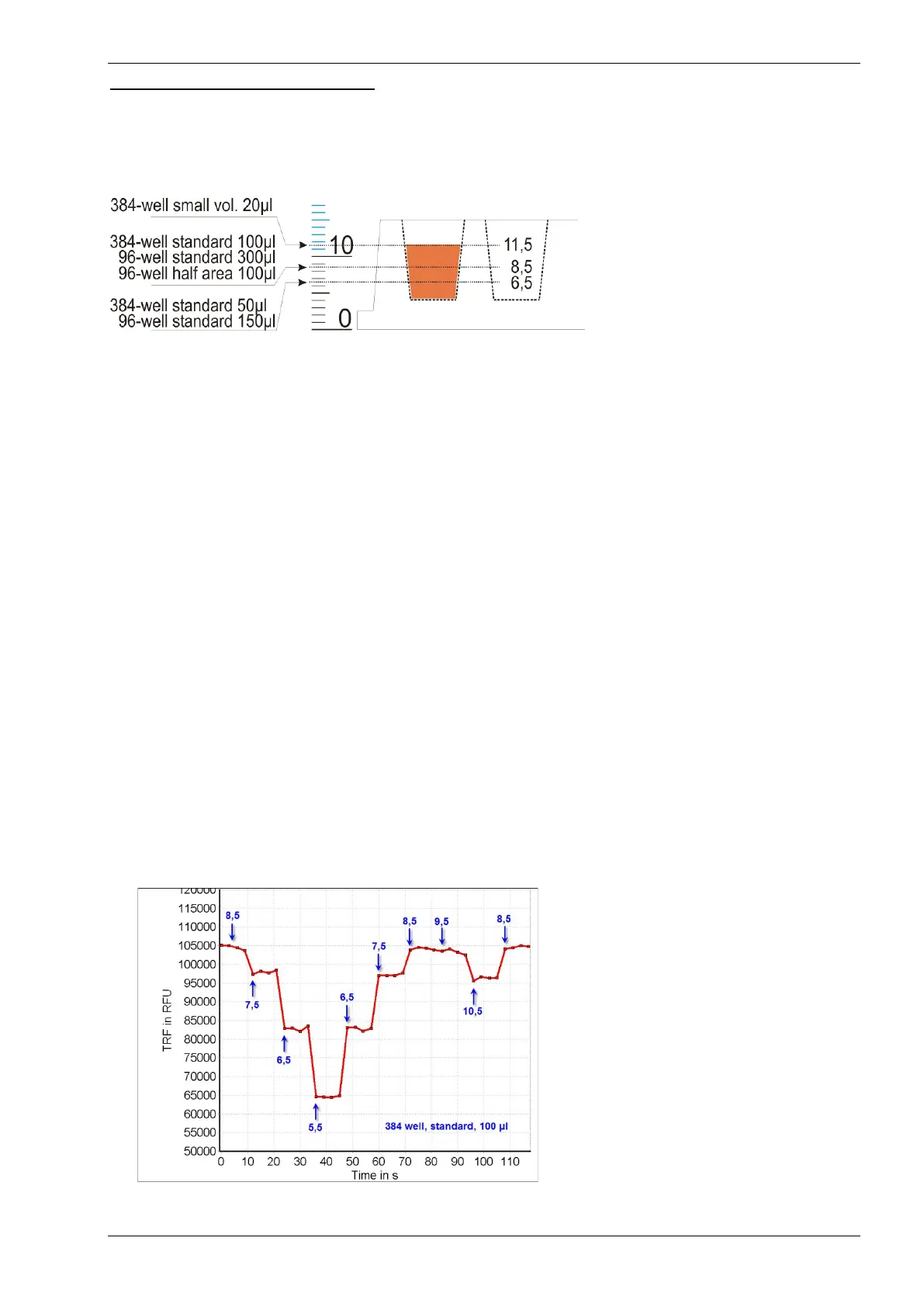
The best sensitivity of a fluorescence measurement in a microplate well can be achieved by exciting the
fluophore at the z position of the maximal light absorption. This is done by adhering to the following z-heights
when standard 96 or 384 well plates and volumes are used (Fig. 24).
Figure 24: Recommended z-height
positions for respective well formats
and volumes
1) Use the knob located at the top of the TRF-optic and set the z-height according to the plate format and
well volume.
2) Dispense a known volume of your assay with the highest concentration in well B2. Insert the microplate
into the reader.
3) Start the Reader Control software, go to ‘Settings | Program Configuration | Additional Options’ and select
‘Automatic open current state display’.
Next, click on the Test Protocol tab, select the button for ‘Time Resolved Fluorescence’ and double click on
‘TRF_OpticHead_Adjust’ to open the protocol.
5) Make sure to select the correct microplate and the correct excitation and emission filters.
6) Double check the layout to make sure well B2 is selected. If you have dispensed your assay solution into
a different well, change the layout accordingly.
7) Set the Gain to 2300 (for white microplates) or 2500 (for black microplates). In general, BMG LABTECH
recommends white plates and 200 flashes for best performance.
8) Start the protocol and double-click on the well currently being measured. A window appears and displays
the TRF raw data (RFU) / time.
9) Now, turn the knob on the Advanced TRF-optic and watch how the intensity is changing. Move the lens up
and down in 1 mm steps after approx. 10 sec to see 4-5 data points / setting.
The following image shows how to determine the optimal z-height for maximal intensity:
Figure 25: Determination of the best z-height
in a 384 well plate format. Note the change
in intensity at different z-heights. The optimal
z-height was set at 8,5 mm.


 To Next Page