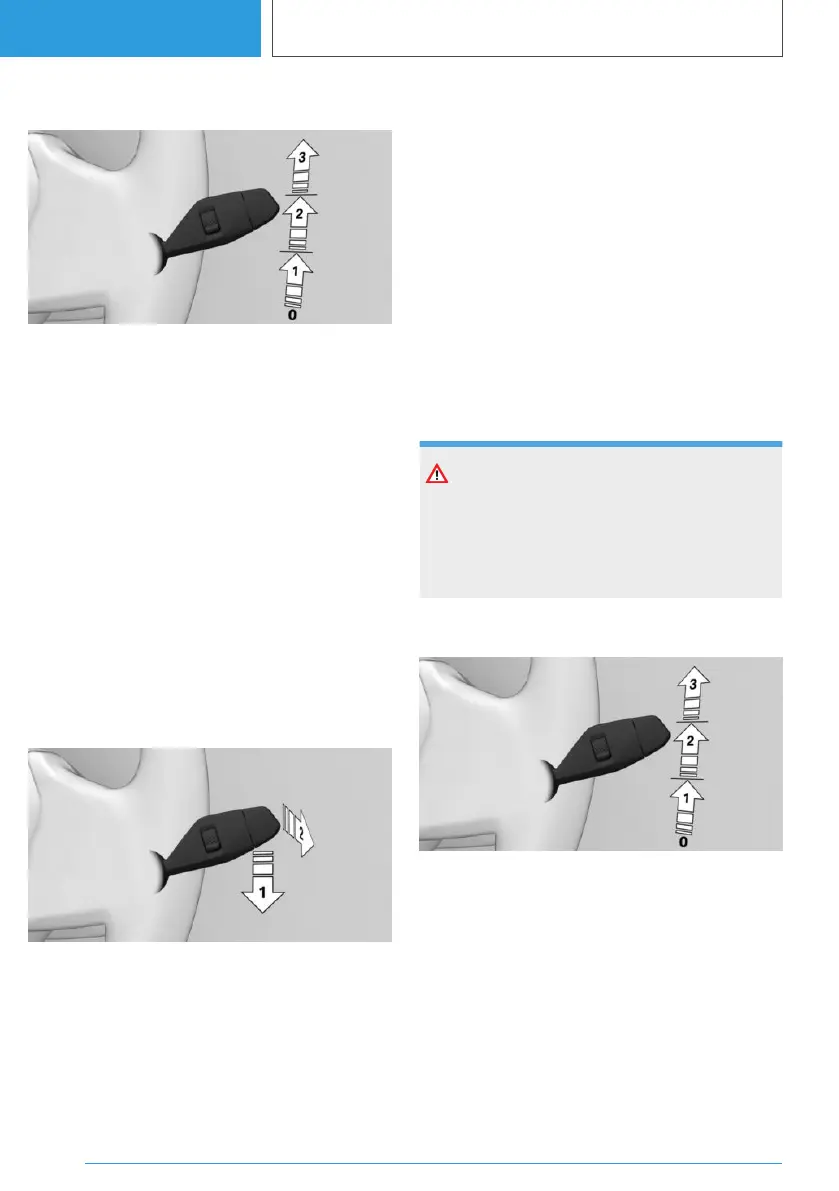
Switching on the wiper system
Press the lever upwards to the desired position.
▷ Rest position of the wipers, position 0.
▷ Rain sensor, position 1.
▷ Normal wiper speed, position 2.
When the vehicle is at a standstill, the wipers
switch to intermittent mode.
▷ Fast wiper speed, position 3.
When the vehicle is at a standstill, the wipers
switch to normal speed.
If a journey is interrupted with the wiper system
switched on: when the journey is resumed, the
wipers continue operating at the previous set‐
ting.
Switching off the wiper system and
flick-wiping
Press the lever downwards or forwards.
▷ To switch off: press lever downwards, ar‐
row 1, until position 0 is reached.
▷ To flick-wipe: press the lever downwards
from position 0, arrow 1, and press the lever
forwards to position 0 or position 1, arrow 2.
The lever returns to position 0 when re‐
leased.
Rain sensor
Principle
The rain sensor automatically controls the wiper
operation depending on the rain intensity.
General
The sensor is mounted on the windscreen, di‐
rectly in front of the interior mirror.
Safety note
NOTE
In car washes, the wipers may inadvertently
start moving if the rain sensor is activated.
There is a risk of material damage. Deactivate
the rain sensor in car washes.
Activating the rain sensor
Press the lever upwards once from position 0, ar‐
row 1.
Wiping is started.
The LED in the wiper lever is illuminated.
If there is frost, wiping may not start.
Deactivating the rain sensor
Press the lever back to position 0.
Seite 150
CONTROLS
Driving
150
Online Edition for Part no. 01405A38CB9 - VI/21



 To Next Page