BOGE FOCUS compressor control for piston compressors Page 27
FOCUS 1.7 Warning message / Fault message
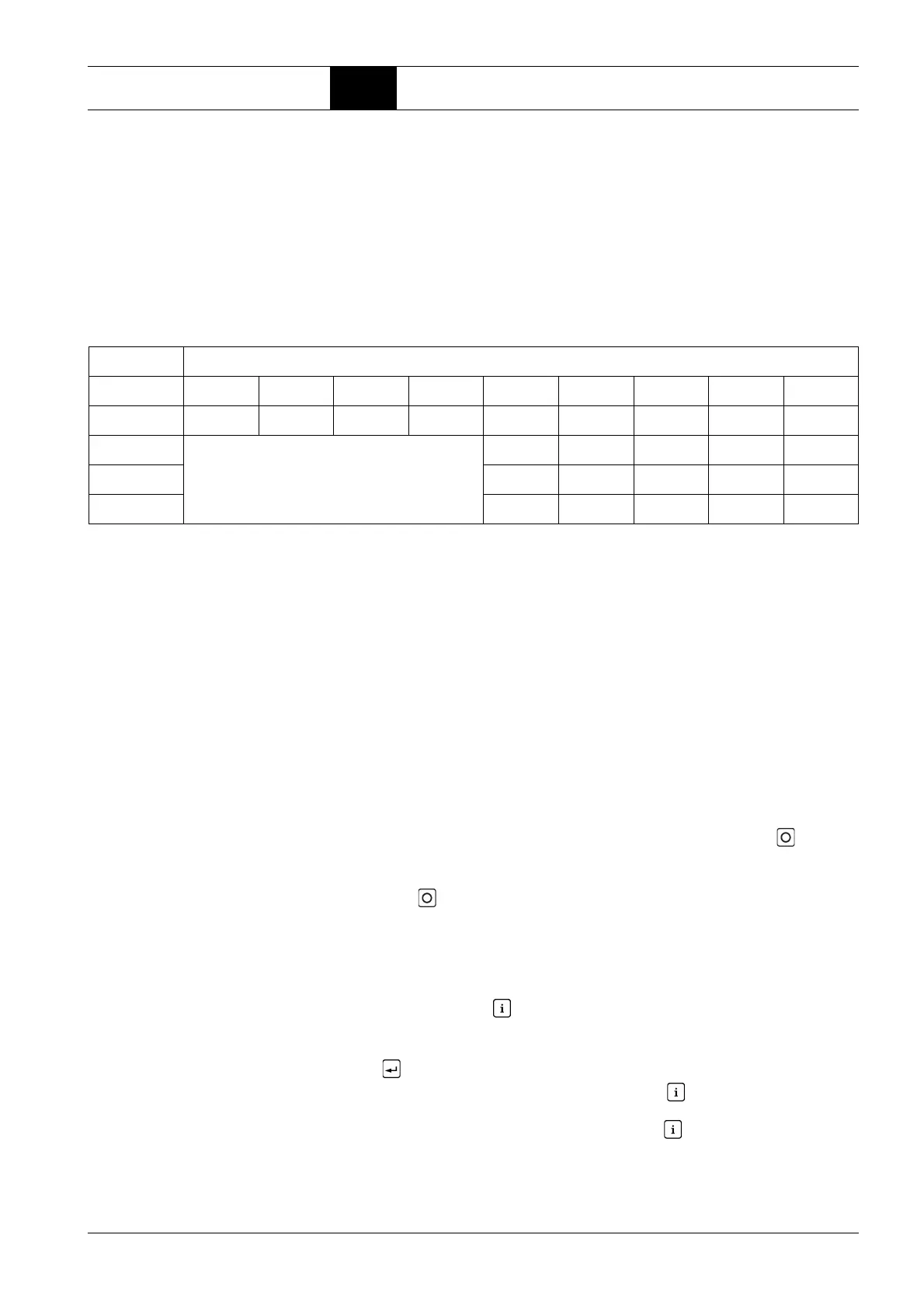
Example without monitoring and emergency operation function
Four compressors (145 psi), all of which are equipped with a FOCUS control,
are connected by means of RS485 interfaces. The pressure at user's facility
is to be completely released over the weekend and over night and, in addition,
be able to be reduced. Providing sufficient receiver / network volume, the
pressure values can be set according to the following table allowing pressure
reduction by 22 psi which can be actuated by an external contact or by means
of a switch clock – as regards switch clock actuated pressure reduction, also
see Chapter Unplanned compressed air requirement.
1.7 Warning message / Fault message
Warning message /
Fault message
As far as pending messages are concerned there is a difference between
warning and fault messages.
Depending whether an input is defined as fault or warning either only the warn-
ing is displayed ort he compressor is switched off at once via a fault message.
All warning and fault messages are saved by the control in the LogBook to-
gether with operating states and time.
If a message is pending when the control is powered up this is signalled at
once by means of a flashing LED.
In this case the boot display can be left by pressing the OFF key , or you
can get to the main menu by displaying and acknowledging the message.
Even if you leave the boot display via displaying the message, nevertheless
the OFF key has to be actuated once before the control resumes its normal
function.
Warning message
In case of a pending warning or servicing message the compressor remains
in operation and this status is visible by means of a flashing yellow LED.
Press the INFO button to display the message type and –number and de-
code the message via the message code list.
The warning can only be acknowledged / pre-acknowledged with the ENTER
button in this display. It leads to the main display.
Otherwise, repeated pressing of the INFO button leads to displaying of the
compressor state at the time the first unacknowledged (displayed) warning is
triggered. Repeated pressing of the INFO button takes you back to the pre-
vious message display – also from other displays (like the main display).
Compressor Parameter setting in psi
No P075 P076 P077 P078 P012 P013 P014 P015 P064
1 (Master) 137.8 108.8 116 87 145 129 123 107 0
2 144 128 122 106 0
3 no function 142 126 120 104 0
4 141 125 119 103 0



 To Next Page