-- 20 --
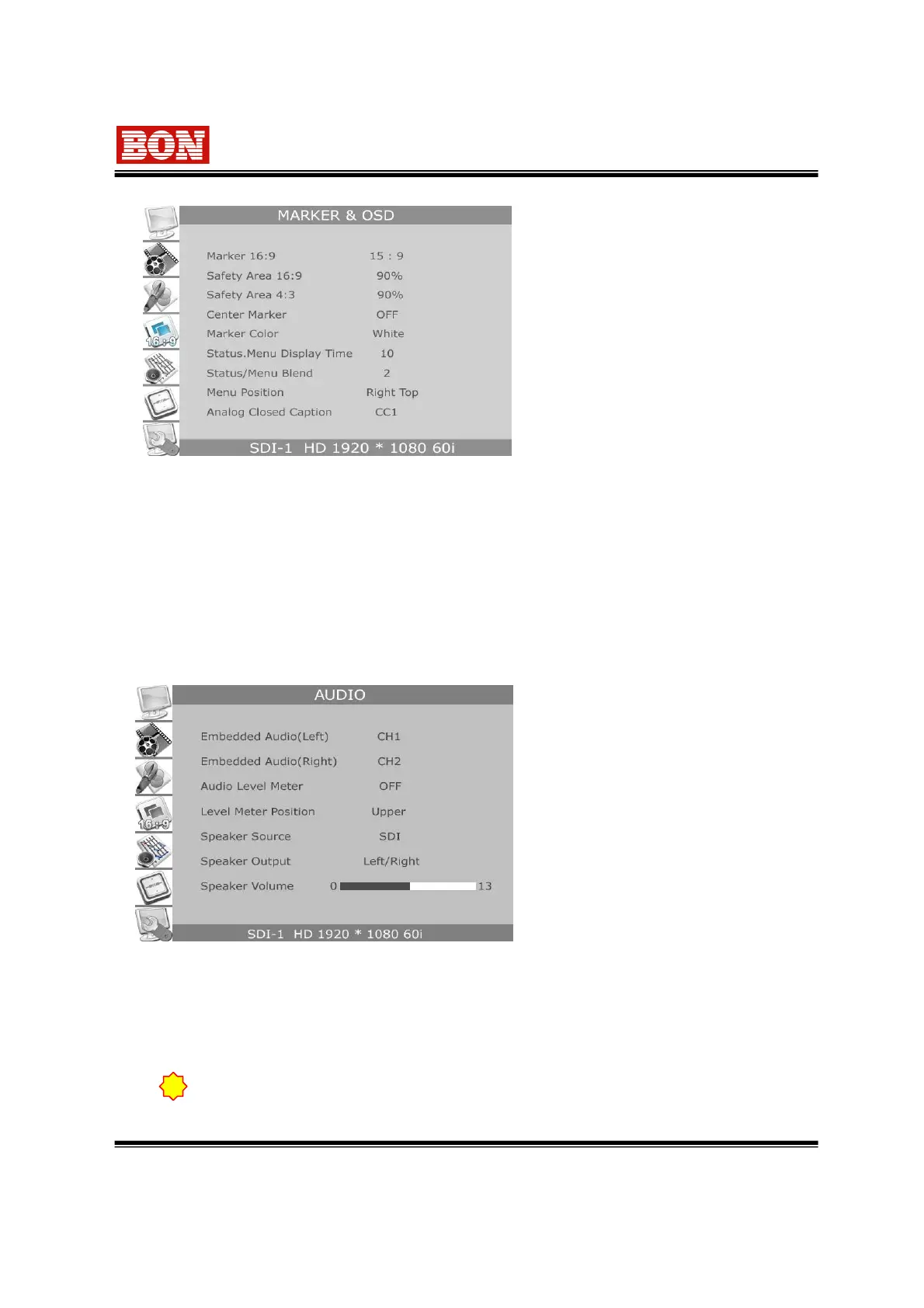
6-4. MARKER
▪ Marker 16:9
Set the type of marker in case
the aspect ratio setting is16:9.
- Type of Marker
: 4:3,15:9,14:9,13:9, 1.85:1,2.35:1, OFF
▪ Safety Area 16:9
Select the range of SAFETY AREA in
16 : 9 HD screen.
- Safety Area : 95%,93%,90%, 88%,85%
80%, OFF
▪ Safety Area 4:3
Select the range of Safety Area in 4:3
SD mode.
- Safety Area : 95%,93%,90%,88%,85%,
80%, OFF
▪ Center Marker : Select ON/OFF for center marker.
▪ Marker Color : Select Marker color. Color -> White, Red, Green, Blue, Gray, Black
▪ Marker Back Color : Select marker of area for safety in among Normal, Half tone or Black.
▪ Status/Menu Display : Set time and menu information.
Select one of 5sec,10/15/20/25/30~60 sec
▪ Status/Menu Blend : Set transparency of menu and indication window on the screen.
Menu Position: Select for Center, Left Top, Right Top, Left Button, Right Button
Analog Closed Caption: Select for OFF, CC1, CC2. This is for 608 Standard. The function provides
for composite, component signal as 525/60,625/50(NTSC,PAL)
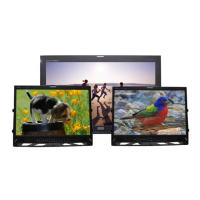
6-5. AUDIO
▪ Embedded Audio (L : left)
Select Digital Audio (L) output from 1 to 16
channels when SDI input.
▪ Embedded Audio (R : right)
Select Digital Audio (R) from 1 to 16
channels when SDI input.
▪ Audio Level Meter
Select ON/OFF for the function which can
display Embedded Audio signal of SDI
input to display a Level bar on the screen.
▪ Level Meter Position : Select position of level
display with upper or Lower.
▪ Speaker Source : Select Speaker output between Line (external input) and SDI
(De-embedded).
▪ Speaker Output : Select Speaker output status among L, R, L/R, MIX and OFF.
▪ Speaker Volume : Select Speaker output level.
Speaker setting menu is valid only for the option product.
!


 To Next Page