-- 22 --
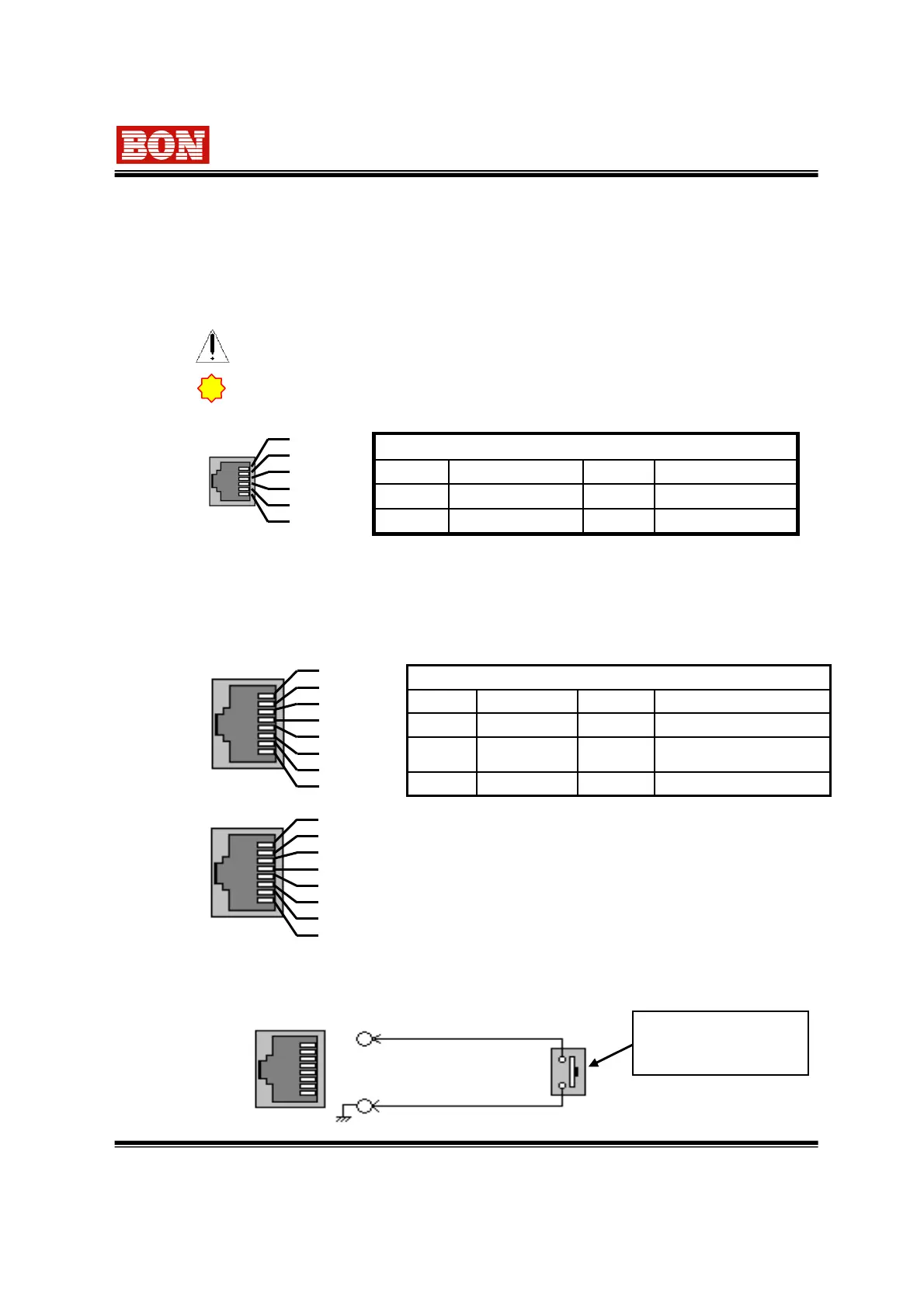
COMMON(GND)8 PINGPI Port 44 PIN
GPI Port 7(Stand by
Power ON/OFF)
7 PINGPI Port 33 PIN
GPI Port 66 PINGPI Port 22 PIN
GPI Port 55 PINGPI Port 11 PIN
Remote PIN Assignment
8. Remote Terminal Assignment
8-1. Remote Terminal(RJ-45) Assignment
Each terminal function can be set from the GPI CONTROL SETUP Menu.
1
2
3
4
5
6
7
8
Remote (RJ-45)
7. How to use Program Update Port
Program Update Port (RJ-11)
This is for upgrading firmware program, Color Temperature, Gamma and Color Measure. It also
can be used for controlling multi monitor by using exclusive control program on your PC.
Please consult with technician for update program or display adjustment.
1
2
3
4
5
6
Update(RJ-11)
!
In case program path is wrong or disconnected, the Failure message will be
displayed on information window.
For detail information, please consult to the service center.
TX-6 PINRX-3 PIN
TX+5 PINRX+2 PIN
GND4 PINNC1 PIN
Update Terminal Assignment
8-2. How to connect GPI Port
Connect with external contract point.
Contact Point Switch. It
is possible to attach pin
one by one.
GND Terminal : 8 pin of RJ-45
Control Terminal : 1 ~ 7 Pin
Through (RJ-45)
1
2
3
4
5
6
7
8
“Through Terminal” is the same function as “Remote Terminal”.
It is useful to connect with Remote Terminal
(Through Terminal: Option)


 To Next Page