-- 23 --
Waveform/ Time Code On/OffWaveform/ Time Code
Level Operation
(Connected: ON, Open: Off)
Operating conditions
Cursor UP when Menu setupUP (
▲
)
Switches the input RGBRGB Input
Adjust Safety area when 4:3Safety 4:3
Adjust Safety area when 16:9Safety 16:9
Center Marker ON/OFFCenter Marker on/off
Anamorphic ON/OFFAnamorphic on/off
Edge operation
Select the screen size as like front button functionSCAN
H/V Delay ON/OFFH/V Delay on/off
Menu ON/OFFMENU
Enter button ON/OFFENTER
Cursor DOWN when Menu setupDOWN (
▼
)
1:1 SCAN ON/OFF1:1 SCAN on/off
PaP mode ON/OFFPaP on/off
Switches the input YUVY/Pb/Pr Input
Switches the input PC-RGBPC-R/G/B Input
Switches the input DVIDVI Input
Switches the input SDI-2SDI2 Input
Switches the input SDI-1SDI1 Input
Switches the input VBS3VBS3 Input
Switches the input VBS2VBS2 Input
Edge operation
Switches the input VBS1VBS1 Input
Pixel to Pixel ON/OFFPixel to Pixel on/off
Audio Level ON/OFFAudio Level Display on/off
Switches the input Y/CY/C Input
Screen Mono ON/OFFMONO on/off
Marker 16:9 ON/OFFMARKER 16:9 on/off
Screen Blue Only ON/OFFBLUE on/off
SD Aspect ON/OFFSD ASPECT on/off
Marker 4:3 ON/OFFMARKER on/off
Power ON/OFFSTANDBY
Tally Lamp Green ON/OFFTally Green on/off
Tally Lamp Red ON/OFFTally Red on/off
Operating conditionsFunctionPort Assignment Items
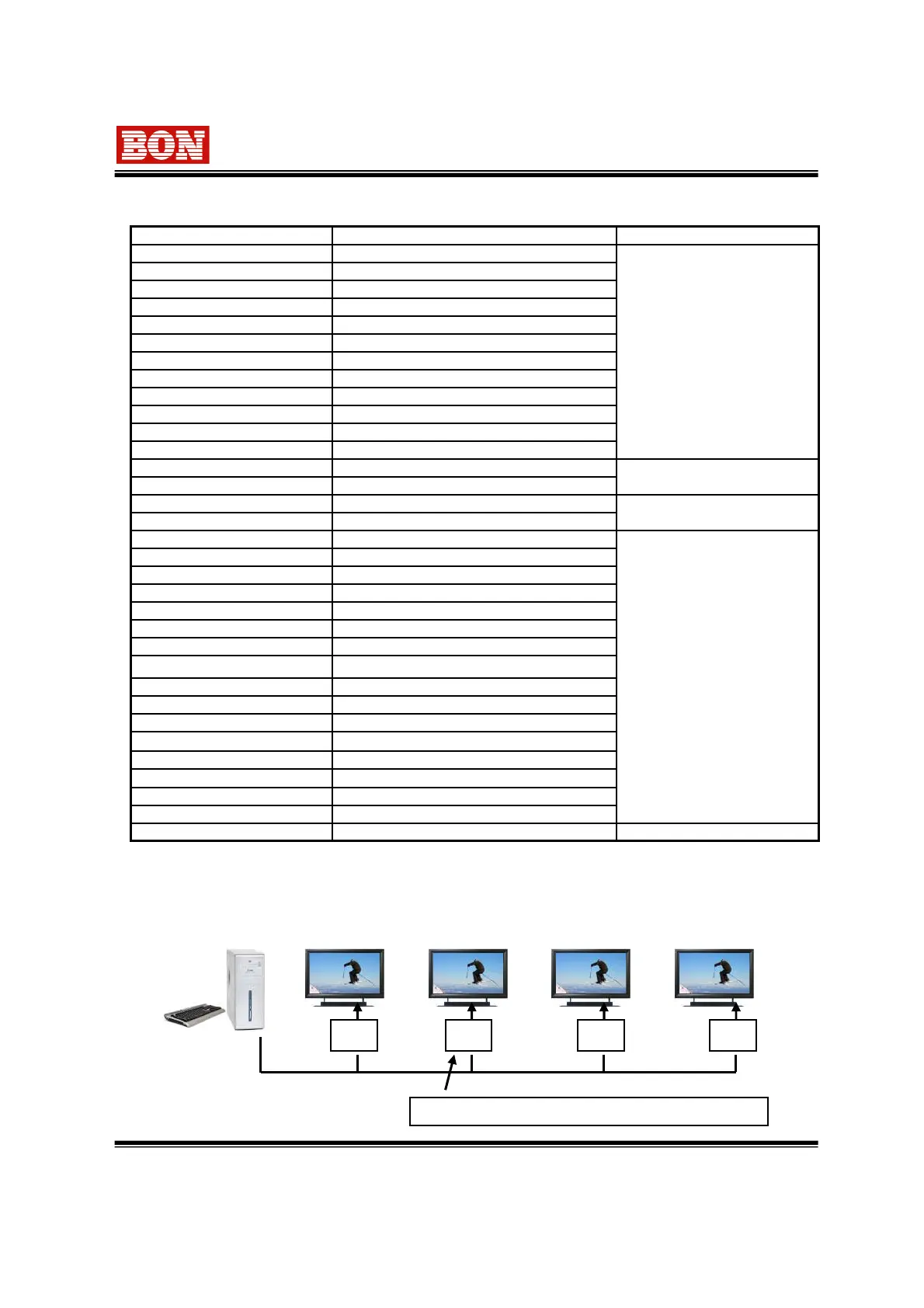
8-2. Remote Terminal Assignment
You can connect multi monitors and make multi monitors used by its own use Adator(RS-485<-
>Remote Board) and PC which its own use program is built in.(option)
A AA A
Adaptor(RS-485 <-> Remote Board) Converter
PC (Control S/W)
8-3. The way to connect and control multi Monitors
Specifications can be changeable for the efficiency and quality improvement of this
product without prior notice.


 To Next Page