Key to
press
Description Display
A
TWICE
C
A
3 TIMES
C
A
ONCE
C
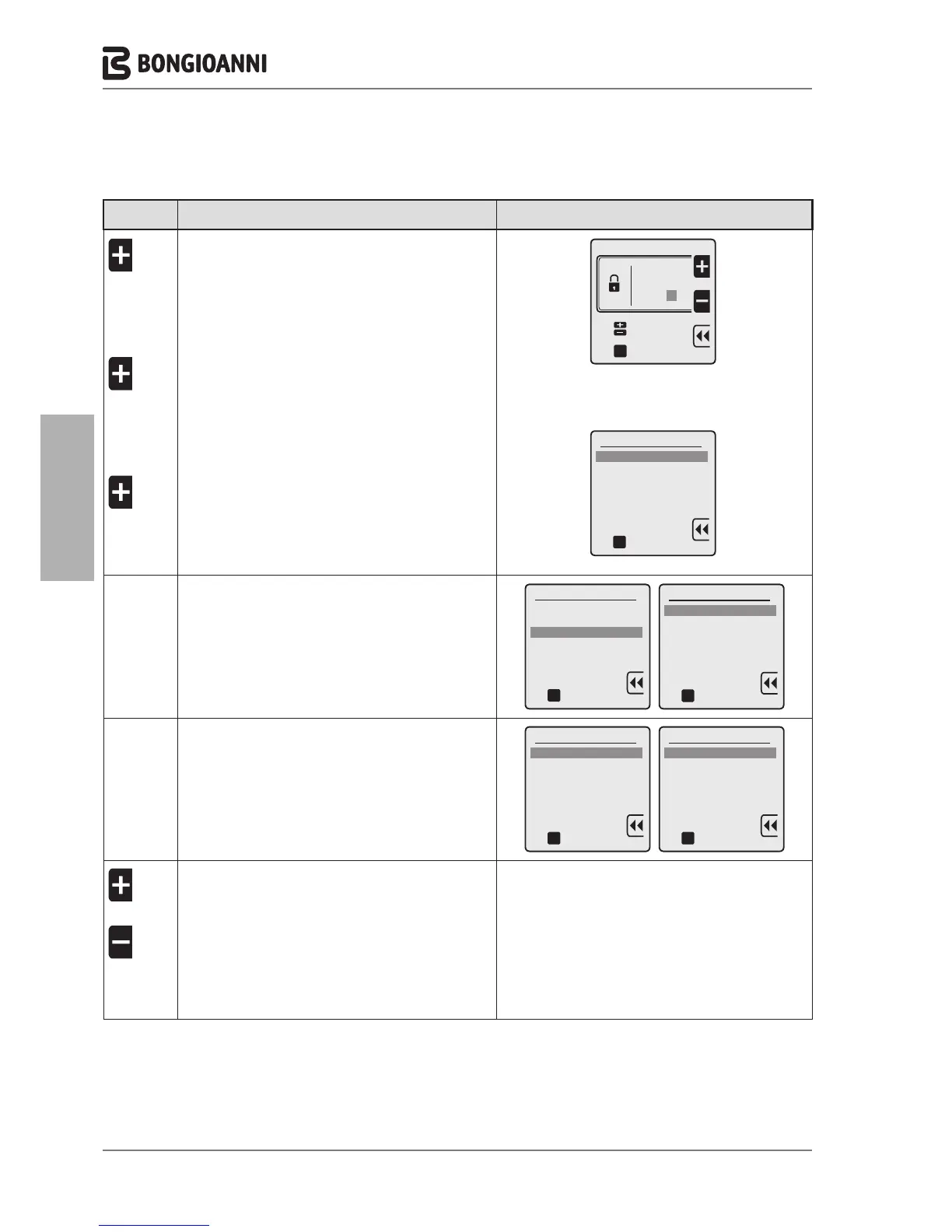
To enter the PASSWORD “231”:
to enter the first digit “2”
to confirm and move to the second digit
to enter the second digit “3”
to confirm and move to the third digit
to enter the third digit “1”
to confirm the password and enter the menu
2 3 1
oK
Technician menu
Insert code
to select
to confirm
oK
Technician menu
1. ADVANCED CH SETTINGS
2. ADVANCED DHW SETTINGS
3. SYSTEM SETTINGS
4. DIAGNOSTICS
5. USER SETTINGS
6. CASCADE
7. RESTORE FACTORY SETTINGS
to confirm
D
3 TIMES
C
to select "3. SYSTEM SETTINGS"
to confirm and access the selected line
oK
Technician menu
1. ADVANCED CH SETTINGS
2. ADVANCED DHW SETTINGS
3. SYSTEM SETTINGS
4. DIAGNOSTICS
5. USER SETTINGS
6. CASCADE
7. RESTORE FACTORY SETTINGS
to confirm
System settings
1. Boiler parameters
2. User interface settings
3. Service settings
oK
to confirm
C
C
to confirm and access the selected line
to select "1. Ignition power
System settings
1. Boiler parameters
2. User interface settings
3. Service settings
to confirm
oK
Boiler parameters
1. Ignition power
2. Delay siphon check
3. Number of boiler pump
4. Pump speed max
5. Pump speed min
6. Antilegionella
7. Heat exchanger protection
to confirm
oK
A
OR
A
C
to increase or decrease the power
(from 0 to 100%)
to confirm
- 46 -



 To Next Page