Bosch Security Systems | 2007-11 | 9922 141 70691 en
DCN Wireless | Installation and User Instructions | Contribution Devices en | 88
16.3 Controls, connectors and
indicators
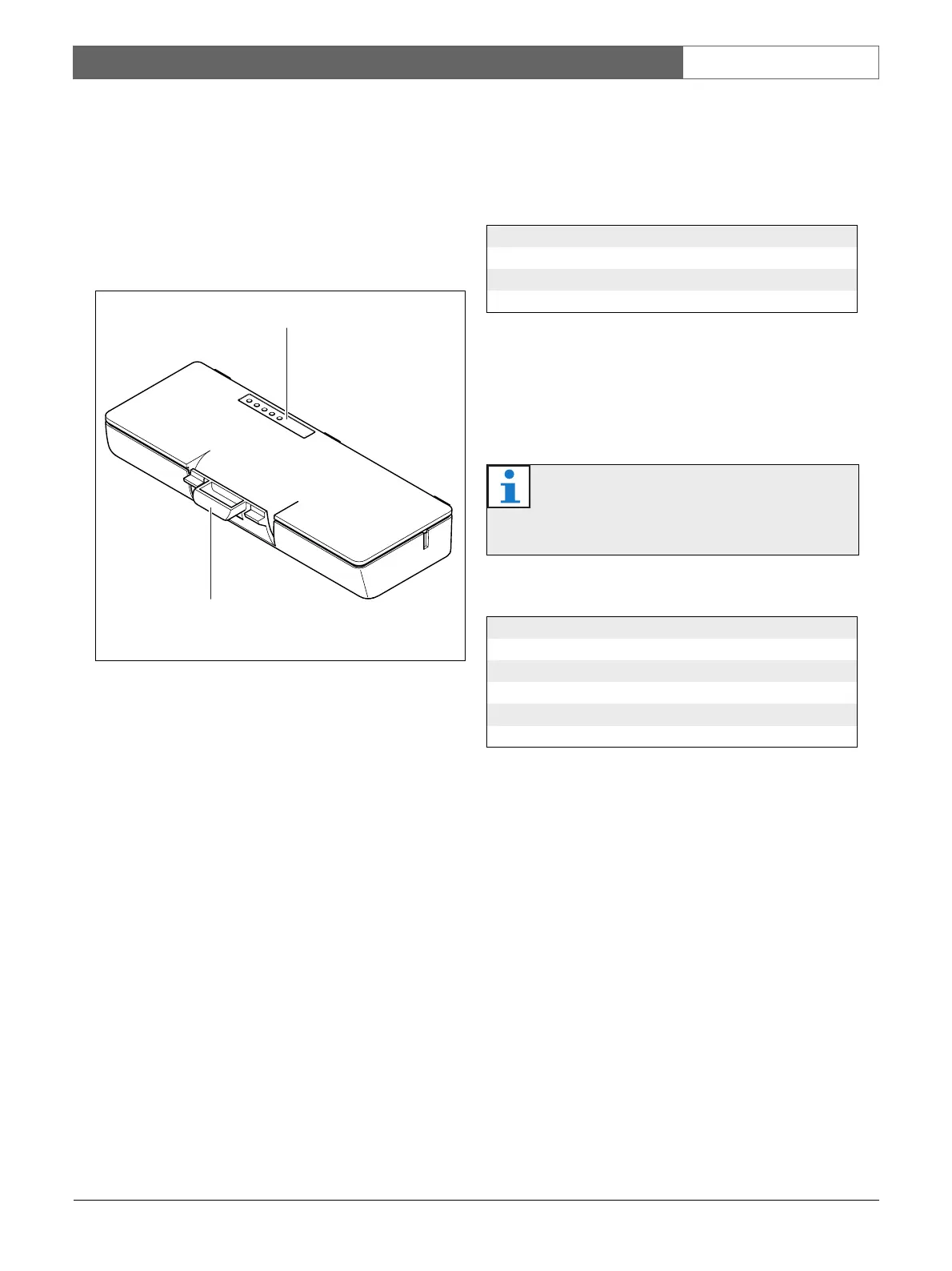
The battery pack (refer to section figure 16.2) contains:
1 Capacity LEDs - Show the capacity of the battery
pack (refer to section 16.5).
2 Clip - Locks the battery pack in, for example, a
wireless discussion unit.
16.4 Installation
Install the charged battery pack in a compatible device
(refer to table 16.2).
16.5 Operation
To enable the capacity LEDs, press the button next to
the LEDs. The higher the capacity, the higher the
number of capacity LEDs that come on (refer to table
16.4).
figure 16.2: Overview
1
2
table 16.3: Physical characteristics
Dimensions (h x w x d):
136 x 22 x 64.5 mm
Weight:
230 g
Note
The battery capacity in table 16.4 is plus or
minus 20%.
table 16.4: Capacity LEDs
No. LEDs on Battery capacity (hours)
518 - 20
4 13 - 18
38 - 13
2 3 - 8
1< 3













 To Next Page