Home
Bosch
Monitor
DDU 9
Page 58
Bosch DDU 9 - Page 58
148 pages
Manual
Save Page as PDF
To Next Page
To Next Page
To Previous Page
To Previous Page
Loading...
10 | Display Configuration
58/148
DDU 9
Bosch Motorsport
5.
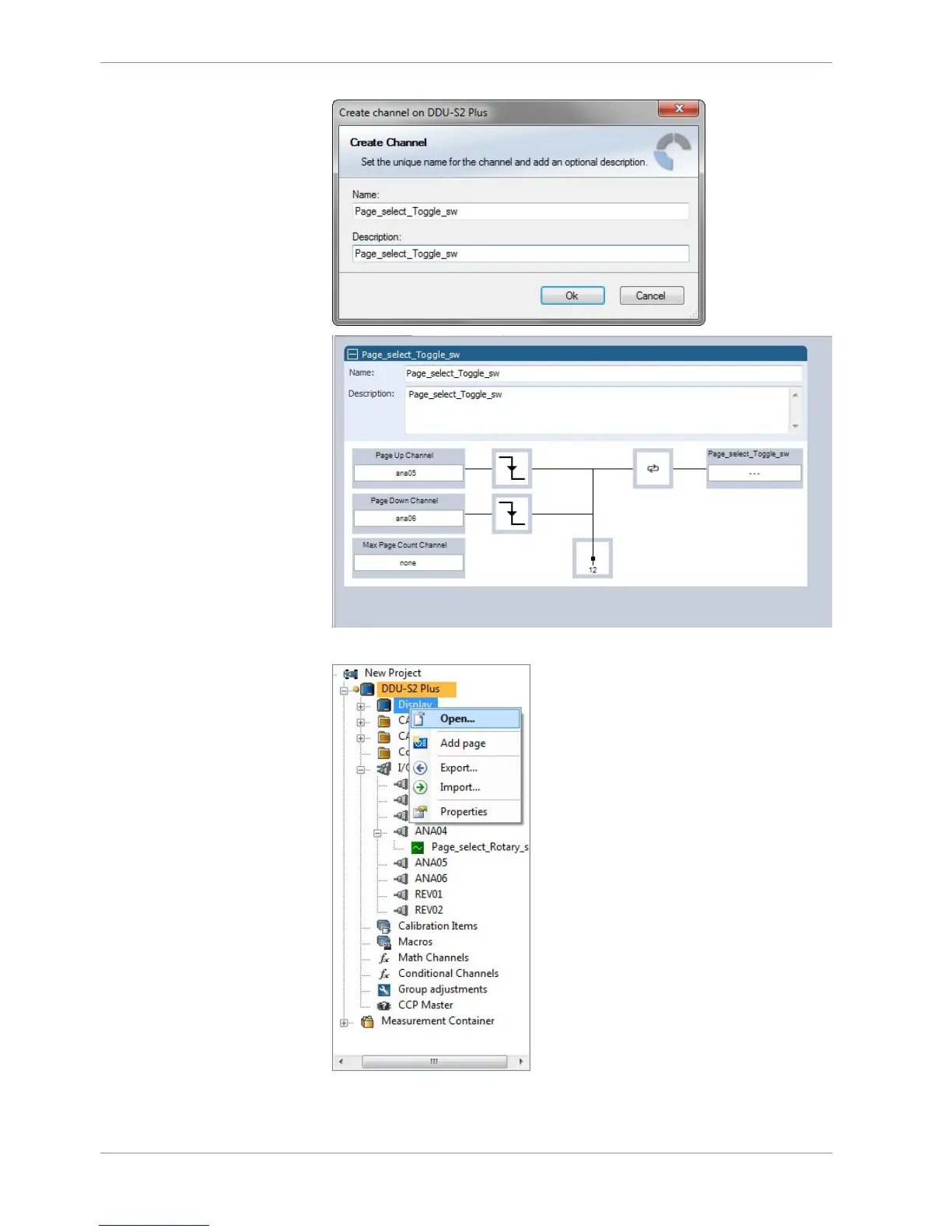
In the project tree, select “Display” and then “Open”.
6.
To use the channel as a Page Switch, check the box "Use a channel to switch pages"
and select the channel configured above.
57
59
Table of Contents
Main Page
Default Chapter
2
Table of Contents
2
1 Onboard Network Concept
4
2 Preparation
5
3 Power Supply
6
4 Error Memory
7
Error Memory Representation in Racecon
7
Information on Errors Available from the Error Memory
9
Analog Input Diagnosis
13
5 Technical Data
15
6 Disposal
19
7 Inputs and Outputs
20
Input Channels
20
Output Channels
20
Communication Channels
20
8 Mechanical Drawing
22
9 Starting up
23
Before Starting
23
Feature Activation
28
First Display Configuration (Quick Start)
30
First Recording (Quick Start)
32
Set Time and Date
35
10 Display Configuration
38
Display
38
Display Element Configuration
39
Leds
47
Page Select / Display Brightness / LED Brightness
51
Math and Condition Channels
62
Condition Channels
65
CPU Load Limits
68
11 CAN Bus
70
CAN Bus Trivia
70
CAN Input
71
CAN Output
75
12 Analog and Frequency Inputs
78
Analog Inputs
78
Configuring Inputs
79
Configuring Computed Sources
93
Hysteresis
94
13 Online Measurement
98
Setting up an Online Measurement
98
Online Calibration of Measurement Channels
103
Group Adjustment
105
Online Calibration of Multipoint Adjustment Channels
108
14 Recording
110
Features
110
Configuration of Recordings
110
Recording Data on USB Device
115
15 Lap Trigger
120
Lap Trigger (Timing Beacon)
120
Counting Outing/Laps/Fragments
127
Lap Timing
128
Segment Timing
130
Countdown Timer
131
16 GPS Sensor
132
GPS (Global Positioning System)
132
Protocol
132
Sensor Recommendation
132
Measurement Labels
135
GPS Troubleshooting
136
17 Predated Laptime
138
Setting up the Predated Laptime
138
Functionality and Channel Outputs
138
18 Firmware
139
Firmware and Configuration
139
Firmware Update
139
19 Clone the Unit
142
20 Fuel Consumption Calculation
144
Setting up Fuel Consumption Calculation and Tank Management
144
Fuel Consumption Diagnosis/Counter Reset
145
Example
146
21 Racecon Shortcuts
147
Related product manuals
Bosch DDU S2 Plus
136 pages
rexroth BODAS DI4 10 Series
40 pages
rexroth BODAS DI3 10 Series
40 pages
Bosch Rego 1000
24 pages
Bosch UML Series
5 pages
Bosch UML-223-90
40 pages
Bosch UML-273-90
68 pages
Rexroth IndraControl VDP 16.3
64 pages
Rexroth IndraControl VDP 08.3
84 pages
Rexroth IndraControl VDP 16.1
72 pages
Rexroth IndraControl VDP 40.3
84 pages
IMSA Prototype Classes Scrutineering System
46 pages













 To Next Page