3 | Starting up
26/76 Engine_Control_Unit_MS_6.x_Manual Bosch Motorsport
3 Starting up
3.1 Installation of Software Tools
PC tools and ECU programs for the MS 6 system are available at Bosch Motorsport
homepage for free download.
RaceCon V2.5.1.400 or higher Mainly used for system configuration
Modas Sport V1.08.012 or higher Data application and online measurement
WinDarab V7 Data analysis tool, Light version as share-
ware or Expert version if license available
MS 6 customer_delivery ECU programs and function description
All tools are delivered as self-installing executable files.
Select your personal installation folder.
3.1.1 Communication PC to device
Ethernet as used network may have some restrictions by firewall and IT protections. Be as-
sure no firewall is active at the PC.
For assistance, Bosch Motorsport homepage explains the necessary PC installations.
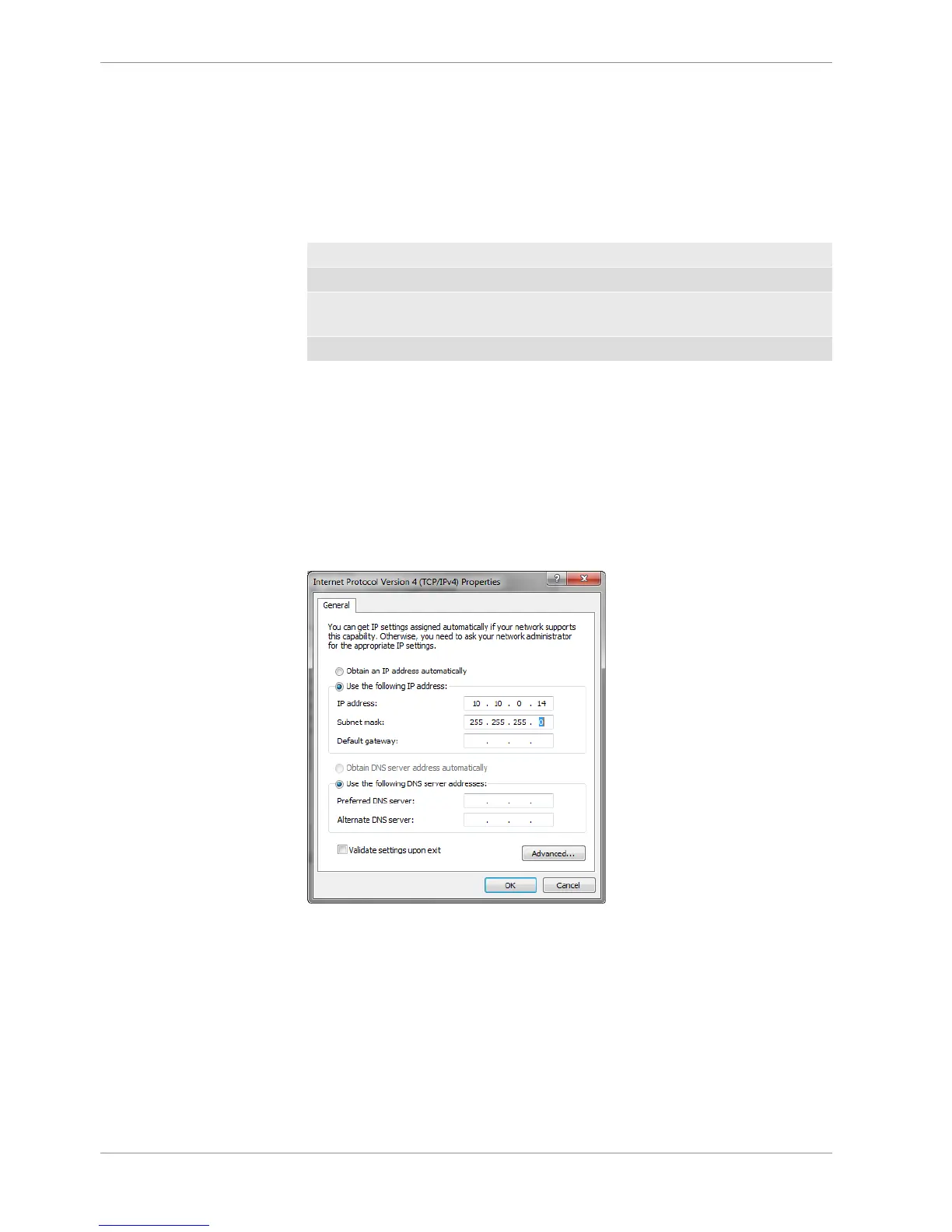
The MS 6 system requests a defined IP-adress at the PC, for example 10.10.0.14.
Middle of 2016, programs and basic systems were extended to handle automatic TCP/IP
selection also. Former produced devices and program versions may be modified to cus-
tomer request and -order.
MS 6 devices are connectable via commercial CAT7 cables to the PC; also Bosch
Motorsport offers diagnostic cable and programming harnesses as track- and office con-
nections.
Successful connection between PC and MS 6 is shown as green marked connection in the
top left corner of RaceCon.



 To Next Page