Project Configuration | 6
Bosch Motorsport Engine_Control_Unit_MS_6.x_Manual 51/76
6.2 Conditional Function
– Arithmetic and logical operations on one or more measurement channels
– If - Else structure with reset
– Numerical result
– Result can be used as input source for further calculations in the whole project
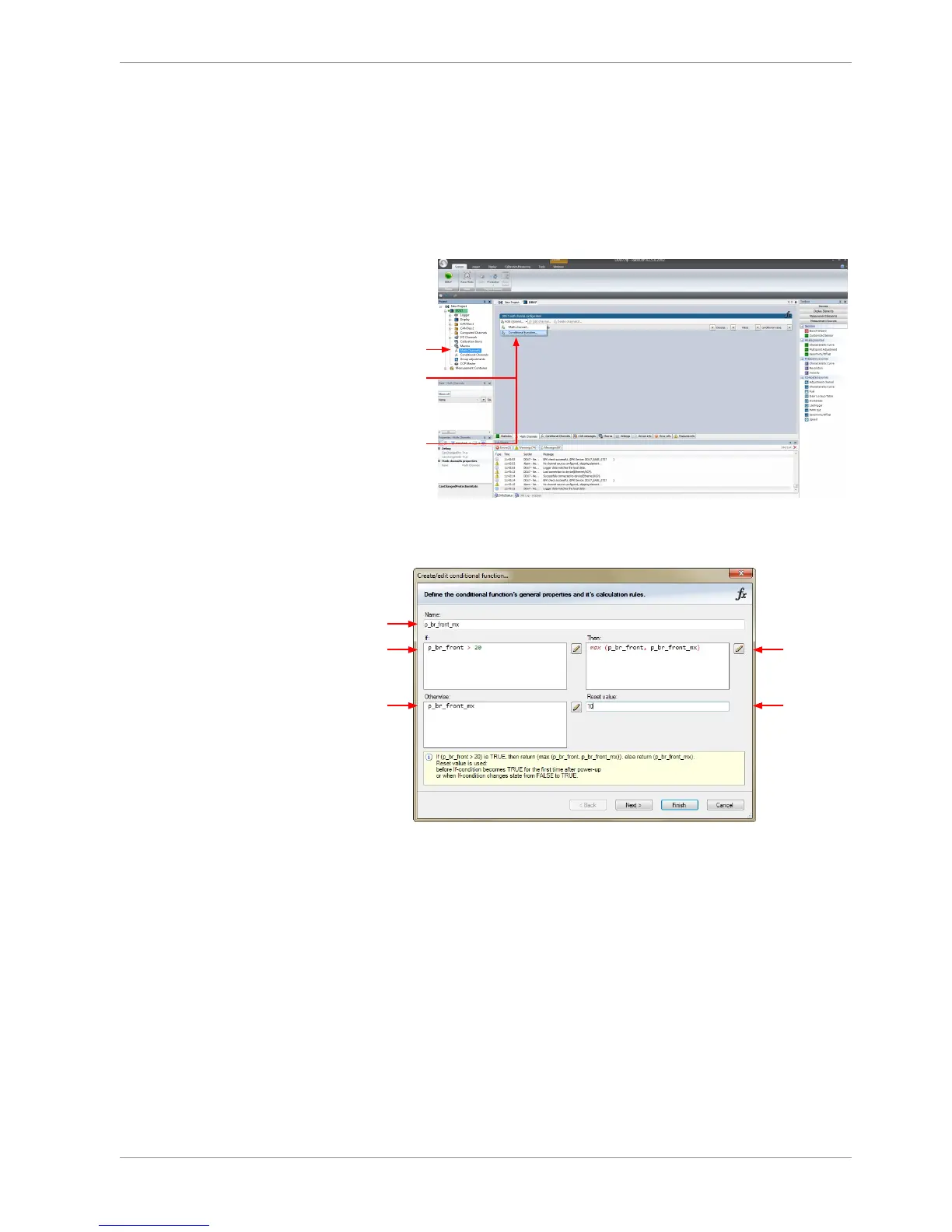
1. Follow the steps shown in the screenshot.
1st: Double-click on
"Math Channels"
in Project Tree
2nd: Click on
the dropdown
arrow beside
'Add channel'
3rd: Choose
'Conditional
function...'
The “Create/edit conditional function” window appears.
2. Define the conditional function, using the following configuration possibilities:
a)
b)
c)
d)
e)
a) Enter the name of the conditional function.
b) Enter the If-condition. Click on the pencil symbol to open an editor to enter expressions.
c) Enter the Then-condition. Click on the pencil symbol to open an editor to enter expressions.
d) Enter the Otherwise-condition.Click on the pencil symbol to open an editor to enter expressions.
e) Enter the reset value (must be a number).
3. Click ‘Finish’ when done.



 To Next Page