Pack201 | Operator Interface | Section 4
EN | 3
© Bosch Packaging Technology, Inc.
All rights reserved 2012
4 Operator Interface
4.1 Buttons and Switches
The following buttons and switches are located near the HMI�
Operator Interface
Button/Switch Function
Press
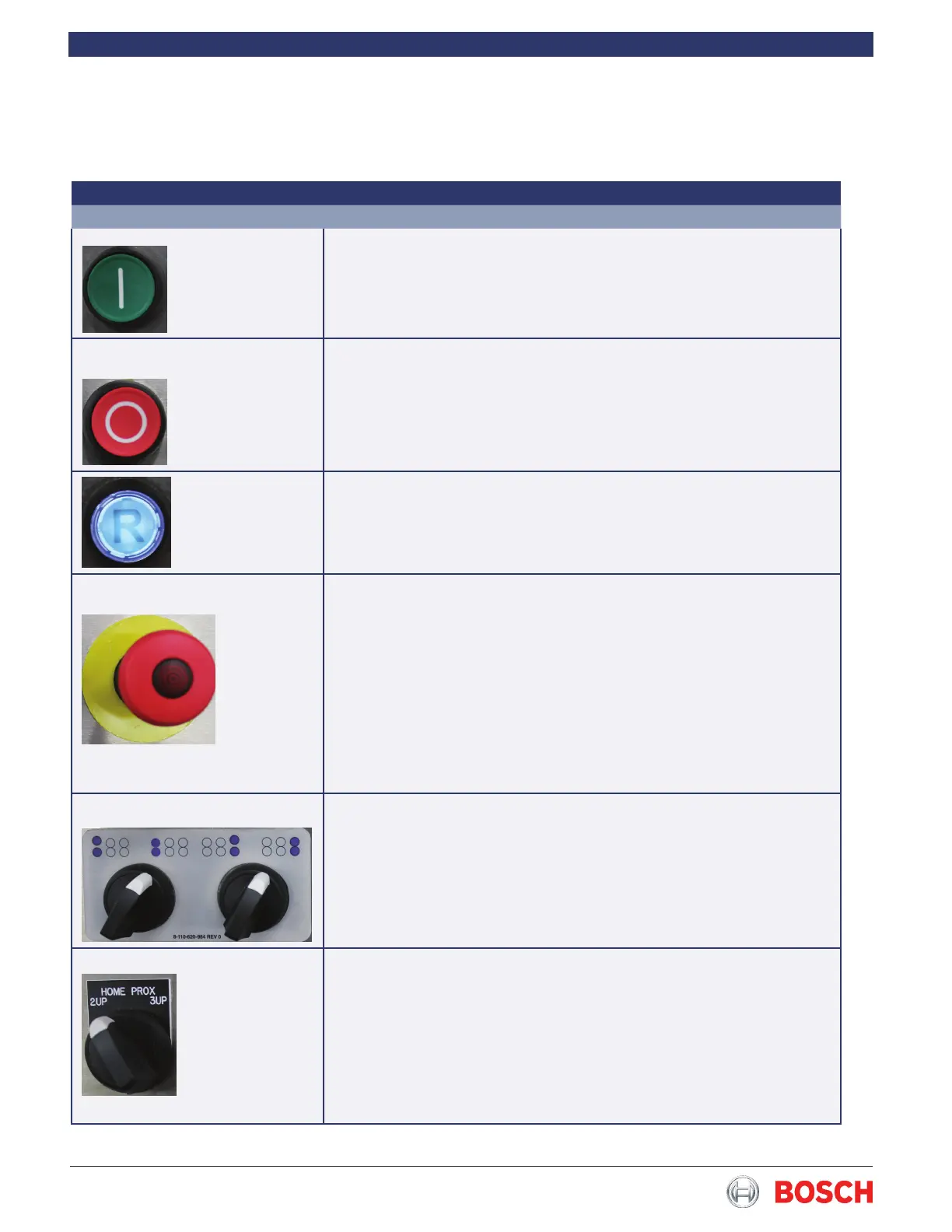
Push button - Start
The wrapper starts in the selected operating mode�
Push button - Stop
The wrapper stops in a synchronized condition� Used for normal opera-
tion� There may be a slight delay before the wrapper completely stops�
Push button - Reset
Used to reset the machine after an alarm condition has been resolved�
Push button - Emergency stop
Causes the wrapper to stop immediately without regard to machine posi-
tion� Used for emergencies or to disable wrapper for safety purposes�
Control circuits are active again�
Finwheel Open/Close switch
Used to open the rst and third (cold) nwheels.
Home Prox Switch
Used to home the endseal/crimper shafts when changing over from two to
three crimpers per shaft�


 To Next Page